
For most small businesses, separate WordPress installs are the safer choice. Multisite fits a smaller set of cases: a group of closely related sites, run by one team, that share a design and the same plugins. If your sites have different owners, different branding or different plugin needs, give each one its own install.
I build and maintain WordPress sites for small businesses, nonprofits and agencies, so this question comes up a lot. Below I walk through what each setup actually is, where they differ day to day, and how to decide without regret later.
TL;DR
- Multisite runs many sites from one WordPress install, one set of plugins and themes, and one database. Separate installs keep every site fully independent.
- Multisite saves time on updates and user management, but a problem on the network can reach every site on it.
- Choose Multisite for related sites with shared branding and one administrator. Choose separate installs for unrelated sites, client sites and anything that needs its own plugins.
- Restoring or moving a single site is much easier with separate installs.
- Not sure? Start separate. Moving into a network later is possible, and the steps are documented.
Table of Contents
- What each option actually is
- Multisite vs separate installs, side by side
- Where Multisite genuinely helps
- Where separate installs are the better call
- Setup requirements to check before you commit
- How to decide: five questions
- Managing many separate sites without the pain
- Switching later
- Our perspective
- Let us build the right structure
- FAQ
- Sources
What each option actually is
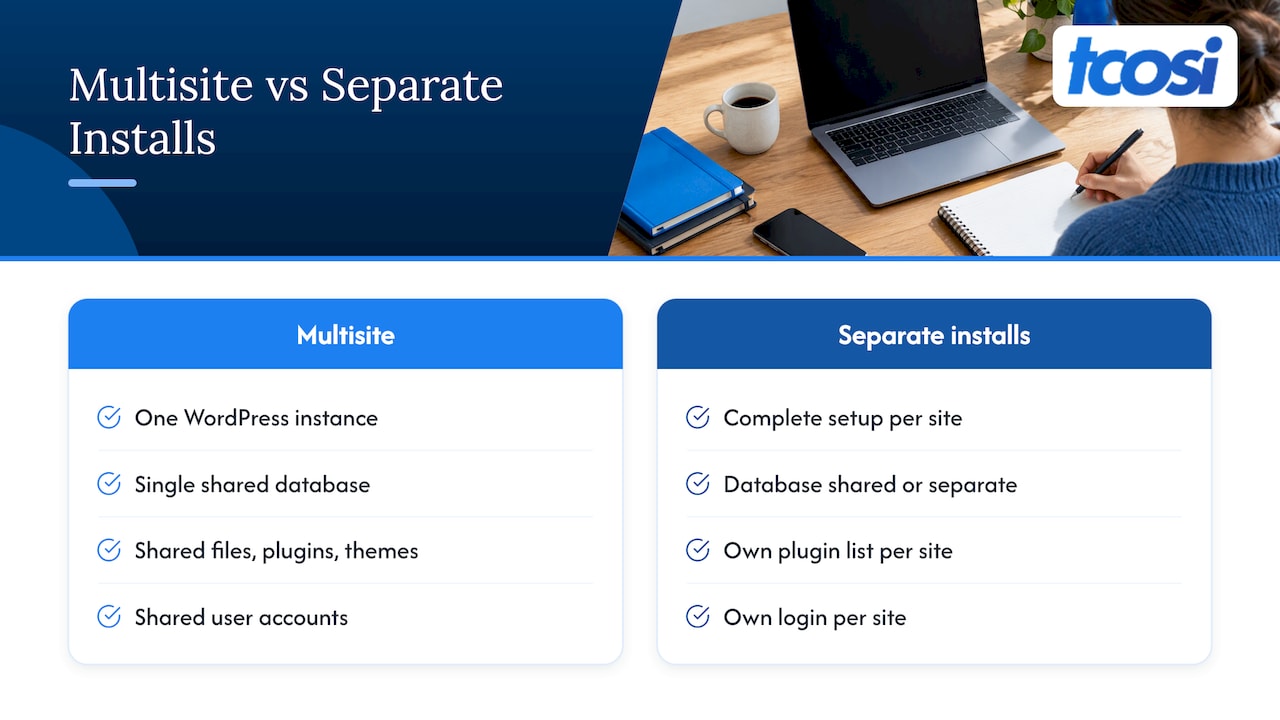
A Multisite network is one WordPress instance with several sites created inside it. According to the WordPress developer documentation, those sites share a single database instance. Separate installations can share a database or each use their own.
The sharing goes further than most people expect. The official WordPress tutorial on Multisite explains that every site on a network uses the same WordPress files and the same plugins and themes. Each site still has its own media uploads directory and its own database tables for content.
With separate installs, each site is a complete WordPress setup of its own. It has its own dashboard, its own login and its own plugin list. Kinsta’s comparison puts it simply: Multisite shares user accounts, plugins and themes, while separate installations do not.
One point of confusion is worth clearing up. Multisite is not the same as running several sites on one server. You can host ten separate WordPress installs on one hosting account and they remain ten independent sites. Multisite is a WordPress feature, not a hosting arrangement.
Multisite vs separate installs, side by side
Here is how the two compare on the things you will deal with every month.
| Factor | Multisite network | Separate installs |
|---|---|---|
| Core, plugin and theme updates | Applied once in Network Admin | Applied per site |
| Plugin choice | Installed by the network admin only; all sites share versions | Each site picks its own plugins and versions |
| User accounts | One login across the network | Separate accounts per site |
| Security | One weak plugin or one compromised super admin can affect every site | A problem stays inside one site |
| Backup and restore | Whole network is simple; one site is harder | Standard whole-site backup and restore |
| Moving one site to another host | Complex, because the database is shared | Straightforward |
| Performance | All sites share the same server resources | Can be sized and cached per site |
| Best for | Related sites under one owner | Unrelated sites, client sites, mixed needs |
The Cloudsoft Zone comparison draws the same lines: shared updates and one login on the Multisite side, contained problems and independent sizing on the separate side.
Where Multisite genuinely helps
Multisite earns its place when the sites really are a family. Bluehost’s guidance describes the good fit as sites that are clearly related, governed as a group and built on similar design patterns, where central control matters more than each site’s independence.
Common examples include:
- A business with subsites for different services, locations or brands that all follow one design.
- A university or large organization where departments get their own site under the same theme and branding.
- A publisher with several blogs on one topic.
- A platform where users create their own sites.
HubSpot’s overview of Multisite lists these same use cases. Bitnami’s documentation adds a helpful rule of thumb: Multisite suits sites focused on the same industry or topic, and separate instances suit sites that each have a different focus.
The day-to-day payoff
The real gain is fewer repeated tasks. Per Kinsta, you can apply core, plugin and theme updates once in Network Admin, and install each extension once. User management is centralized too. If you run twelve sister sites with the same staff, that is a meaningful saving.
It also makes launching a new site quick. A new subsite is a few clicks, with the theme and plugins already in place. For a franchise or a multi-location business that rolls out new location pages on a fixed template, that speed matters.
Where separate installs are the better call
The trouble with Multisite shows up when the sites are less alike than you thought. Bluehost’s article calls it a poor fit when sites are unrelated or independently owned, need frequent unique customization, or need strong isolation from each other.
Plugins and themes are controlled centrally
On a network, the WordPress documentation on network administration says site admins cannot install new themes or plugins. Only the Super Admin can. All themes are installed for the whole network, and editing one theme’s code affects every site using it.
That is a feature when you want consistency. It is a roadblock when one site needs a booking tool, another needs an events calendar and a third needs a membership plugin. Some plugins also do not behave well on a network, or have licensing terms that complicate multi-site use. That is why the WordPress guide to moving sites into Multisite tells you to check that your plugins will work in the network first.
One problem can become everyone’s problem
Pressable describes the single point of failure: technical issues or a security breach can affect the whole network. A busy site can also slow the others, because all of them run in one hosting container.
Security deserves a close look. Pantheon’s Multisite security playbook notes that the Super Admin role grants full access across the network. If that account is compromised, an attacker can create new Super Admins, reset passwords, install malicious plugins and take control of every subsite. Pantheon also advises network-activating only essential plugins and auditing plugins and themes for vulnerabilities.
With separate installs, a hacked contact-form plugin on one site is a one-site cleanup.
Backups and moves are harder
This is the one that surprises people. WPScale’s documentation says Multisite migrations are extremely complex because the sites share a database, and that restoring a backup for a single site will not work the way it does on a standalone site.
Picture a client who sells their business and takes their website with them. On separate installs, you hand over a site. On Multisite, you have to extract one site’s tables and uploads from the shared network.
Setup requirements to check before you commit
Multisite is not a switch you flip on any hosting plan. The WordPress documentation on preparing a network says you must be an administrator of the WordPress install and normally need file system access. The server must also support the rewrite rules Multisite requires, including mod_rewrite on Apache.
Ask your host these questions up front:
- Does your plan support Multisite, and does it allow subdomain or domain-mapped networks?
- How many PHP workers and how much memory will the network get? AHosting’s guide suggests 8 or more PHP workers for networks of five or more sites under load, and a current PHP version.
- How are SSL certificates handled? For subdomain networks, AHosting recommends a wildcard certificate. For mapped domains, a multi-domain certificate works. SSL Dragon explains that servers hosting several HTTPS sites on one IP rely on SNI to serve the right certificate.
- Can the host restore one site from a network backup?
If you use mapped domains, the official domain mapping guide says to confirm that subsites can be created without issues before you start mapping.
Hosting choice matters more on a network because everything shares one environment. If you are weighing options, our guides on the best WordPress hosting for small business and how to choose managed WordPress hosting cover what to look for.
How to decide: five questions
Run your project through these in order. The first “no” usually settles it.
- Does one person or team own and control all the sites? If different clients or departments own them, go separate.
- Do the sites share a design and the same plugins? If each needs its own toolkit, go separate.
- Can you accept shared risk? If one site’s trouble affecting the others is unacceptable, go separate.
- Will any site ever be sold, handed off or moved to its own host? If yes, go separate.
- Do you expect many sites, launched often, from one template? If yes and the other four answers allow it, Multisite is worth a serious look.
Quick scenarios
- A dental practice with three locations and one brand: Multisite is a reasonable option, or a single site with location pages. One owner, one design, one team.
- A marketing agency with 25 client sites: Separate installs. Different owners, different plugins, different hosting needs and billing.
- A nonprofit with a main site and a separate fundraising microsite: Usually separate, unless both are managed by the same person and share a theme.
- A local service business with a blog, a shop and a landing page for a new service: Often one install with the right structure, not two or three.
That last one is worth saying out loud. Many businesses ask this question when what they need is a well-organized single site. Our guide on site structure for SEO on WordPress helps you test whether you need a second site at all.
Managing many separate sites without the pain
The main argument for Multisite is that updating many sites one by one is tedious. That is true, but it is solvable without moving to a network. A repeatable process does most of the work: a staging copy first, then updates, then a check. Our write-up on WP-CLI and staging-first plugin management shows how admins and agencies handle plugin updates across many sites safely.
Content teams face a similar load on the publishing side. If your goal is to keep several sites supplied with new posts, automating WordPress publishing can cut repetitive work whichever architecture you pick.
Backups, security monitoring and updates are the three jobs that make separate installs feel heavy. They are also the three jobs a maintenance plan covers.
Switching later
You are not locked in. The WordPress guide to migrating sites into Multisite says to export a WXR file from each existing site, copy theme and plugin files into the network’s directories and set up each site’s configuration. It also warns that widget configuration and plugin settings are not carried over by the standard export, so plan to rebuild those by hand.
Going from Multisite out to separate installs takes the same care in reverse, and it is where the shared database causes the extra work.
Whichever way you move, protect your search rankings. Changed URLs and missing redirects are the usual cause of lost traffic, and our SEO migration checklist lists the checks to run. For a deeper look at this exact decision, see our companion piece on WordPress Multisite vs single site.
Our perspective
I come at this as a builder who has to live with decisions after launch. Most of the small businesses, nonprofits and agencies we work with have sites that are different from each other, with different goals, different plugins and sometimes different owners. For them, separate WordPress installs are the cleaner path.
The reason is simple. We want each website to be built to last, and independence supports that. A site that can be updated, restored or handed off on its own is easier to look after and easier for the owner to understand. That clarity is what we care about most.
The extra effort of separate installs is mostly maintenance, and maintenance is something we can take off your plate. Our Ongoing Maintenance plan is $100 per month, and our Plugin & Security Management and Content Updates are also listed at $100 per month. If you are an agency, our white-label WordPress development is there so your team can take on more client sites without hiring.
If your situation really does fit a network, say so and we will talk it through. The goal is always the same: the structure that fits your business, explained in plain words.
Tommy Cosimano
Let us build the right structure
Whether you need one custom WordPress site or several independent ones, I can help you pick the structure first and build it second. Published packages start with Essentials at $1,200, Growth at $2,400 and Premium at $4,800, and a Base Website is $875. See our website pricing for what each includes.

If you already have sites and want them kept updated and secure, look at our website maintenance cost guide. Agencies can find details on white-label WordPress development. To start a conversation, visit tcosi.com.
FAQ
Is WordPress Multisite better than multiple WordPress sites?
Neither is better in every case. Multisite works well for related sites under one owner that share a design and plugins. Separate installs work better when sites differ, have different owners or need their own plugins and backups.
Do sites on a Multisite network share a database?
Yes, they share one database instance, but each site gets its own set of tables for its content. They also share the same WordPress files, plugins and themes, while each site keeps its own uploads directory, as the official WordPress tutorial explains.
Can a site admin install plugins on Multisite?
No. On a network, only the Super Admin can install plugins and themes. Site admins can activate plugins the network admin has made available, depending on how the network is set up.
Can I move a site out of a Multisite network later?
Yes, but it takes more work than moving a standalone site, because the sites share a database. You export that site’s content and uploads, then rebuild it as its own install. Test the result on a staging copy before switching anything live.
What hosting do I need for Multisite?
You need a host that supports Multisite rewrite rules and gives you file access. For networks under load, you also want enough PHP workers and memory, and an SSL setup that matches your subdomain or mapped domain structure.
Sources
- Installing Multiple WordPress Instances, WordPress developer documentation
- Introduction to WordPress Multisite Networks, Learn WordPress
- WordPress multisite vs multiple WordPress installations, Kinsta
- WordPress Multisite vs separate installs compared, Cloudsoft Zone
- When to use WordPress Multisite, Bluehost
- What is WordPress Multisite?, HubSpot
- Understand when to use WordPress Multisite, Bitnami
- Multisite Network Administration, WordPress developer documentation
- Migrate WordPress sites into WordPress Multisite, WordPress developer documentation
- Understanding WordPress Multisite, Pressable
- Complete WordPress Multisite Security Playbook, Pantheon
- Why use or not use WordPress Multisite, WPScale
- Before You Create A Network, WordPress developer documentation
- WordPress Multisite Hosting guide, AHosting
- How to Install an SSL Certificate on WordPress Multisite, SSL Dragon
- Multisite Domain Mapping, WordPress developer documentation


