
A website audit is a data-driven assessment of how well your site performs across technical health, SEO, content quality, user experience, and security. Think of it as a full checkup for your website. It surfaces hidden problems that quietly cost you traffic, leads, and trust. Tools like Google Search Console, HubSpot’s Website Grader, and Core Web Vitals reports are standard starting points. The goal is not just to collect data. The goal is to connect every finding to a real business outcome.
What is a website audit and what does it include?
A website audit is a comprehensive review that examines five core areas: technical SEO, content and trust, user experience, performance, and security. Each area targets a different layer of your site’s health. Skipping even one can leave serious problems undetected.
Here is what each area covers:
- Technical SEO: Crawlability, indexability, redirects, structured data, and site architecture. A technical SEO audit inspects the backend infrastructure that search engines use to find and rank your pages.
- Content and trust (E-E-A-T): Page quality, accuracy, author credibility, and whether your content meets Google’s Experience, Expertise, Authoritativeness, and Trustworthiness standards.
- User experience (UX) and conversion: Navigation clarity, mobile usability, call-to-action placement, and website accessibility. Poor UX drives visitors away before they convert.
- Performance (Core Web Vitals): Load speed, interactivity, and visual stability. Google’s thresholds are LCP under 2.5 seconds, INP under 200 milliseconds, and CLS under 0.1, all measured at the 75th percentile in real user data.
- Security: SSL certificates, outdated plugins, exposed admin pages, and known vulnerabilities. A vulnerability assessment can catch risks before they become breaches.
| Audit area | Primary focus | Business impact |
|---|---|---|
| Technical SEO | Crawl errors, indexing, redirects | Search visibility and rankings |
| Content and trust | Quality, accuracy, E-E-A-T signals | Organic traffic and credibility |
| UX and conversion | Navigation, mobile, accessibility | Leads and sales |
| Performance | Core Web Vitals, load speed | Bounce rate and user retention |
| Security | SSL, vulnerabilities, plugin health | Risk reduction and user trust |
Pro Tip: Do not treat these five areas as separate checklists. Integrated audit findings that connect SEO, UX, and performance fixes to the same business goal produce far better results than siloed reports.

How to perform a website audit: steps, tools, and best practices
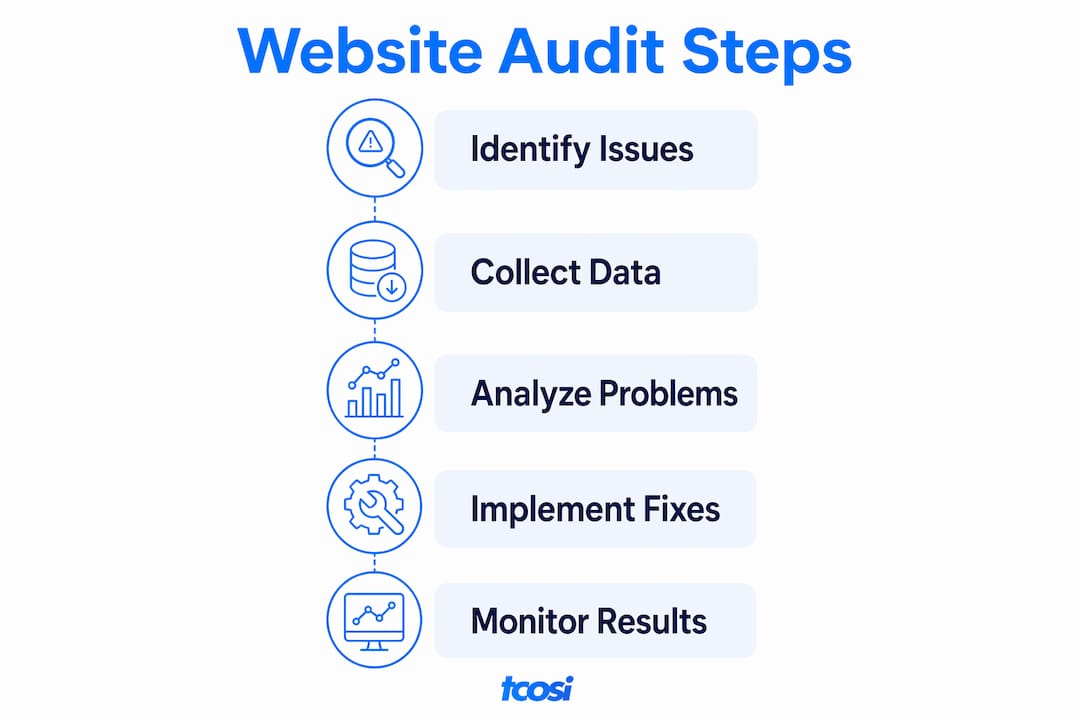
Performing a site review follows a clear process. Combining audit data with KPIs and business goals is what separates a useful report from a pile of metrics.
Follow these steps:
- Define your scope. Decide whether you are auditing the full site or specific sections, such as your top revenue pages or a recent redesign.
- Gather data. Run Google Search Console for indexing and crawl errors. Use Core Web Vitals reports for performance. Pull content data from your analytics platform.
- Analyze each audit area. Review technical issues, content gaps, UX friction points, performance scores, and security flags. Do not skip security. Many business owners do.
- Prioritize by business impact. Focus fixes on revenue-driving pages rather than the total number of affected URLs. A broken link on your homepage matters more than one buried in an old blog post.
- Compile an actionable report. Group findings by severity. Assign owners and deadlines. Tie each fix to a measurable outcome, such as improved rankings, faster load times, or reduced bounce rate.
- Verify fixes. Use Google Search Console’s URL Inspection tool to confirm that changes are reflected in Google’s index. For performance, monitor Core Web Vitals over several weeks using real user data rather than lab tests alone.
Pro Tip: Real user field data from CrUX or Google Search Console gives a more accurate picture of performance than lab tools like Lighthouse. Lab scores can look great while real visitors still experience slow loads.
When fixing performance issues, sequence matters. Address Largest Contentful Paint (LCP) first, then Interaction to Next Paint (INP), then Cumulative Layout Shift (CLS). This order gives you the most improvement per hour of work.
How does a website audit differ from an SEO audit?
An SEO audit is a subset of a full website audit. It focuses on factors that affect search engine crawling, indexing, and rankings. It does not cover UX, security, or content quality in depth. Many services labeled as SEO audits exclude content and UX analysis that a full audit would catch.
| Checklist item | SEO audit | Full website audit |
|---|---|---|
| Crawl errors and indexing | Yes | Yes |
| Page speed and Core Web Vitals | Partial | Yes |
| Content quality and E-E-A-T | No | Yes |
| UX and navigation | No | Yes |
| Security vulnerabilities | No | Yes |
| Conversion rate factors | No | Yes |
When is an SEO audit enough? If your only goal is to improve search rankings and your site has no known UX or security issues, a focused SEO audit can work. But for most business owners, that is a narrow view. A site can rank well and still fail to convert visitors because of poor navigation or a slow checkout page.
Common misconceptions worth clearing up:
- “My site ranks, so it does not need an audit.” Rankings do not reflect UX, security, or conversion performance.
- “An SEO audit covers everything.” It covers search visibility. It does not cover common SEO mistakes that overlap with content and UX problems.
- “Audits are only for large sites.” A five-page business site can have broken links, missing meta descriptions, and an expired SSL certificate just as easily as a large e-commerce platform.
Why are website audits important and how often should you do them?
Regular audits catch problems that quietly erode your site’s performance over time. HubSpot notes that broken links, hidden content, long load times, and crawl errors can reduce traffic and conversions without any obvious warning signs. You may not notice the damage until it shows up in your analytics months later.
The risks of skipping audits include:
- Broken internal and external links that frustrate visitors and hurt rankings
- Outdated plugins and themes that create security vulnerabilities for your business and customers
- Slow page speeds that push visitors to competitors before your page finishes loading
- Poor mobile usability that penalizes your rankings in Google’s mobile-first index
- Content that no longer reflects your services, pricing, or brand accurately
How often should you audit? Quarterly audits work well for active sites with frequent content updates or ongoing ad campaigns. Biannual audits are a reasonable baseline for most small business sites. Annual audits are the minimum. Any time you launch a redesign, migrate to a new platform, or notice a traffic drop, run an audit immediately.
Pro Tip: Set a calendar reminder for your audit schedule the same way you would for a tax deadline. Treat it as a fixed operating cost, not an optional task. Sites that improve continuously through regular reviews outperform those that only fix problems after they become visible.
The importance of website audits comes down to one thing: alignment. Your site needs to support your business goals at every stage of growth. An audit tells you whether it does.
Key Takeaways
A website audit is the most direct way to connect your site’s technical health to real business outcomes like traffic, leads, and revenue.
| Point | Details |
|---|---|
| Audits cover five core areas | Technical SEO, content, UX, performance, and security all require separate review. |
| SEO audits are not full audits | SEO audits miss UX, security, and content quality checks that affect conversions. |
| Prioritize by revenue impact | Fix issues on your highest-value pages first, not by total number of affected URLs. |
| Use real user data for performance | Field data from Google Search Console reflects actual user experience better than lab tests. |
| Audit on a regular schedule | Quarterly or biannual audits catch problems before they show up in lost traffic or leads. |
What I have learned from auditing business websites
Most business owners I work with are surprised by what a thorough audit uncovers. They expected a few broken links. They did not expect to find that their contact page was not indexed, their SSL certificate had expired, or their most important service page was loading in over five seconds on mobile.
The biggest mistake I see is treating an audit as a one-time cleanup. You run it once, fix the obvious issues, and move on. But your site is not static. Algorithms change. Plugins get outdated. Content drifts out of date. What passed a performance check six months ago may fail today.
The second mistake is separating SEO from UX. I have reviewed sites that ranked well but converted poorly because the navigation was confusing or the mobile layout was broken. Those are not separate problems. They are the same problem viewed from different angles. Fixing them together produces results that neither fix alone would achieve.
The third thing I want business owners to understand is that audit findings need to be tied to business goals, not just technical scores. A perfect Lighthouse score means nothing if your highest-traffic page has a weak call to action. Start with your money pages. Fix what costs you leads first.
Audits are not a sign that something is wrong with your site. They are how you keep a site working well over time. The businesses I see grow their online presence consistently are the ones that treat audits as a regular part of running their website, not a reaction to a crisis.
— Tommy Cosimano
How tcosi can help you audit and improve your site
If reading through this made you wonder what your own site is hiding, that is a fair reaction. Most business websites have at least a handful of fixable issues affecting their performance right now.
tcosi works with business owners across the United States to review, redesign, and improve their websites. Whether you need a full site review or targeted fixes on your most important pages, the process starts with a clear conversation about your goals. Visit tcosi.com to learn more about how Tommy approaches website design, development, and ongoing site support. If you are ready to talk through what your site needs, the contact page is the best place to start.
FAQ
What is a website audit in simple terms?
A website audit is a structured review of your site’s technical health, content, user experience, performance, and security. It identifies problems that reduce traffic, conversions, or user trust and produces a prioritized list of fixes.
How long does a website audit take?
The time depends on the size and complexity of the site. A focused audit of a small business site can take a few hours. A full audit of a large site with hundreds of pages may take several days.
What tools are used in a website audit?
Common tools include Google Search Console for indexing and crawl data, Core Web Vitals reports for performance, and crawler tools for technical SEO issues. HubSpot’s Website Grader is a quick starting point for an overview.
How often should a business website be audited?
Quarterly audits work best for active sites. Biannual audits are a solid baseline for most small businesses. You should also run an audit after any major redesign, platform migration, or unexplained drop in traffic.
Is a website audit the same as an SEO audit?
No. An SEO audit focuses on search engine crawling, indexing, and rankings. A full website audit also covers UX, content quality, security, and conversion factors that an SEO audit typically excludes.


