
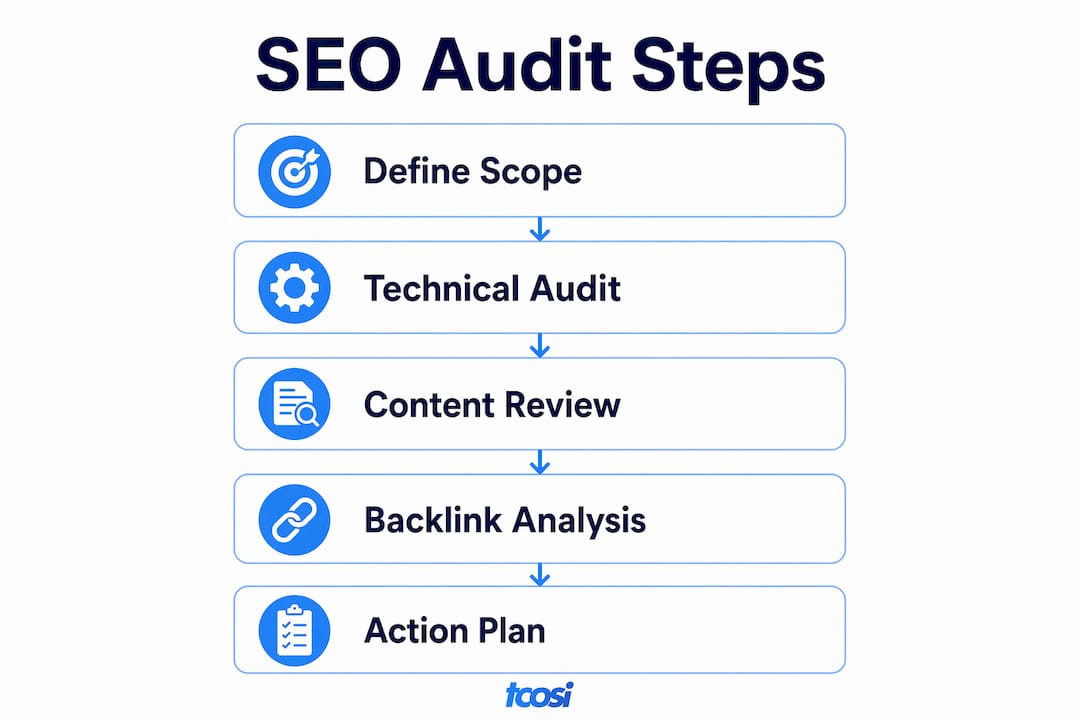
An audit of website SEO performance is a systematic evaluation of your site’s technical health, content quality, and search engine visibility to maximize organic rankings. The industry term for this process is an SEO audit, and it covers everything from crawlability and Core Web Vitals to E-E-A-T signals and AI content extraction. Skipping regular audits means ranking problems pile up silently. You lose organic traffic without knowing why. This guide walks you through every audit domain, the tools you need, and how to turn findings into real improvements.
What tools do you need to audit website SEO performance?
The right tools determine how much you actually find. Free, widely trusted options cover most audit needs without requiring an enterprise budget.
Core tools by audit function:
- Technical SEO: Google Search Console (crawl errors, index coverage, Core Web Vitals field data), Bing Webmaster Tools (catches indexing gaps Google misses), and Google PageSpeed Insights (lab and field performance data)
- On-page and content: A dedicated crawler tool to map heading hierarchy, canonical tags, and metadata across every page
- Backlinks: Google Search Console’s Links report for a baseline; a dedicated backlink tool for deeper quality analysis
- Structured data: Google’s Rich Results Test and Schema Markup Validator
One important note on performance data: real field data from the Chrome User Experience Report (CrUX) carries more weight in Google’s ranking than lab data from Lighthouse. Always check both, but prioritize fixing what CrUX flags first.
Before you start crawling, define your audit scope. Decide whether you are auditing the full site or a specific section. Set your crawl depth to match. Verify site ownership in both Google Search Console and Bing Webmaster Tools so you have access to full index and performance data. Pulling your analytics baseline before the crawl gives you a before-and-after reference point once fixes go live.
| Audit Function | Tool | What It Checks |
|---|---|---|
| Technical health | Google Search Console | Index coverage, crawl errors, Core Web Vitals |
| Performance | Google PageSpeed Insights | LCP, INP, CLS, load speed |
| On-page structure | Crawler tool | Headings, canonicals, metadata, broken links |
| Backlinks | Search Console Links report | Link quantity, anchor text |
| Structured data | Rich Results Test | Schema validity, snippet eligibility |
Pro Tip: Run your crawler with JavaScript rendering enabled. Many modern WordPress sites load content dynamically, and a non-rendering crawl will miss a significant portion of on-page issues.
How to conduct a technical SEO audit
Technical SEO is the foundation. Fixing content and links on a site Google cannot crawl properly is wasted effort. Start here before touching anything else.
- Crawl the full site. Export all URLs and flag pages returning 4xx or 5xx status codes. Broken pages bleed crawl budget and create dead ends for users.
- Check robots.txt and XML sitemap. Confirm robots.txt is not accidentally blocking important pages. Verify your sitemap is submitted in Google Search Console and contains only indexable, canonical URLs.
- Audit canonical tags. Duplicate content without proper canonicals splits ranking signals. Every page should either be canonical itself or point clearly to the preferred version.
- Review Core Web Vitals. Check Largest Contentful Paint (LCP), Interaction to Next Paint (INP), and Cumulative Layout Shift (CLS) in Google Search Console’s Core Web Vitals report. PageSpeed bottlenecks most often come from oversized images, render-blocking CSS, and unminified code. Switching to modern image formats like WebP and deferring non-critical CSS resolves the majority of LCP issues.
- Test mobile usability. Google indexes the mobile version of your site first. Check viewport configuration and confirm tap targets meet minimum sizing requirements.
- Validate structured data. Run key page templates through Google’s Rich Results Test. Invalid schema blocks your eligibility for rich snippets in search results.
A full audit also surfaces issues that general reporting tools miss entirely. Missing alt text on images, incorrect tap target sizing, and absent social media metadata are common findings that only appear when you run a complete page-level scan.
Pro Tip: Prioritize fixes using two criteria: SEO impact and fix difficulty. A high-impact, easy fix like correcting a blocked robots.txt entry should go to the top of your list every time.

How to perform an on-page SEO and content audit
On-page issues are the most common reason a technically sound site still underperforms in search. A content audit looks at what your pages say, how they say it, and whether search engines and AI tools can extract clear answers from them.
Check these elements on every key page:
- Title tags: Each page needs a unique title tag under 60 characters that includes the target keyword naturally. Duplicate or missing titles are a fast fix with a measurable impact.
- Meta descriptions: These do not directly affect rankings, but a well-written meta description improves click-through rate from search results.
- Heading hierarchy: Pages should follow a logical H1 > H2 > H3 structure. Multiple H1 tags or skipped heading levels confuse both crawlers and readers.
- Keyword cannibalization: If two or more pages target the same keyword, they compete against each other. Consolidate or differentiate them.
- Content quality and freshness: Thin pages under 300 words rarely rank for competitive terms. Pages that have not been updated in over a year may be losing ground to fresher content.
E-E-A-T (Experience, Expertise, Authoritativeness, Trustworthiness) signals matter more than ever. Check that author bios, contact information, and credentials appear clearly on content pages. Manual review of E-E-A-T signals increases audit accuracy for content authority and snippet eligibility in ways automated tools cannot replicate.
AI search visibility is now a real audit factor. Content that is too vague prevents AI citation engines from extracting definitive answers, which limits traffic potential even when the page is technically healthy. Write direct answers near the top of each page. Use clear question-and-answer structures where appropriate. This serves both featured snippet eligibility and AI-generated answer inclusion.
Pro Tip: Read your top 10 pages out loud. If you cannot summarize the main point in one sentence after reading a paragraph, neither can an AI engine. Rewrite for clarity first, then keyword placement.
How to analyze your backlink profile
Backlinks remain one of Google’s strongest ranking signals. A backlink audit tells you whether your link profile is helping or quietly hurting your rankings.
Backlink audits should assess link quality, diversity, anchor text distribution, and the presence of toxic links. Here is what to look for:
- Link quality: Links from relevant, authoritative sites in your industry carry far more weight than links from unrelated directories or low-quality blogs.
- Anchor text distribution: A natural profile mixes branded anchors, generic anchors like “click here,” and keyword-rich anchors. A profile dominated by exact-match keyword anchors looks manipulative to Google.
- Toxic links: Spammy or paid links can trigger manual or algorithmic penalties. Identify them using a backlink tool and use Google’s Disavow Tool if removal requests go unanswered.
- Link diversity: Links from a wide range of referring domains signal organic growth. One hundred links from ten domains is weaker than one hundred links from eighty domains.
For a deeper look at how off-page issues show up across different site types, the SEO audit case studies at BrandLock offer useful real-world context, particularly for technology sector websites.
Correlate your backlink data with your organic traffic trends. A sudden traffic drop that aligns with a spike in new low-quality links is a strong signal that a penalty or algorithmic filter is in play.
How to interpret audit results and build an action plan
Raw audit data is only useful when you turn it into a prioritized list of fixes. The goal is not to fix everything at once. The goal is to fix the right things first.
Group findings into three buckets: critical (blocking indexing or causing ranking penalties), moderate (limiting performance or content quality), and low priority (minor improvements with minimal ranking impact). Address critical issues within the first week. Schedule moderate fixes over the following month.
| Site Type | Audit Frequency | Primary Focus |
|---|---|---|
| Small business site (under 50 pages) | Every 6 months | Technical health, on-page content |
| Growing blog or content site | Every 3 months | Content freshness, keyword cannibalization |
| E-commerce site | Monthly | Crawl budget, product page metadata, structured data |
| Enterprise site (1,000+ pages) | Monthly or continuous | Index coverage, Core Web Vitals, backlinks |
One finding that surprises many site owners: approximately 23% of critical pages are missing from Bing’s index despite being indexed by Google, due to crawl and canonical issues. Running your audit across both Google Search Console and Bing Webmaster Tools catches these gaps. Ignoring Bing means leaving a meaningful share of search traffic on the table.
After fixes go live, set up ongoing monitoring. Track Core Web Vitals weekly in Search Console. Review index coverage monthly. Schedule a full website SEO checkup on a recurring calendar so issues do not accumulate between audits. Consistent monitoring is what separates sites that grow steadily from sites that spike and drop.
Key Takeaways
A thorough SEO audit covers technical health, on-page content, E-E-A-T signals, and backlink quality, and all four areas must be addressed together for sustained ranking improvement.
| Point | Details |
|---|---|
| Start with technical SEO | Fix crawlability and indexing issues before working on content or links. |
| Use field data over lab data | CrUX data from Google Search Console reflects real user experience and ranking impact. |
| Audit for AI visibility | Vague content blocks AI citation engines even when technical SEO is clean. |
| Prioritize by impact and effort | Fix high-impact, low-effort issues first to see the fastest ranking gains. |
| Audit both Google and Bing | A significant share of pages indexed by Google may be missing from Bing’s index. |
What most SEO audits miss (and why it matters)
After working on websites across a wide range of industries, the audit finding that surprises clients most is not a broken link or a slow page. It is vague content. Pages that are technically perfect but written in a way that never directly answers a question. No clear claim in the first paragraph. No structured answer a search engine or AI tool can pull and cite.
Clients consistently underestimate that content clarity is a larger barrier to organic traffic than technical errors. I have seen sites with clean Core Web Vitals scores and solid backlink profiles sitting on page three because their content reads like a brochure instead of an answer. Automated tools will not catch this. You have to read the pages yourself.
The other thing I keep seeing is audits that treat AI search visibility as optional. It is not optional anymore. AI-powered answer engines like Perplexity and ChatGPT pull from pages that give direct, structured answers. If your content does not do that, you are invisible to a growing share of search traffic, regardless of your traditional rankings.
My honest recommendation: build manual content review into every audit. Read your top pages. Ask whether each one answers a specific question clearly and early. That single habit will do more for your long-term SEO than any technical fix on the list.
— Tommy Cosimano
How tcosi supports your SEO audit and website growth
Running a thorough SEO audit takes time, the right tools, and the ability to act on what you find. tcosi works with business owners and marketing teams to do exactly that.
Whether you need a custom WordPress build designed with clean code and SEO-friendly structure from day one, or ongoing support to keep your site performing after the audit is done, tcosi handles the technical and strategic side so you can focus on your business. Every site tcosi builds is structured to support strong indexing, fast load times, and clear content architecture. If your audit has surfaced issues you are not sure how to fix, or if you want a second set of eyes on your site’s SEO health, reach out to tcosi to talk through what your site needs.
FAQ
What is an SEO audit?
An SEO audit is a systematic review of a website’s technical health, on-page content, and backlink profile to identify issues that limit search engine rankings and organic traffic.
How often should I audit my website’s SEO?
Small business sites benefit from a full audit every six months, while e-commerce and content-heavy sites should audit monthly or quarterly to catch issues before they compound.
What does an SEO audit check for?
A complete audit checks crawlability, index coverage, Core Web Vitals, title tags, heading structure, content quality, E-E-A-T signals, structured data, and backlink quality.
Can I audit my site’s SEO for free?
Yes. Google Search Console, Bing Webmaster Tools, Google PageSpeed Insights, and Google’s Rich Results Test are all free and cover the core areas of a solid SEO review.
Why is my site not ranking even after fixing technical issues?
Technical fixes are necessary but not sufficient. If your content is vague or does not directly answer search queries, search engines and AI tools will favor pages that do. Audit your content clarity alongside your technical health.


