
Most US small businesses spend a wide range to build a WordPress site, with many projects landing in the mid-tier range once factoring in a premium theme, basic customization, and setup. DIY builds generally cost less, while custom agency work can be significantly higher. The real budgeting mistake isn’t underestimating the build. It’s forgetting that hosting, plugins, and maintenance add real dollars every single year after launch.
TL;DR:
- Small business WordPress sites generally cost between $1,200 and $12,000 to build, with custom features and complex designs pushing prices higher.
- Ongoing annual costs for hosting, plugins, security, and maintenance typically range from $4,200 to $18,000, adding significantly to initial expenses.
- Adding ecommerce functionality via WooCommerce increases upfront costs to $5,000–$30,000 and raises annual operational expenses to $1,500–$8,000 or more.
- Proper planning of scope, design, and content before development reduces project delays and budget overruns, especially for custom or agency builds.
- Clear, fixed quotes that include staging, backups, and code ownership help prevent unexpected charges during and after site development.
Table of Contents
- How Much Does a WordPress Website Cost?
- What Factors Actually Move Your WordPress Quote?
- What Do You Actually Get at Each Price Point?
- One-Time Build Costs vs. Ongoing Operating Costs
- What Does WooCommerce Add to Your WordPress Budget?
- How to Read a WordPress Quote (and Spot the Red Flags)
- How Long Does a WordPress Build Actually Take?
- What Tommy Cosimano Has Learned From Pricing Hundreds of Websites
- When DIY Makes Sense, and When It’s Time to Hire a Pro
- Get a Straight Answer on What Your WordPress Site Will Cost
- Sources
- FAQ
How Much Does a WordPress Website Cost?
The honest answer depends entirely on who builds it and how much custom work goes into it. I’ve quoted small business sites from under $2,000 to well over $15,000, and the difference almost always comes down to design complexity, functionality, and how much hand-holding the client needs during the process.
Here’s how the tiers typically break down for US-based businesses:
| Build tier | Typical cost range | What you actually get |
|---|---|---|
| DIY / template starter | $150–$800 | Pre-built theme, basic setup, minimal customization |
| Freelancer build | $1,500–$8,000 | Custom design tweaks, some plugin setup, direct communication with one developer |
| Small to mid agency | $2,500–$12,000 | Discovery process, custom design, QA testing, ongoing support options |
| Custom / enterprise | $20,000–$200,000+ | Fully custom development, complex integrations, dedicated project teams |
ProjectCostEstimator’s calibration across more than 600 project quotes puts brochure sites at $1,200 to $2,500, standard business sites at $2,500 to $5,000, and custom builds at $5,000 to $12,000. That matches what most small business owners actually pay when they’re not adding ecommerce or heavy custom functionality.
On the higher end, Elsner’s US-focused breakdown shows agency work commonly landing between $5,000 and $50,000, with enterprise projects exceeding $50,000 and sometimes reaching $200,000 for large organizations with complex requirements.
A few real-world examples make this concrete:
- A single-location service business (plumber, dentist, salon) with five to eight pages and a contact form typically falls in the $2,500 to $6,000 range.
- A professional firm needing a blog, staff bios, and a client portal login often lands between $6,000 and $15,000.
- A nonprofit needing donation processing and event calendars usually costs $4,000 to $10,000 depending on integration complexity.
- A multi-location franchise with location finder tools and centralized content management can run $15,000 to $40,000 or more.
The important thing to remember: these are build costs only. They don’t include the hosting, plugin licenses, and maintenance you’ll pay every year the site is live. We’ll break that out separately below, because too many business owners budget for the build and get blindsided by year-two costs.
What Factors Actually Move Your WordPress Quote?
Six variables account for almost every price swing you’ll see between quotes. Understanding them lets you decide where to spend and where to save.
Design approach. A premium theme (think $60 to $200 one-time) gets you a polished look fast, but it’s built for thousands of other businesses too. Custom design work, where a designer builds your layout from scratch, adds $1,500 to $8,000 or more depending on the number of unique page templates. If your brand needs to look distinct from every other business on your street, custom design earns its cost.
Functionality and integrations. Every plugin, every third-party connection, and every custom feature adds both build time and ongoing license fees. A basic contact form is nearly free. A booking system tied to your calendar software, a membership portal, or a WooCommerce store each adds meaningfully to both the initial quote and the annual bill.
Hosting and performance requirements. A brochure site on shared hosting might run $10 a month. A high-traffic ecommerce store on managed hosting through providers like Kinsta or WP Engine can run $100 to $300+ monthly. The tradeoff is real: cheap hosting means slower load times and weaker uptime guarantees, which directly affects search rankings and conversion rates.
Content, SEO, and media. Someone has to write the copy, source or shoot the photos, and structure the pages for search. Agencies that include content strategy in their quote often charge more upfront but save you months of scrambling post-launch.
Security, backups, and compliance. SSL certificates are standard now, but automated backups, malware scanning, and PCI compliance (for stores) all cost money, either as plugin licenses or hosting features.
Support model. Hourly billing feels cheap until an “emergency fix” eats a $150/hour invoice. Fixed-scope and retainer models cost more predictably but protect you from surprise bills.
Pro Tip: Investing in performance and proper coding practices during the initial build almost always costs less than fixing a slow, poorly configured site two years later. Technical debt compounds, and retrofitting a page builder mess is rarely cheap.
What Do You Actually Get at Each Price Point?
Mapping your project to the right tier saves you from either overpaying for capability you don’t need or underpaying and getting stuck with a site that can’t grow.
DIY and template starter builds
If you’re comfortable spending a weekend learning a builder interface, a DIY WordPress site using a free or low-cost theme runs $150 to $800, mostly covering domain registration, hosting, and maybe a premium theme license. Timeline: a few days to two weeks. This works fine for a solo consultant or a hobby project that needs an online presence and nothing more. It breaks down fast the moment you need custom functionality, a unique brand look, or ongoing technical support you can’t provide yourself.
Freelancer builds
Hiring an independent freelancer typically runs $1,500 to $8,000 for a small business site, according to Elsner’s US cost data. Freelancer hourly rates commonly range from $50 to $150, and project timelines run three to six weeks depending on scope and how fast you supply content. This tier fits businesses that need genuine customization but don’t require a full team, QA process, or long-term support infrastructure. The tradeoff: you’re depending on one person’s availability, and if they get busy or move on, you may be stuck finding someone new to pick up where they left off.
Small to mid-size agency builds
Agency pricing runs from roughly $2,500 on the low end to $50,000 for larger projects, though most small business engagements land between $5,000 and $20,000. What you’re paying for beyond the design itself: a structured discovery process, dedicated design and development phases, QA testing on a staging environment before launch, and often a defined support window after go-live. Agencies also tend to bring project management, so you’re not the one chasing deadlines. Timeline typically runs six to twelve weeks.
Custom and enterprise builds
Once you need deep integrations (custom CRM connections, proprietary internal tools, multi-site management across dozens of locations) you’re in custom territory, where projects start around $20,000 and can exceed $200,000. These builds often include service-level agreements, dedicated account teams, and ongoing development retainers baked into the contract. Timelines commonly run three to six months or longer.
SocialAnimal’s total-cost-of-ownership research found that once hosting, plugin licenses, security, and maintenance get added up, many business WordPress sites cost $4,200 to $18,000 per year to actually keep running. That’s the number most quotes never mention, and it’s the one that catches business owners off guard in year two.
One-Time Build Costs vs. Ongoing Operating Costs
Here’s the budgeting mistake I see most often: business owners get a build quote, pay it, and assume they’re done. WordPress isn’t a one-time purchase. It’s more like owning a car. You pay for the vehicle, then you pay for gas, insurance, and maintenance for as long as you drive it.
One-time build costs typically include:
- Design and development: $1,200 to $50,000+ depending on tier
- Custom integrations (booking systems, CRMs, payment processors): $500 to $5,000+
- Content creation and copywriting: $500 to $3,000
- Photography or stock imagery licensing: $200 to $2,000
- Site migration from an old platform: $300 to $2,500
Annual operating costs typically include:
| Category | Typical annual cost |
|---|---|
| Shared hosting | $60–$300 |
| Managed hosting | $300–$1,200 |
| VPS or dedicated hosting | $600–$2,500 |
| Premium plugin licenses | $200–$1,500 |
| Security and backup services | $100–$600 |
| Maintenance retainer or hourly support | $600–$6,000 |
| Domain renewal | $12–$50 |
Add it up and you land squarely inside SocialAnimal’s $4,200 to $18,000 annual TCO range for a functioning business site with real maintenance behind it.
A practical budgeting rule that shows up across multiple industry cost studies: plan to spend 15% to 20% of your original build cost every year on maintenance, security, and updates. If you spent $6,000 building your site, budget roughly $900 to $1,200 annually just to keep it secure, updated, and running well.
Consider two example budgets:
A small business brochure site might cost $4,000 to build, then $700 to $1,000 per year in hosting, plugins, and light maintenance from year two onward. A WooCommerce store might cost $10,000 to build, then $2,500 to $5,000 per year once you factor in payment processing fees, extension licenses, and the extra hosting horsepower ecommerce traffic demands.

What Does WooCommerce Add to Your WordPress Budget?
Adding an online store changes the math significantly, and it’s the single most common reason a WordPress quote doubles from what a business owner expected.
- Payment gateway fees: Most processors charge 2.6% to 3.5% per transaction, on top of any monthly gateway fee.
- Extensions for shipping, tax calculation, and subscriptions: SocialAnimal’s research found these can collectively exceed $1,000 per year in licensing for a mid-sized shop.
- Inventory management integrations: Connecting WooCommerce to existing inventory systems often runs $500 to $3,000 in one-time setup, depending on complexity.
- PCI compliance and security: Stores handling payment data need stronger security postures, typically adding $200 to $800 annually in dedicated security tooling.
- Hosting that scales: Traffic spikes during sales events strain shared hosting fast. Most WooCommerce stores need managed or VPS hosting once they pass a few hundred orders a month.
A small WooCommerce store (under 100 products, standard checkout) usually runs $5,000 to $12,000 to build and $1,500 to $4,000 annually to operate. A medium store with custom integrations, multiple payment options, and higher traffic can push build costs to $15,000 to $30,000 with annual operating costs of $3,000 to $8,000. If your integration needs get complex, particularly around customer support automation at scale, tools built specifically for ecommerce support can offset some of that operational load without adding headcount.
How to Read a WordPress Quote (and Spot the Red Flags)
A quote is a promise on paper. Reading it carefully now saves you from a frustrating conversation about “extra” charges three months into the project.
- Check what’s explicitly included. Deliverables should list the number of unique page designs, CMS training, a defined support or warranty window after launch, and who owns the final code.
- Look for common exclusions. Content writing, premium plugin licenses, stock photography, and third-party service fees (payment processors, email marketing platforms) are frequently billed separately. Ask directly if they’re not mentioned.
- Watch for open-ended hourly estimates with no cap. A quote that says “40 to 80 hours” with no fixed ceiling can balloon fast.
- Confirm a staging environment exists. Changes should be tested on a staging site before going live, not built directly on your production site.
- Ask about the backup and rollback plan. If something breaks after launch, how quickly can they restore a working version?
- Ask who owns the code and login credentials. You should retain full ownership and admin access, not be locked into a provider who controls your site.
Pro Tip: If a quote doesn’t mention a staging environment or a backup plan, ask about it directly before signing. Its absence is one of the clearest signs of a rushed or underresourced process.
How Long Does a WordPress Build Actually Take?
Timeline and cost move together, and rushing a build almost always costs more.
- Theme setup / DIY: Days to two weeks. Minimal customization, mostly configuration.
- Freelancer or small customized build: Three to six weeks, depending on content readiness and revision rounds.
- Agency build: Six to twelve weeks, following a discovery, design, development, QA, and launch sequence.
- Custom / enterprise build: Three to six months or longer, often running discovery and design phases in parallel with backend architecture work.
Scope changes mid-build, adding a new integration after development has started, are the other major timeline and budget killer. Locking your content and feature list before development begins is the single best thing you can do to protect both your deadline and your budget.
What Tommy Cosimano Has Learned From Pricing Hundreds of Websites
I’ve watched the same budgeting mistakes repeat across dozens of client conversations at tcosi. The businesses that end up happiest with their spend are the ones who plan for the full lifecycle of the site, not just the launch date.
The single biggest predictor of a smooth, on-budget project is how finished the design and content are before development starts. Every “we’ll figure that out later” decision adds cost and time somewhere down the line.
A few practices I recommend to every client:
- Lock your sitemap and content plan before requesting quotes, not after.
- Prioritize performance and clean code from day one. Retrofitting a slow site is more expensive than building it right the first time.
- Budget maintenance as a line item from the start, not as a surprise expense in year two.
- Ask any provider directly how they handle scope changes, so there are no ambiguous hourly surprises mid-project.
Clients who follow this approach consistently report fewer post-launch surprises and clearer, more predictable invoices.
When DIY Makes Sense, and When It’s Time to Hire a Pro
DIY builders and WordPress.com plans genuinely work for solo operators, hobby sites, and businesses testing an idea before committing real budget. If your needs are simple and you have time to learn the tools, WordPress.com’s bundled hosting plans can get you online for very little money.
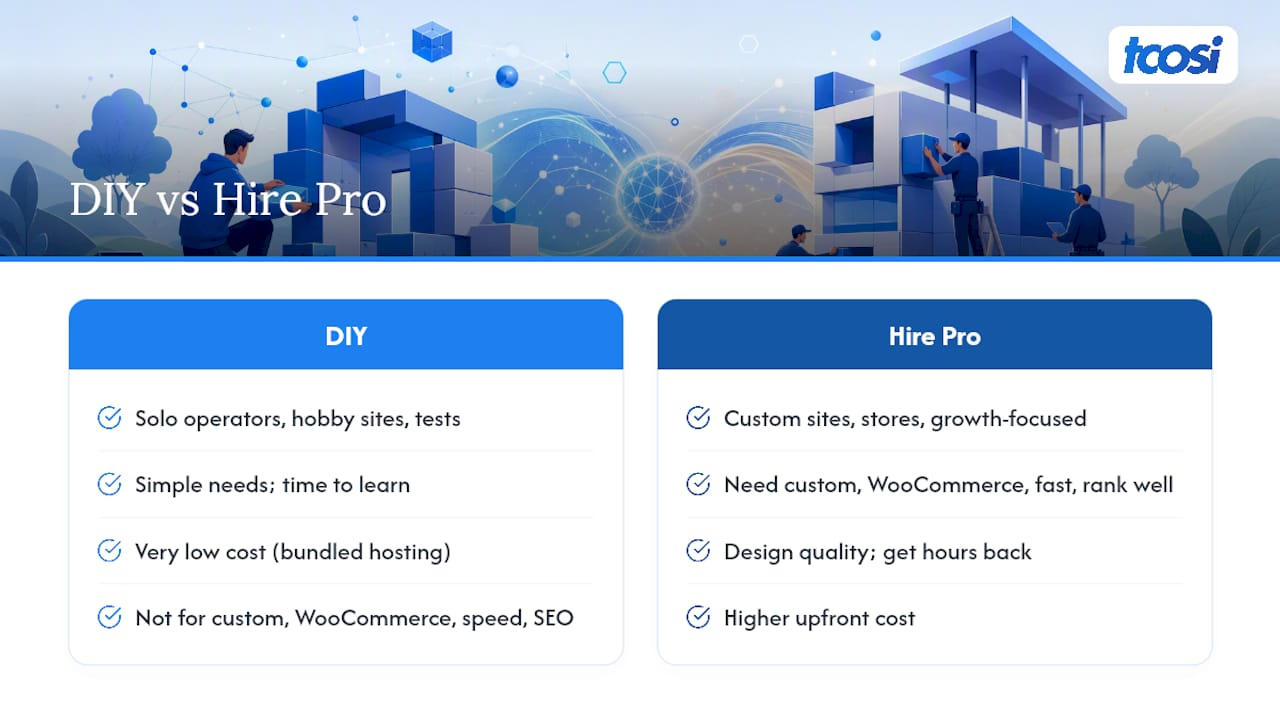
But the moment you need custom functionality, WooCommerce, or a site that has to load fast and rank well, DIY tools start showing their limits. That’s usually when hiring a developer or agency pays for itself, not just in design quality but in the hours you get back to run your actual business.
Pricing is typically structured around a project fee for the build and an optional ongoing maintenance arrangement afterward. Most conversations start with a simple scope discussion: what pages you need, what functionality matters, and what your realistic timeline looks like. From there, you get a fixed quote, not an open-ended hourly guess.
— Tommy Cosimano
Get a Straight Answer on What Your WordPress Site Will Cost
This service is an alternative to guessing your way through vague hourly quotes. As a small business owner, you get a fixed project price upfront, not a moving target that grows every time someone finds a “small addition” mid-build.

Before requesting a quote, have a rough sense of your page count, any special functionality (booking, ecommerce, membership access), and your target launch window. A typical tcosi proposal walks through discovery, a clear design and development timeline, a fixed price, and a defined support window after launch, so you know exactly what happens if something needs attention once the site is live.
If you’re ready to talk specifics, the website design services or the full website pricing breakdown are good places to start. Reach out through the contact page to get a real conversation, not a sales script.
Sources
For deeper cost breakdowns, see ProjectCostEstimator’s WordPress cost analysis, Elsner’s US development cost guide, and SocialAnimal’s total cost of ownership research. For core software and plugin licensing questions, visit WordPress directly.
- WordPress Website Cost: $1.2K-$12K (2026, Theme + Hosting)
- WordPress Website Development Cost in USA (2026)
FAQ
How much should a WordPress website cost?
Most small business WordPress sites cost $1,200 to $12,000 to build, with $1,800 to $7,500 covering the majority of common small-business projects. Annual operating costs typically add $4,200 to $18,000 once hosting, plugins, and maintenance are included.
Is WordPress outdated in 2026?
No. WordPress remains actively developed and widely used, with core software, themes, and plugins continuously updated through WordPress.org. It stays competitive because of its flexibility and the depth of available integrations, not despite them.
Why are people moving away from WordPress?
Some businesses shift to simpler hosted builders when they want less technical overhead, but many return to WordPress once they need custom functionality, better SEO control, or ecommerce features that hosted platforms handle less flexibly.
Is WordPress cheaper than Wix?
It depends on the build. A basic WordPress DIY site can cost less than $800, comparable to entry-level hosted builder plans, but WordPress scales more affordably at higher complexity since you aren’t locked into a single provider’s pricing tiers for hosting, plugins, or design.


