
For most small businesses that want to be found on Google, a multi-page website is the better build. A single-page site fits a narrow job: one offer, one audience, one action. If you sell more than one service, serve more than one area, or want search traffic to grow, each of those deserves its own page. I build WordPress sites both ways, and the structure question is usually settled in the first conversation about what you sell and who needs to find you.
TL;DR
- A single-page site puts everything on one URL that visitors scroll. A multi-page site gives each topic its own URL.
- One page works for a single offer, an event, a launch or a quick proof of concept.
- For search, separate pages let you target separate searches. Google can only rank a URL for what that URL is about.
- Multi-page sites cost more up front, but they grow without a rebuild. Our published pricing starts at $875 for a Base Website.
- A hybrid is common: a focused homepage plus a handful of core pages.
Table of Contents
- What the two structures actually are
- Where a single-page site works well
- Single-page site SEO: what limits it
- Where a multi-page site pulls ahead
- Speed and mobile: a fair comparison
- Side by side
- What each costs
- The hybrid: a focused home page and a few core pages
- How to decide: six questions
- Common mistakes when choosing
- Where tcosi fits
- Our perspective
- FAQ
- Sources
What the two structures actually are
A single-page website uses one address, such as yourbusiness.com. Your introduction, services, proof and contact form sit in sections on that page. The menu usually jumps to each section with anchor links, so a link like yourbusiness.com/#services scrolls down instead of loading something new.
A multi-page website gives each topic its own address: /services, /about, /contact, /services/plumbing. The menu takes people to different pages, and each page can be built around one purpose.
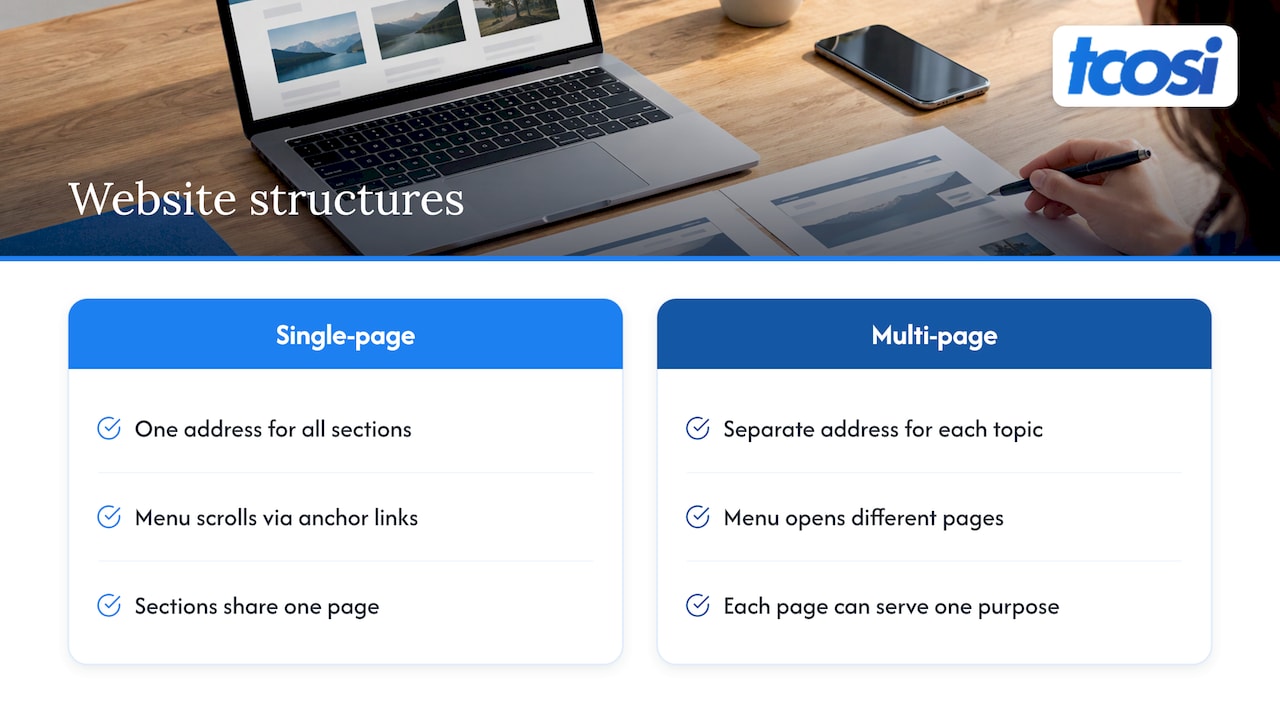
That difference sounds small. It decides what you can rank for, how much you can add later and how people move through the site.
Where a single-page site works well
One-page sites have real strengths, and I don’t want to talk you out of them where they fit.
- A clear, linear story. The Canadian Internet Registration Authority credits one-page sites with a faster linear flow and a distraction-free path to a single call to action.
- Phone-friendly scrolling. Scrolling is natural on a phone, so a tight page reads comfortably there.
- Simpler upkeep. There is less navigation and fewer pages to keep current.
That adds up to a good match for:
- A landing page for one campaign or one product.
- A personal resume or portfolio.
- An event or a pre-launch “coming soon” page.
- A very small business with one service, one location and one way to contact it.
If you fit that last description, a one-page site can be a sound way to open. Just plan for what comes next, which I cover below.
Single-page site SEO: what limits it
This is the question most people searching this topic care about, so here is the plain version.
Google ranks pages, not websites. Each URL competes for the searches it matches best. A page that tries to cover plumbing, drain cleaning, water heaters and emergency repair in one scroll gives Google a blurry signal for all four. Four dedicated pages give four clear ones.
Two more details matter:
- Anchor sections are not separate pages. Google’s guidance on URL structure says that it generally doesn’t support URL fragments for changing content. A section reached through
/#servicesis not treated as its own page in search. - Content gets trimmed. Ahrefs notes that content is often truncated on one-page sites, which can strip out information visitors need and text that has search value.
One-page sites also leave you with a single title tag and a single meta description to describe the whole business. On a multi-page site every page gets its own.
What the lead data suggests
HubSpot’s Marketing Benchmarks study of more than 7,000 businesses found that most companies don’t see more leads when they grow from 1 to 5 landing pages to 6 to 10. The benefit shows up at higher page counts. The lesson is not that you need dozens of pages on day one. It is that more pages with a clear purpose give you more chances to be found, and that the gains build over time.
Where a multi-page site pulls ahead
Search coverage. Each service, location or audience gets a page built around what people type. A roofer can have a page for roof repair, one for gutter installation and one for each town served. That is how a local business earns visibility beyond its own name. My guide on keeping every page within four clicks explains how to organize those pages so both visitors and search engines find them.
Room to grow. Adding a service, a case study, a team page or a blog on a multi-page site means adding a page. On a one-page site it means making the scroll longer, and eventually the page becomes unwieldy. If you ever outgrow one page, you also have to move to new URLs carefully. Our SEO migration checklist covers what to protect when that happens, and starting with a structure that can grow avoids much of that work.
Trust and familiarity. People expect an About page, a Contact page and a Services page. Those pages give you space for credentials, reviews, pricing context and the details a buyer wants before calling.
Better analytics. With separate pages you can see which services draw interest and where visitors leave. On one page you mostly see scroll depth.
Clean architecture. A deliberate structure helps search engines understand how your content relates. This walkthrough of site architecture best practices compares the structures and where each one fits.

Speed and mobile: a fair comparison
One-page sites are often described as faster because there is less to load. That is only true when the page is kept light. A long page packed with large images, sliders and videos loads everything in one go, and the first screen suffers.
Google’s web performance team treats a Largest Contentful Paint of 2.5 seconds or less as good. That is the time until the biggest visible element loads. It is measurable on any structure, and it is down to how the site is built: image sizes, hosting, scripts and caching. A well-built multi-page WordPress site loads one lightweight page at a time and can meet that mark just as easily. This look at landing page speed and the 2-second LCP goal shows why mobile visitors in particular leave slow pages.
For mobile layout, the same rules apply to both: tap-friendly menus, readable text and fast first screens. I cover them in how to make your website mobile friendly.
Side by side
| Question | Single-page | Multi-page |
|---|---|---|
| Best for | One offer, event, launch, resume | Several services, locations or audiences |
| Search targeting | One URL, one main topic | One URL per topic or intent |
| Adding content later | Page gets longer | New page, new menu item |
| Navigation | Scroll and anchor links | Menu to separate pages |
| Reporting | Mostly scroll behavior | Page-by-page performance |
| Build effort | Smaller | Larger, but scales |
| Growth path | Often needs a restructure | Built to last and expand |
What each costs
A one-page site takes less design and build time, so it costs less at the start. It is also the one most likely to need rebuilding when the business grows.
Our website pricing is published on the pricing page:
- Base Website: $875
- Essentials: $1,200
- Growth: $2,400
- Premium: $4,800
- SEO Setup: $375
- Wireframes: $175
- Style Guide: $300
All are one-off prices. Ongoing Maintenance is $100 per month. If you’re weighing what upkeep costs over time, this breakdown of website maintenance costs lays it out for US small businesses.
The hybrid: a focused home page and a few core pages
Most of my small business clients land here, and it is often the best answer. The homepage works like a one-page site: a clear promise, your top services, proof and a call to action. Behind it sit a few pages doing specific jobs: a page per main service, an About page, a Contact page and, where it fits, a page per location.
You get the focused first impression of a one-pager and the search reach of a full site. You can start with five or six pages and add more as the business grows. If you want to see how pages should link to each other, what is website navigation is a good primer.
How to decide: six questions
Work through these before you commit to a structure.
- How many different things do you sell? One offer points to one page. Three or more services point to separate pages.
- Do you want to be found for those services on Google? If yes, each needs a page that matches what people search.
- Do you serve more than one town or area? Each area is a separate search, and a separate page can answer it.
- How much does a buyer need to read before calling? Pricing context, credentials, reviews and FAQs need room.
- Will you add content over the next two years? Case studies, a blog or new services are easier to add to a multi-page site.
- Is this a short-lived project? A campaign or event is the best case for a single page.
If you answered “several, yes, yes, a lot, yes, no,” you need a multi-page site. If the answers run the other way, one page is a fair choice. If you are split, the hybrid is the safe middle.
Common mistakes when choosing
- Picking one page for the look. A tidy scroll is nice, but if your customers search for specific services, they will not find you through it.
- Cramming five services into one page. Each topic dilutes the others.
- Building many thin pages. Pages with a sentence or two each do not help. Give each page a real purpose and enough substance.
- Skipping planning. A simple set of wireframes and a style guide before design saves rework, and both are available as add-ons on our pricing page.
- Forgetting upkeep. A site is not finished at launch. Ongoing optimization is how it keeps growing.
Where tcosi fits
I design and build custom WordPress websites for small businesses, startups, nonprofits and professional firms across the United States, and the first step is always the same: we talk through what you sell, who needs to find you and what you want visitors to do. From there I can map out whether you need a focused page, a hybrid or a full multi-page site. My aim is to make the process clear and collaborative, so you understand the choices as we make them.
If you want a site with pages built to be found, see the packages and prices, or look at our design and development services to start a conversation. SEO Setup and Ongoing Maintenance are available alongside the build.

Agencies that need a WordPress developer behind their own client work can find out about white-label WordPress development.
Our perspective
When someone asks me whether they need one page or many, I start with a different question: what do you want a stranger to do after finding you? If the answer is one thing, a single page can carry it. If the answer is “find the right service, check that I’m credible, and call,” you need pages for each of those moments.
We build sites to last, so we plan the structure around where your business is headed, not only where it is today. That is why we like to begin with wireframes and a style guide: you see the shape of the site before any design work, and you can say yes or no to each page.
A site that has room to grow lets you add a service page next spring without starting over. That is what a multi-page WordPress site gives you, and it is why it is our usual recommendation for businesses that want to be found.
Tommy Cosimano
FAQ
Is a one-page website bad for SEO?
It is limited, not bad. One URL can rank well for one focused topic, but it cannot target several distinct searches the way separate pages can. If you offer multiple services or serve multiple areas, separate pages give you far more chances to appear in results.
What are the pros and cons of a one-page website?
The pros are a simple, linear story, easy mobile scrolling and lighter upkeep. The tradeoffs are one URL for search, limited room for content and a structure that is harder to extend. It suits a single offer or a short-term project.
Can I start with one page and add more later?
Yes, and it is common. Plan the new URLs and redirects so existing visibility carries over. Starting with a small multi-page site, such as a homepage plus a few core pages, avoids most of that work.
Is a multi-page website slower?
Not by nature. Speed depends on image sizes, hosting, scripts and caching. Each page of a multi-page site loads only its own content, and a well-built one can reach Google’s 2.5-second target for Largest Contentful Paint.
Sources
- When and how to create a one-page website, CIRA
- URL structure best practices for Google Search
- Single-Page Websites and SEO: The Essential Guide, Ahrefs
- Marketing Benchmarks from 7,000 businesses, HubSpot
- Largest Contentful Paint (LCP), web.dev