A WordPress support retainer is a monthly agreement that gives your site dedicated hours for updates, security work, bug fixes, and monitoring, plus a predictable bill instead of a surprise invoice every time something breaks. The main payoff isn’t convenience. It’s stability: fewer outages, fewer security scares, and a site that quietly gets better instead of slowly decaying. If you publish often, sell online, or depend on integrations that can’t afford downtime, a retainer is worth serious consideration.
TL;DR:
- A WordPress support retainer provides proactive updates, security monitoring, and performance checks, reducing outages and vulnerabilities over time.
- Retainer costs range from about $100 to several hundred dollars monthly, depending on site complexity and response time guarantees.
- Initial onboarding often includes a thorough audit, staging setup, and risk prioritization to ensure the retainer delivers measurable benefits from the start.
- Core tasks like plugin updates and backups are bundled into a retainer, while major feature development or redesigns typically require separate project contracts.
- Clear SLAs, transparent reporting, and staging-first workflows are essential for building trust and ensuring timely, effective support.
Table of Contents
- What Does a WordPress Support Retainer Include?
- Who Actually Needs a Retainer?
- How Do Retainer Hours and Billing Actually Work?
- What SLAs and Monitoring Should You Require?
- How Do You Choose the Right Retainer Provider?
- What Does a Retainer Typically Cost?
- What Happens in Your First 30 Days?
- Staging-First Workflows and Scripted Plugin Management
- What’s Not Covered by a Standard Retainer?
- What Contract Terms Should You Watch For?
- Does a Retainer Actually Pay Off?
- When Is a Retainer the Right Call?
- tcosi’s Approach to Ongoing WordPress Support
- Sources
- FAQ
What Does a WordPress Support Retainer Include?
Most retainers follow a similar operational rhythm, even when the branding differs from agency to agency. You’re paying for a team to watch your site the way you’d watch a car with 80,000 miles on it: not waiting for the check-engine light, but catching the slow leak before it becomes a tow truck.
Here’s what typically falls inside scope:
- Core, plugin, and theme updates run on a staging site first, with compatibility checks before anything touches production.
- Security monitoring includes vulnerability scanning, malware detection, and cleanup if something slips through.
- Backups are automated, stored offsite, and tested periodically, not just scheduled and forgotten.
- Uptime and performance monitoring flags slowdowns or outages before a customer notices them.
- Small content and template edits cover text changes, image swaps, and layout tweaks within your existing design.
- Bug fixes and QA address broken forms, plugin conflicts, or display issues after updates.
- Monthly reporting documents what was done, how many hours were used, and what’s queued next.
A standard retainer typically bundles core, plugin, and theme updates with security monitoring and performance checks as one package, rather than pricing each piece separately. That bundling is what separates a retainer from a one-off repair call. It’s not that the individual tasks are exotic. It’s that someone is doing them on a schedule, whether or not you remembered to ask.
Who Actually Needs a Retainer?
Not every site needs the same level of care, and matching your retainer to your actual usage saves you from overpaying for hours you’ll never use.
- Low-change brochure sites (a local plumber’s five-page site, for example) often do fine with light monthly maintenance: updates, backups, basic security.
- Marketing-driven sites that publish weekly, run landing pages, and track conversions need more hands-on hours for testing, form fixes, and content edits.
- WooCommerce stores carry the highest stakes. A broken checkout costs revenue in real time, so these sites usually justify faster response times and more monitoring.
Publishing frequency matters as much as site size. A ten-page site that changes twice a year has different needs than a fifty-page site adding new content every week, even if both run on similar hosting.
Revenue dependence changes the math too. If your site is a brochure, a few hours of downtime is annoying. If it’s your storefront, it’s lost sales, and that changes how much you should be willing to pay for guaranteed response times.
Before signing anything, look inward. Does your team already handle content edits and just needs someone for technical maintenance? Or are you looking for a vendor to own the whole relationship, from updates to strategy? Being honest about your internal capacity keeps you from paying for hours that duplicate work you’re already doing, or worse, leaving gaps nobody’s covering.
How Do Retainer Hours and Billing Actually Work?
Retainer pricing sounds simple until you read the fine print. Here’s what typically drives the number on your invoice:
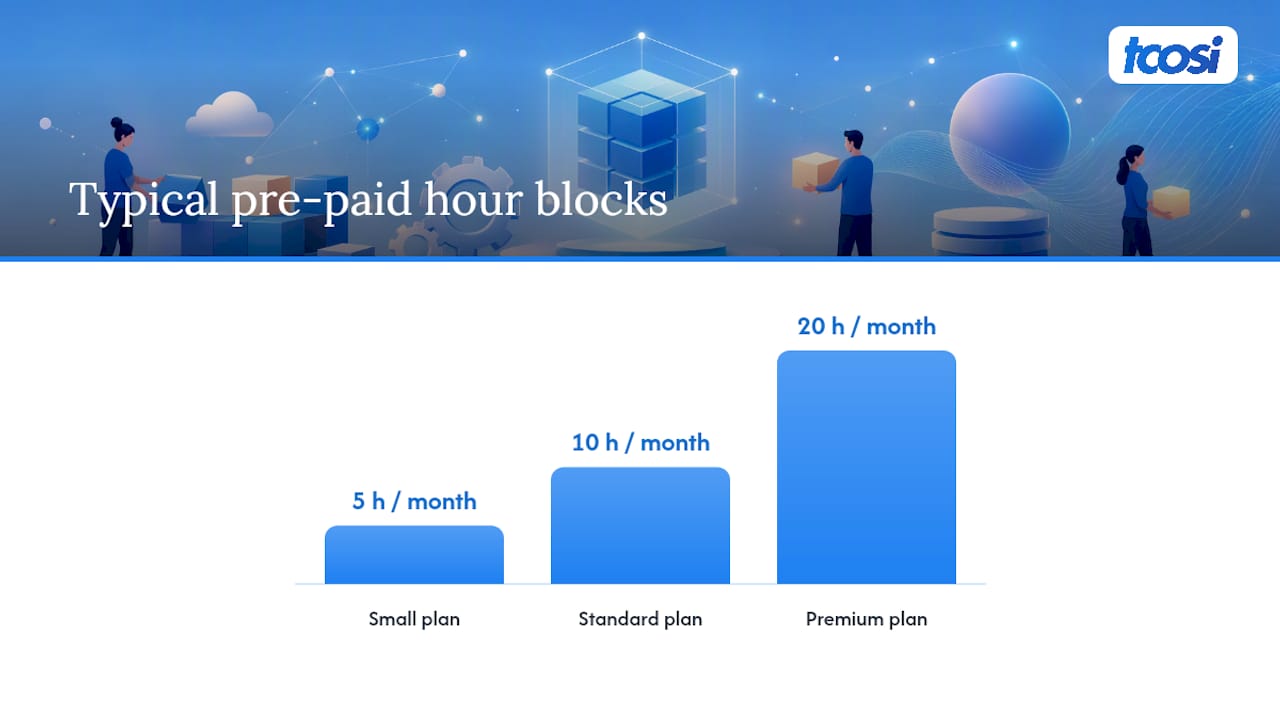
- Pre-paid hour blocks. Most retainers sell a fixed number of hours per month, often 5, 10, or 20, at a set rate.
- “Unlimited” plans with concurrency limits. Some vendors advertise unlimited requests, but that usually means one task at a time, not unlimited simultaneous work.
- What counts against your hours. Status meetings, estimates for new work, and revision rounds often eat into your allotment, so ask before assuming edits are free.
- Rollover policies. A B2B website support retainer commonly includes some form of rollover for unused hours, though the cap and window vary by vendor.
- Overage rates. Work beyond your monthly hours typically bills at a higher hourly rate than what’s baked into the retainer.
If your needs are unpredictable, month to month volatility might make hourly billing a better fit than a fixed retainer. But if your site needs consistent attention, ongoing hands-on support tends to cost less over a year than paying premium rates for emergency fixes every time something breaks.
Pro Tip: Ask upfront whether a 30-minute check-in call counts as billable time. That single question exposes more about a vendor’s fairness than almost anything else in the contract.
What SLAs and Monitoring Should You Require?
Service level agreements are where a retainer either earns your trust or reveals its weaknesses. A vague SLA is a red flag; a specific one tells you exactly what happens when something breaks.
Common tiers look like this:
- Business hours issues: response within 24 hours, resolution timeline scoped separately.
- Urgent issues (broken checkout, site down): response within 2 to 4 hours, sometimes faster on premium tiers.
- Critical emergencies (site completely offline): often guaranteed same-day attention, occasionally with on-call coverage.
WordPress retainers shift sites from reactive break-fix work toward proactive optimization that improves security and uptime over time, rather than just responding to fires as they start.
Monitoring is the mechanism that makes those response times possible. Agencies commonly rely on tools like Pingdom, NewRelic, and dedicated uptime monitoring platforms to catch outages, error spikes, or slow load times before a customer files a complaint. Ask what alerts trigger, who receives them, and how fast a human responds after the alert fires. A monitoring dashboard nobody watches is just decoration.
Escalation paths matter too. Who handles the issue if your main contact is on vacation? Is there a second person, or does everything stop? And do you get a monthly report showing hours used, work completed, and what’s coming next, or do you have to ask for that information every time?
How Do You Choose the Right Retainer Provider?
Evaluating a retainer proposal is easier when you have a specific list in front of you instead of a gut feeling.
- Confirm scope in writing. What’s included, what’s excluded, and what counts as a “small edit” versus a billable project.
- Check the SLA specifics. Response times for each severity tier, not just a general promise to “get back to you quickly.”
- Ask about hours and rollover. How many hours, what happens to unused ones, and what the overage rate looks like.
- Request a sample report. A real report, not a description of one, shows you exactly what transparency looks like month to month.
- Verify backup and staging practices. Ask specifically whether updates run on a staging environment before going live.
- Clarify access controls. Who has admin access, and what happens to that access if you cancel the contract.
Ask these exact questions during a sales call: Do status meetings count against my hours? Who is my actual point of contact, and what happens if they’re unavailable? Can I see a sample monthly report before signing?
Pro Tip: If a vendor can’t produce a sample report on request, that’s your answer. Reporting habits don’t appear magically after you sign a contract.
Watch for red flags: SLAs described in vague language like “fast” or “priority” instead of actual hours, “unlimited” plans with no concurrency explanation, and any vendor who can’t describe a staging workflow. If updates go straight to your live site, you’re one bad plugin update away from a bad week.
What Does a Retainer Typically Cost?
Pricing varies more by scope than by any single factor, but there are patterns worth knowing before you start comparing quotes.
- Basic maintenance retainers for low-complexity sites often start in the range of $100 to $500 per month, covering updates, backups, and basic security.
- Mid-tier retainers with more hours, faster SLAs, and active monitoring commonly scale into higher monthly ranges depending on hour count and response guarantees.
- Agency-level retainers with senior engineers and strict SLAs often start higher for modest scope and climb from there as hours and urgency increase.
WooCommerce stores, custom integrations, and strict uptime requirements all push price upward, since faster response times require reserved capacity, not just reactive labor.
For evaluating ROI, compare the retainer’s monthly cost against what a single emergency fix would cost at hourly rates, plus the revenue lost during downtime. For many businesses, monitoring-only plans look cheaper on paper, but a plan without allocated hours for fixes doesn’t substitute for the proactive improvements a real retainer delivers.
What Happens in Your First 30 Days?
A retainer that starts with a real audit tends to outperform one that starts with “we’ll take a look when something breaks.”
- Initial audit. Hosting review, full plugin inventory, backup verification, and a vulnerability scan establish your starting point.
- Staging environment setup. Before any updates run on your live site, a staging-first plan gets built so changes get tested safely.
- Prioritized remediation list. Outdated plugins, security gaps, and performance issues get ranked by risk, not tackled randomly.
- Delivery of a 30/60/90 plan. You should receive a written risk map, a maintenance schedule, and a reporting template you’ll see every month going forward.
If your onboarding skips the audit and jumps straight into billable hours, ask why. A retainer without a baseline is a retainer with no way to measure whether it’s actually helping.
Staging-First Workflows and Scripted Plugin Management
The difference between a retainer that prevents problems and one that just responds to them usually comes down to process, not effort.
Staging-first means every update runs on a copy of your site before it touches production. If a plugin update breaks a layout or conflicts with another plugin, it breaks on staging, where nobody notices but the team fixing it. Ask any vendor proposal one direct question: does every update go to staging first? If the answer is unclear, that’s worth pushing on.
Scripted WP-CLI plugin management also matters more than it sounds. Running updates through command-line scripts instead of clicking through the dashboard one plugin at a time makes the process repeatable and auditable. It also allows safe bulk updates across multiple plugins without the guesswork of manual clicking.
A few markers of a well-run retainer relationship:
- A named point of contact, not a rotating ticket queue where you explain your site’s history every time.
- Short weekly status updates, even a two-line email, so you’re not wondering what happened to your hours.
- Transparent hours reporting that shows exactly what was done, not just a total number billed.
None of this is complicated. It’s just consistent, and consistency is what most break-fix relationships never deliver.
What’s Not Covered by a Standard Retainer?
Retainers are built for maintenance, not major builds, and understanding that boundary saves you from a frustrating conversation later.
New feature development typically falls outside standard retainer scope. Adding a booking system, building a custom membership portal, or integrating a new payment gateway are project-based requests, usually quoted and billed separately from your monthly hours.
Full redesigns work the same way. A retainer keeps your current site healthy; it doesn’t rebuild your homepage from scratch or redesign your brand identity. That’s a separate engagement with its own timeline and cost.
Platform migrations, moving from another CMS to WordPress, or switching hosting providers entirely, also sit outside typical retainer scope. These projects require dedicated planning and testing that a monthly hour allotment isn’t designed to absorb.
The line isn’t always obvious in casual conversation, so ask directly: does my retainer cover new pages, or just edits to existing ones? Does it cover plugin installation for new functionality, or only maintaining what’s already there? A good vendor will draw that line clearly in your contract instead of leaving it fuzzy until a dispute happens.
What Contract Terms Should You Watch For?
Retainer agreements are usually straightforward, but a few clauses deserve a careful read before you sign.
Term length and cancellation notice matter more than people expect. Some retainers run month to month; others lock you into a minimum term with a required notice period, often 30 days, before you can cancel.
Ownership of work product should be spelled out. Confirm that code, content, and design assets created under the retainer belong to you, not the agency, especially if you ever switch vendors.
Access and credentials need clear language too. Your contract should specify what happens to admin access, hosting credentials, and domain control if the relationship ends. You want your own house keys back, not a landlord who keeps a copy.
Liability and uptime guarantees are worth reading closely. Most agencies won’t guarantee 100% uptime (nobody honestly can), but the contract should specify what happens if their negligence, not a third-party outage, causes downtime.
Confidentiality clauses protect both sides if the vendor has access to customer data, payment systems, or internal business information through your site.
None of this requires a lawyer for a small business retainer, but reading the actual document, not just the sales pitch, prevents most disputes before they start.
Does a Retainer Actually Pay Off?
The clearest ROI signal isn’t a single big win. It’s the absence of expensive problems, which is hard to put a price on until you compare it to sites that don’t have that protection.
A brochure site that skips maintenance for a year often accumulates outdated plugins, unpatched vulnerabilities, and a slow accumulation of small bugs that eventually require a full cleanup, usually costing more in emergency hours than a year of retainer payments would have. A marketing site on a retainer, by contrast, tends to see steady gains: faster load times from ongoing performance tuning, fewer broken forms, and a security posture that doesn’t require panic when a vulnerability is announced.
For ecommerce stores, the math is sharper. Even a few hours of checkout downtime translates directly into lost revenue, and a retainer with fast response times exists specifically to prevent that scenario from happening at all. Ongoing site optimization also compounds over time. A site that gets small performance and SEO improvements every month tends to outperform one that gets rebuilt from scratch every three years and left alone in between.
When Is a Retainer the Right Call?
Break-fix support feels cheaper until the day your site goes down during a product launch and you’re paying premium rates for someone to drop everything. A retainer trades that risk for a predictable bill and a team that already knows your site’s history when something goes wrong.
The bigger case for retainers is compounding improvement. Ongoing performance tuning and small SEO fixes stack month over month in ways a one-time fix never does. That’s the trade-off worth weighing seriously before you decide reactive support is “good enough.”
— Tommy Cosimano
tcosi’s Approach to Ongoing WordPress Support
tcosi’s Ongoing Maintenance plan starts at $100 per month and runs on the same staging-first discipline covered throughout this guide: updates get tested before they go live, plugin management runs through scripted workflows for consistency, and you get a named contact instead of a rotating support queue. That’s the practical difference between a retainer that prevents problems and one that just reacts to them after your site’s already down.
An assessment with tcosi starts with a straightforward audit: hosting review, plugin inventory, and a look at your current backup setup, the same groundwork covered earlier in this guide. From there, you get a clear picture of what your site actually needs before committing to anything.
If your team already handles content and just needs technical maintenance, a lighter plan might fit. If you’re publishing constantly or running WooCommerce, a more hands-on retainer makes more sense than paying hourly rates every time something breaks. Either way, the pricing page lays out exact plan details, and reaching out for an assessment is the fastest way to find out where your site actually stands.
Sources
- B2B Website Support Retainer: What’s Included | Clear Digital
- 7 Ways WordPress Retainers Boost Website Performance
- WordPress
FAQ
Is WordPress Outdated in 2026?
No. WordPress still powers a substantial share of the web and continues active core development through WordPress. What makes a site feel outdated usually isn’t the platform itself, it’s neglected updates, stale design, or missing performance work, all of which a support retainer directly addresses.
Why Are Some Businesses Moving Away From WordPress?
Most of the frustration people cite comes from poor maintenance, not the platform: unpatched plugins, slow load times, and security scares that a proactive retainer would have caught early. Businesses that stick with WordPress and invest in ongoing support rarely report the same complaints.
How Much Does WordPress Maintenance Typically Cost?
Basic maintenance retainers often start around $100 to $500 per month for smaller sites, scaling upward with hours, SLA speed, and site complexity like WooCommerce integrations. tcosi’s own Ongoing Maintenance plan starts at $100 per month.
Who Can Help Me With WordPress Support?
A dedicated agency retainer works best when you want proactive monitoring, staging-first updates, and a named contact handling your site consistently. tcosi offers this through its Ongoing Maintenance plan, built around the staging-first and reporting practices covered throughout this guide.
What’s the Difference Between a Retainer and Pay-As-You-Go Support?
A retainer reserves monthly hours for proactive work like updates, monitoring, and small fixes, usually at a lower effective rate than one-off requests. Pay-as-you-go support costs more per hour and only responds after something breaks, which makes it harder to prevent the kind of downtime a retainer is designed to avoid.