Use a five-stage review workflow and one source of truth with a named approver. Agree on those three things before the first review even starts. We recommend moving through content and structure, wireframes, visual design, staging, and technical sign-off, with every comment logged in one tool and one person holding final say. Before kickoff, agree on who approves, where feedback lives, and when the first round is due.
TL;DR:
- Staged reviews should be limited to two or three rounds per phase, with strict deadlines to prevent scope creep and delays.
- A single named approver must make final decisions during conflicts, ensuring quick resolution and avoiding prolonged stakeholder disagreements.
- Feedback should be centralized in one tool, with detailed metadata, to keep version control clear and prevent outdated approvals.
- Change requests after sign-off require a formal process, including impact estimation and client approval, to avoid schedule overruns.
- Final launch sign-off must verify visual accuracy, functionality, accessibility, and documentation, not just a general impression.
Table of Contents
- The staged review sequence that prevents expensive surprises
- Who reviews, who approves, and how disagreements get settled
- One source of truth keeps versions from getting lost
- Handling change requests after sign-off
- How to run a review meeting that actually closes decisions
- Final sign-off: what to verify before launch
- What running this process for real projects has taught us
- How we run this workflow for your website project
- FAQ
- Sources
The staged review sequence that prevents expensive surprises
Each stage of a website project calls for a different kind of feedback, and confusing them is where most delays start. Early stages need directional input (does this solve the right problem), while later stages need defect checks (does this work as built).
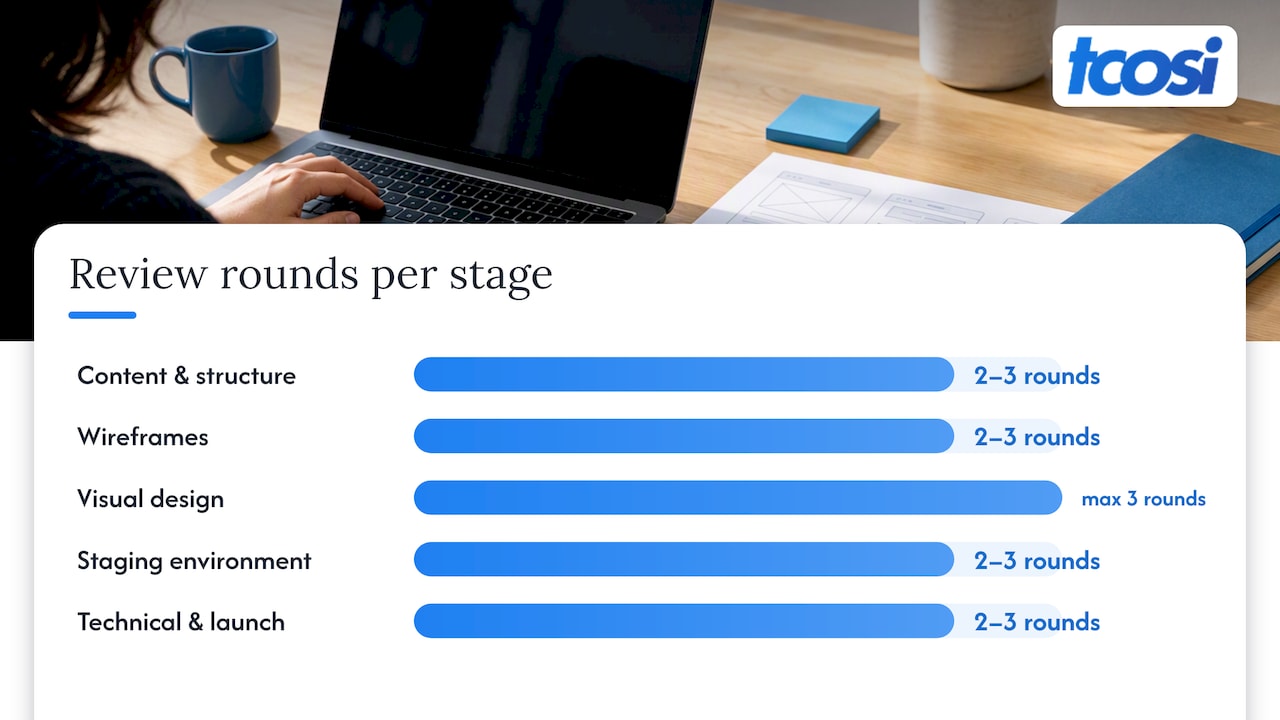
A practical staged sequence looks like this, moving from content and structure, to wireframes, to visual design, to a staging environment, and finally to technical and launch sign-off explained for owners. This order matters because early decisions are cheap to change and late ones aren’t. Once a layout is approved and built, reopening that decision at the staging stage costs real time and money.
We find it helps to run an internal QA pass before opening any stage to client review. Teams that check their own work first keep client feedback focused on direction rather than cleanup, which speeds up approvals and avoids wasted review rounds.
A few working rules keep this stage sequence from sprawling:
- Cap most stages at two to three review rounds, with a hard limit of three for final visual polish.
- Set a deadline for each round, not just a general “send feedback when ready.”
- Run a short verification pass after every fix round to confirm changes landed correctly before moving on.
- Keep each stage’s feedback tied to that stage’s maturity: don’t let comments on font choice derail a content-structure review.
This structure also appears in how we approach website redesign projects, where staged reviews keep scope and expectations aligned from the first draft to launch.
Who reviews, who approves, and how disagreements get settled
Clear roles prevent the single most common source of delay: conflicting feedback with no tiebreaker. We separate three roles on every project.
- Reviewers give input at each stage, flagging preferences, questions, or issues.
- The named approver makes the final call when feedback conflicts, and that decision stands regardless of who commented last or loudest.
- The workflow owner keeps the project moving, tracking deadlines and confirming each stage actually closes.
When feedback conflicts, the named approver’s decision rules, not whoever weighed in last. Every final decision should record the approver’s name, the version reviewed, any accepted limitations, and the deadline tied to it.
For clients with several stakeholders, we recommend limiting who can submit feedback and naming one decision-maker up front. A marketing director, a CEO, and a board member rarely agree on font weight, and the project shouldn’t wait for them to.
One source of truth keeps versions from getting lost
Scattered feedback, email threads, Slack messages, a few sticky notes, is how projects lose track of what was actually approved. We standardize on a single visual proofing tool or project portal for every review round, and we don’t mix channels mid-project.
Keeping comments attached to the right page and version in one place preserves the full conversation history and prevents anyone from approving an outdated design by mistake.
Every piece of feedback needs four pieces of metadata to be useful:
- The page or version it refers to
- Its category: preference, correction, bug, or out-of-scope
- Who owns resolving it
- The date it’s due
The pattern we follow is simple: feedback gets logged in the visual annotation tool, tasks get pushed to the project management tool, and resolution gets tracked and verified before the round closes.
Pro Tip: Set automatic reminders for pending feedback and archive every sign-off the moment it’s approved, so you’re never digging through old threads to confirm what was agreed.
Handling change requests after sign-off
Once a stage is approved, new feedback isn’t a revision anymore, it’s a change request. A revision fixes something within the agreed scope. A change request asks for something new, and it needs its own process so it doesn’t quietly eat the schedule.
We use a four-step flow for this:
- Capture the request in the same proofing system used for everything else, so nothing gets lost in a side conversation.
- Estimate the impact on time and fee before any work begins.
- Get client approval on that specific impact, in writing, inside the same tool.
- Schedule and implement the change once it’s approved.
A documented change request process, with time and fee impacts stated clearly before work starts, is what separates smooth projects from disputed ones. We walk through this exact approach in more detail in our guide to handling change requests on web design projects, including how we present cost impact so clients can approve with confidence rather than guesswork.
How to run a review meeting that actually closes decisions
A review meeting should end with a decision, not spark a new brainstorm. We send materials ahead of time so stakeholders arrive ready to respond, not react.
A tight agenda keeps the meeting on track:
- The specific decision needed
- The type of review (directional or defect) and the work’s maturity
- Required changes and alternatives that were considered and rejected
- Who owns each follow-up and by when
- Any risks left unresolved
Setting expectations before the meeting, is this draft directional or near-final, matters as much as the agenda itself. Stakeholders give sharper feedback when they know what kind of review they’re doing. After the meeting, every decision gets logged in the proofing tool immediately, not summarized from memory a week later.
Final sign-off: what to verify before launch
Final approval should be tied to the exact staging URL and version reviewed, never to a general “it looks done” impression. We treat this as a checklist, not a feeling.
Before recording sign-off, we verify:
- Visual elements match the approved design
- Copy is final and proofread
- Links, forms, and navigation work as expected
- Analytics tracking is installed and firing
- Basic accessibility checks pass
- Any known issues are documented, not hidden
Once verified, we record the approver’s name, the timestamp, the exact version reviewed, and any accepted limitations. Archiving this record along with outstanding change requests protects everyone if a question comes up after launch. Separating this technical sign-off from earlier design approval matters too, since a client can approve the look of a page while functionality still needs its own testing pass.
What running this process for real projects has taught us
Our four-step change request process started because open-ended “can we tweak this” requests were quietly stretching timelines without anyone agreeing to the cost. Writing down capture, estimate, approval, and scheduling as four distinct steps forced every change into a decision point instead of a drift.

For agency partners using our white-label website design and development services, we keep approval ownership with the partner agency’s named contact, never splitting that authority across multiple people on their end. That single point of accountability is what keeps white-label delivery fast.
We’ve applied this same staged, documented approach on projects like our Medicor Cardiology website, where clear review stages and a single approver kept the build on schedule. Fewer open-ended rounds and a documented change process consistently mean less rework and faster launches.
— Tommy Cosimano
How we run this workflow for your website project
We build custom WordPress websites and manage ongoing website support using this exact staged process, so you’re never guessing where a project stands or who needs to sign off on what.

Our website design and development packages, Essentials, Growth, and Premium, all follow the same staged review sequence from content through launch sign-off. For agencies, our white-label WordPress development service applies the same governance, with one named approver on your side and clear change-request handling on ours.
Before any project starts, we set up a short onboarding call to confirm three things:
- Who the final approver is on your team
- Which review channel we’ll use for the whole project
- How many rounds and what deadlines apply to each stage
If you’re ready to put a clear review process behind your next website project, reach out and tell us where you’re starting from.
FAQ
What is a client feedback workflow for a website project?
It’s the staged process an agency uses to collect, organize, and act on client input from early content decisions through final launch sign-off. A clear version ties each round to a specific page or version, a named approver, and a deadline, so feedback doesn’t get lost or contradicted later.
How many rounds of feedback should a website project allow?
Most agencies cap major stages at two to three rounds, with a hard limit of three for final polish, to keep projects moving. Setting that limit upfront and tying each round to a deadline prevents open-ended revisions from stretching the timeline.
What’s the difference between a revision and a change request?
A revision is feedback within the scope already agreed for that stage, like adjusting spacing or wording. A change request is new work outside that scope, and it should go through its own approval step covering time and fee impact before anyone starts on it, as outlined in our change request process.
Who should approve a website design, one person or a group?
One named approver should hold final say, even when several stakeholders review the work. When feedback conflicts, that named approver’s decision stands, which avoids stalling the project while a group tries to reach consensus.
What tool should we use to collect website feedback?
A single visual proofing tool or project portal works best, kept consistent for the whole project so comments stay attached to the right page and version. Centralizing feedback in one place preserves the full history and prevents anyone from approving an outdated design by mistake.