A website redesign realigns your site to measurable business goals. Do it when analytics, UX evidence, or platform constraints are actively blocking growth — not because the design looks dated or a competitor launched something new.
Here is the short version: if your bounce rate is climbing, your CMS fights you on every update, your mobile experience is broken, or your brand has shifted significantly, a full redesign is likely justified. If the core structure is sound and only a few pages underperform, incremental fixes will cost less and carry less risk. NN/g recommends choosing incremental improvements over radical overhauls unless evidence shows a structural or systemic failure.
Three immediate first steps before anything else:
- Export 90 days of GA4 data: top landing pages, exit pages, and conversion funnels
- Run a content inventory: URL, monthly traffic, last updated, and conversion contribution
- Align stakeholders on one primary goal for the redesign before design begins
Quick reference: time and cost at a glance
| Scope | Typical Cost Range | Typical Duration |
|---|---|---|
| Basic web design refresh | $3,000–$10,000 | 4–8 weeks |
| Mid-range redesign | $10,000–$40,000 | 8 weeks |
| Enterprise site overhaul | $40,000–$150,000+ | 4–9 months |
These ranges reflect scope differences, not just design hours. Migration complexity, CMS selection, integrations, and content volume all move the number. See tcosi’s pricing page for a more specific breakdown.
Table of Contents
- Is it time to redesign? Signs, common pitfalls, and quick metric checks
- How much does a redesign cost, and how long will it take?
- Phase 1: Discovery and strategy — audits, goals, and your project brief
- Phase 2: Design — IA, wireframes, design systems, and accessibility
- Phase 3: Development — CMS selection, build workflow, SEO migration, and performance
- Phase 4: QA, testing, launch plan, and rollback steps
- Phase 5: Post-launch measurement, optimization, and ongoing maintenance
- Should you DIY or hire an agency? A clear decision framework
- Real results: two tcosi redesign case studies
- Key Takeaways
- What most redesign guides get wrong
- How tcosi approaches website redesigns
- Useful sources and tools for your redesign
- FAQ
Is it time to redesign? Signs, common pitfalls, and quick metric checks
The honest diagnostic rule: pull your analytics and run a lightweight usability test before deciding anything. If multiple KPIs are failing simultaneously — high exit rates on key pages, low mobile conversion, declining organic traffic, and user complaints about navigation — a redesign is likely the right call. If only one metric is off, fix that one thing first.
Signs that justify a full redesign:
- Your CMS requires developer help for routine content updates
- The site’s information architecture no longer maps to how your business works
- Organic search traffic has declined steadily for 6+ months with no clear on-page explanation
- A major brand shift, merger, or new product line has made the current site misleading
- Mobile performance scores are consistently poor and page-level fixes haven’t moved the needle
Check these 10 clear signs your site needs a redesign for a more detailed diagnostic checklist.
Pitfalls that push teams into unnecessary overhauls:
The most common trap is redesigning because leadership saw a competitor’s new site and felt behind. That is a political trigger, not a data trigger. Another common mistake: treating a slow homepage as a site-wide problem. Fix the homepage first, measure the result, then decide whether the issue is structural.
Pro Tip: Before committing to a full overhaul, run a five-user usability test on your three most important pages. If users can complete the primary task without help, your IA is probably fine and a targeted refresh will do the job.
Metric quick-checks to run right now:
- Conversion funnel drop-off: where are users leaving before completing a goal?
- Bounce rate by page: which pages are underperforming relative to traffic volume?
- Top 20 traffic pages: these must be preserved and prioritized in any migration
- Mobile Core Web Vitals: check Google Search Console’s Core Web Vitals report for mobile-specific failures
How much does a redesign cost, and how long will it take?
Budget and timeline depend almost entirely on scope. Here is a practical breakdown of the three tiers most agencies and freelancers use.
Three budget tiers explained:
Basic web design refresh typically costs a few thousand dollars and takes about one to two months: This covers a visual update, improved page templates, and minor content reorganization on an existing CMS. No platform migration, no major IA overhaul. Right for businesses with a working site that needs a cleaner look and faster load times.
Mid-range redesign is a moderate project involving a new information architecture and CMS changes, usually lasting several months: Includes discovery, new IA, full design system, CMS migration or rebuild, content migration, and QA. This is the most common scope for small-to-mid-size businesses doing a meaningful site overhaul.
Enterprise overhaul projects are comprehensive efforts involving multi-stakeholder processes and custom integrations that can span several months: Multi-stakeholder governance, custom integrations, multi-site or multilingual support, accessibility audits, and phased rollouts. Industry cost guidance confirms these tiers, with enterprise projects scaling well beyond six figures when integrations and compliance requirements are involved.
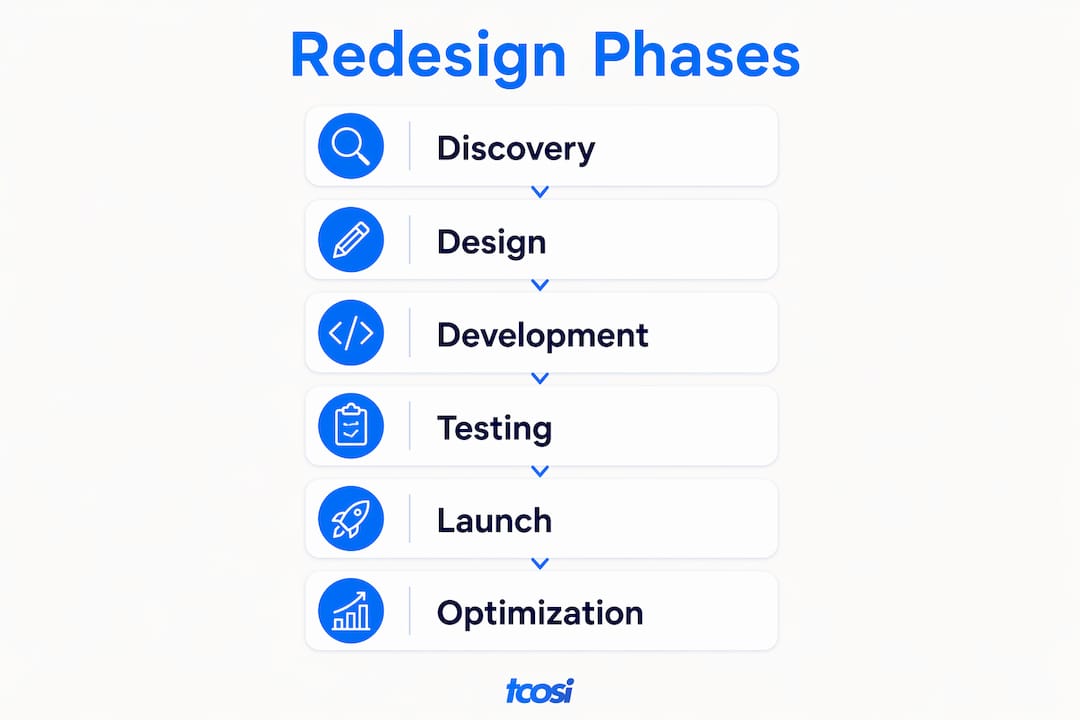
Phase-by-phase timeline table:
| Phase | Duration | Key Milestone |
|---|---|---|
| Discovery and strategy | 1–3 weeks | Signed project brief and goals doc |
| IA and content planning | 1–2 weeks | Approved sitemap and content inventory |
| Design (wireframes to hi-fi) | 2–4 weeks | Stakeholder sign-off on design system |
| Development and CMS build | 3 weeks | Staging site ready for QA |
| Content migration and QA | 1–3 weeks | All redirects mapped and tested |
| Launch and post-launch | 1 week + 90 days monitoring | DNS switch and analytics validated |
Pro Tip: Build a 15–20% contingency into your budget from day one. Content rewrites, delayed stakeholder approvals, and unexpected integration issues are the three most common cost overruns — and they almost always happen.
Total cost of ownership considerations: CMS licensing (if applicable), plugin or integration fees, hosting, and ongoing maintenance are separate from the build cost. A WordPress site might cost $200–$600 per year in hosting and maintenance tools; an enterprise CMS can run significantly more. Factor these into your planning before you sign a contract.
Phase 1: Discovery and strategy — audits, goals, and your project brief
Discovery is decision-making. Do this work before any design or development begins, and use the outputs to define exactly what gets built. Skipping discovery is the single most common reason redesigns go over budget and miss their goals.
Analytics audit checklist:
- Export GA4 data: sessions, bounce rate, and goal completions by page for the last 90 days
- Pull Google Search Console: top queries, impressions, clicks, and any coverage errors
- Identify your top 20 traffic pages — these are non-negotiable to preserve
- Map your conversion funnels: where do users drop off before completing a goal?
- Flag pages with high traffic but low conversion — these are redesign priorities
Content inventory template (capture these attributes for every page):
- URL
- Page title and primary keyword
- Monthly sessions (from GA4)
- Conversion contribution (goal completions or assisted conversions)
- Last updated date
- Content owner (who is responsible for keeping it current)
- Decision: keep, update, consolidate, or retire
This inventory becomes your migration map. Every page marked “keep” needs a redirect plan if its URL changes.
User and stakeholder research:
Run at least five usability sessions on your current site before designing anything. Ask users to complete your top two or three tasks without guidance. Where they get stuck is your IA problem list. Supplement with a short survey (five questions max) asking visitors what they came to do and whether they succeeded.

Stakeholder interviews should produce one thing: a ranked list of business goals for the new site. If stakeholders cannot agree on the top goal, that disagreement will surface as scope creep in month two of the build.
Sample project brief structure:
- Business goals (ranked, specific, measurable)
- Target audience and their primary tasks
- Pages and content to preserve (with traffic data)
- Technical constraints (current CMS, integrations, hosting)
- Budget range and timeline
- Success metrics (what does “done well” look like in 90 days?)
Pro Tip: A well-planned sitemap is worth more than a beautiful homepage mockup. Map your key user journeys first — from entry page to conversion — and build the navigation around those paths, not around your internal org chart.
Phase 2: Design — IA, wireframes, design systems, and accessibility
Design should validate business goals through IA and prototype testing before any visual polish happens. The order matters: structure first, then layout, then visual design.
IA and sitemap best practices:
Good information architecture groups content the way users think about it, not the way your departments are organized. Keep primary navigation to five to seven items. Every key conversion page should be reachable in two clicks from the homepage. Use card sorting with real users to validate groupings before finalizing the sitemap. Navigation structure directly affects how quickly visitors find what they need and whether they stay.
Wireframe and prototype workflow:
Start with low-fidelity sketches or wireframes for your five most important page templates. At this stage, test for task completion, not aesthetics. Once users can complete tasks without confusion, move to high-fidelity mockups. Get stakeholder sign-off on the hi-fi prototype before handing anything to a developer. Changes at the wireframe stage cost hours; changes in development cost days.
Design system checklist:
- Typography tokens: heading scale, body, and caption sizes with line-height values
- Color tokens: primary, secondary, neutral, and semantic colors (error, success, warning)
- Component library: buttons, forms, cards, navigation, and modals
- Responsive breakpoints: mobile (320px+), tablet (768px+), desktop (1280px+)
- Content patterns: how long-form content, FAQs, and CTAs are structured consistently
- Governance rules: who can add new components and how they get approved
A design system pays for itself the moment a developer asks “which shade of blue?” and the answer is already documented.
Accessibility basics:
Target WCAG AA compliance as a minimum for any public-facing site. That means a 4.5:1 color contrast ratio for body text, keyboard-navigable menus, descriptive alt text on all images, and form labels that are visible (not just placeholder text). Run automated checks with tools like axe or WAVE during design review, then follow up with manual keyboard navigation testing. WCAG AA compliance should be part of your QA checklist, not an afterthought.
Pro Tip: Test your prototypes on a real mobile device, not just a browser emulator. Tap target sizes, scroll behavior, and font rendering all look different on an actual phone — and mobile devices generate the majority of web traffic, so this is where most of your users actually live.
Phase 3: Development — CMS selection, build workflow, SEO migration, and performance
Choose your CMS and architecture during planning. This decision affects everything downstream: governance, scalability, integrations, and long-term maintenance cost. Making it at the end of the project is one of the most expensive mistakes a team can make.
CMS selection criteria:
- Scalability: Can it handle your content volume and traffic growth without a rebuild?
- Governance: Does it support role-based access control (RBAC) so editors can’t break the site?
- API and integration support: Does it connect to your CRM, marketing tools, and analytics?
- TCO: What are the licensing, hosting, plugin, and maintenance costs over three years?
- Security and compliance: Does it receive regular security updates? Does it meet your industry’s compliance requirements?
WordPress powers a large share of the web and suits most small-to-mid-size businesses well, especially with a managed hosting provider. Enterprise teams with complex governance needs may evaluate headless CMS options, but the added complexity has a real cost in developer time and ongoing maintenance.
Development workflow:
| Environment | Purpose | Key Action |
|---|---|---|
| Local | Active development | Feature branches, daily commits |
| Staging | QA and client review | Full content migration, analytics validation |
| Production | Live site | Deployment only after staging sign-off |

Use version control (Git) for every project. Deployment should be a one-command process, not a manual file transfer. Define your rollback procedure before launch day, not after something breaks.
SEO and migration checklist:
Content migration is the highest-risk phase of any redesign. Enterprise guides consistently flag URL mapping and redirect implementation as the most common source of post-launch ranking loss.
- Crawl and export all existing URLs before touching anything
- Map every changed URL to its new destination (one-to-one 301 redirects)
- Preserve existing page titles, meta descriptions, and heading structure where possible
- Update all internal links to point to new URLs
- Regenerate and submit your XML sitemap in Google Search Console
- Check canonical tags and robots.txt after migration
- Verify structured data and schema markup carried over correctly
Performance optimization priorities:
- Compress and serve images in next-gen formats (WebP or AVIF)
- Implement lazy loading for below-the-fold images
- Minimize render-blocking scripts and defer non-critical JavaScript
- Use a CDN and browser caching for static assets
- Target Core Web Vitals: LCP under 2.5 seconds, CLS under 0.1, INP under 200ms
Pro Tip: Check your SEO-optimized design practices before development begins. Fixing a missing canonical tag or a broken redirect after launch is far more disruptive than catching it in staging.
Phase 4: QA, testing, launch plan, and rollback steps
A staged, checklist-driven launch prevents most post-launch failures. Validate analytics, SEO, forms, and integrations on staging before you touch the DNS. Launching without this step is how teams spend the first week after go-live fixing things that should have been caught in QA.
Pre-launch QA checklist:
- Cross-browser testing: Chrome, Firefox, Safari, and Edge on desktop and mobile
- Responsive checks: test at 320px, 768px, 1024px, and 1440px breakpoints
- Form and workflow tests: submit every form and confirm the confirmation email and CRM entry
- Accessibility validation: automated axe scan plus manual keyboard navigation
- 404 and redirect verification: crawl the staging site and confirm all 301s resolve correctly
- Page speed: run Lighthouse on your five most important pages and resolve any critical issues
- Analytics and event tracking: fire every tracked event on staging and confirm it appears in GA4
Analytics validation steps:
Test your analytics on staging before the DNS switch. Confirm that your GA4 measurement ID is on every page, that key events (form submissions, button clicks, scroll depth) are firing correctly, and that your conversion goals are recording. Set a GA4 annotation on launch day so you can compare pre- and post-launch performance cleanly.
Rollback and contingency plan:
- Set DNS TTL to 300 seconds (5 minutes) at least 48 hours before launch so a rollback is fast
- Keep the old site on a subdomain (e.g., old.yourdomain.com) for at least 30 days
- Define a hotfix process: who has deployment access, and what is the decision threshold for rolling back?
- Prepare a brief internal communication for your team and, if needed, a short external notice for clients
Pro Tip: Use tcosi’s brand website launch checklist as a second set of eyes before you go live. It covers items that are easy to overlook when you’re deep in the final push.
First 72 hours post-launch — watch these:
- Google Search Console for crawl errors and indexing issues
- GA4 real-time for traffic and conversion anomalies
- Server error logs for 404s and 500s
- Core Web Vitals in Search Console (data populates within 24–48 hours)
- Any form or integration failures reported by your team
Phase 5: Post-launch measurement, optimization, and ongoing maintenance
Measure against your discovery baseline and commit to a 90-day monitoring plan with specific KPIs and clear ownership. A redesign that isn’t measured is just a guess. Measurable improvements in traffic, conversions, and user satisfaction are achievable within 3–6 months when projects follow a disciplined discovery and measurement plan.
90-day monitoring plan:
- Weeks 1–2: Daily checks on Search Console, GA4 real-time, and server logs
- Weeks 3–4: Weekly conversion rate comparison vs. pre-launch baseline
- Month 2: Organic traffic trend analysis; flag any pages losing rankings
- Month 3: Full KPI review against discovery goals; prioritize optimization backlog
Ongoing maintenance checklist:
- WordPress core, theme, and plugin updates: monthly minimum
- Security scans and malware monitoring: weekly
- Offsite backups: daily automated, tested monthly
- Content governance review: quarterly audit of outdated pages
- Performance check: run Lighthouse quarterly and address regressions
Optimization prioritization framework:
Use a simple impact-versus-effort matrix. Plot each identified issue on two axes: business impact (high/low) and implementation effort (high/low). Fix high-impact, low-effort items first. Schedule high-impact, high-effort items for your next sprint. Defer or drop low-impact items entirely. This keeps the team focused on what actually moves the needle rather than chasing every minor issue.
Pro Tip: Post-launch ongoing optimization is where most of the long-term value gets built. The launch is the starting line, not the finish line.
Should you DIY or hire an agency? A clear decision framework
DIY if the scope is small, your internal team has the skills and time, and the risk of a botched migration is low. Hire when scale, integrations, governance, or SEO migration risk exceed what your team can confidently handle.
Decision criteria:
- Project complexity: A five-page brochure site is a reasonable DIY project. A 200-page site with CRM integration and e-commerce is not.
- CMS and platform constraints: Migrating from a legacy CMS to WordPress requires technical expertise that most marketing teams don’t have in-house.
- Content migration risk: If you have significant organic traffic, a poorly executed migration can cost you rankings that take months to recover.
- Stakeholder load: Managing design reviews, content approvals, and development handoffs across multiple departments is a full-time job during a redesign.
- Timeline: Agencies have dedicated teams. A solo internal effort on top of a day job almost always runs long.
Agency interview questions and red flags:
- Walk me through your discovery process. What deliverables do I get before design begins?
- How do you handle content migration and redirect mapping?
- What does your QA process look like before launch?
- What post-launch support do you offer, and for how long?
- Can you share a case study where a redesign improved organic traffic?
Red flags: An agency that skips discovery and goes straight to design mockups. A proposal with no mention of SEO migration. A contract with no post-launch support period. Vague timelines with no milestones.
Sample project brief checklist to send to vendors:
- Primary business goal for the redesign (one sentence)
- Target audience and their top two tasks on the site
- Current CMS and hosting environment
- Top 20 pages by traffic (export from GA4)
- Known technical constraints or required integrations
- Budget range and hard deadline (if any)
- Post-launch support expectations
Real results: two tcosi redesign case studies
Case study 1: Redaelli Industries
Redaelli Industries came to tcosi with a site that no longer reflected the company’s capabilities or visual identity. The existing build was difficult to update, and the design had not kept pace with the brand’s growth. tcosi approached the project with a clear discovery phase: stakeholder interviews to align on goals, a content audit to identify what to keep and what to retire, and a new IA built around how prospective clients actually navigate industrial supplier sites.
The result was a custom WordPress build with a clean design system, improved page hierarchy, and a content structure that made the company’s product range easy to browse. The site launched on time and gave the internal team the ability to update content without developer help. See the full Redaelli Industries case study for process details and outcome highlights.
Key lessons from this project:
- Stakeholder alignment on goals before design begins prevents mid-project scope changes
- A content audit that results in retiring outdated pages improves both UX and SEO
- Giving clients editorial control over their own content is a long-term investment in the site’s health
Case study 2: Local service business website makeover
A local service business approached tcosi with a site that was not generating leads. The homepage had no clear call to action, the mobile experience was broken, and the contact form was buried three clicks deep. tcosi ran a short discovery sprint: GA4 audit, a five-user usability test, and a competitor benchmarking session.
The redesign focused on three things: a mobile-first homepage with a prominent contact CTA, a simplified navigation structure, and a faster page load time. Within 90 days of launch, the client reported a measurable increase in contact form submissions and a significant drop in mobile bounce rate. The project stayed within the mid-range budget tier.
Key lessons:
- Mobile-first is not optional. A broken mobile experience is a broken business.
- Simplifying navigation to match user intent outperforms adding more pages.
- Measuring against a pre-launch baseline is the only way to know the redesign worked.
Key Takeaways
A successful website redesign starts with discovery, protects SEO through careful migration, and measures outcomes against a pre-launch baseline for at least 90 days post-launch.
| Point | Details |
|---|---|
| Incremental vs. full redesign | Use analytics and usability data to decide; a full overhaul is justified only for structural or systemic failures. |
| Budget and timeline reality | Basic refreshes run $3,000–$10,000 in 4 weeks; enterprise overhauls can reach $150,000+ over 4–9 months. |
| Migration is the highest risk | Map every URL, implement 301 redirects, and validate SEO on staging before the DNS switch. |
| Measure from day one | Set a 90-day monitoring plan with specific KPIs tied to your discovery baseline. |
| tcosi for hands-on help | tcosi handles custom WordPress redesigns, CMS migration, and post-launch optimization for businesses across the U.S. |
What most redesign guides get wrong
Most articles treat a website redesign as a design problem. It isn’t. It’s a business alignment problem that happens to have a design component.
The teams that get the best results are the ones who spend the most time in discovery — not the ones who hire the most talented designer. I’ve seen beautifully designed sites fail to move a single business metric because nobody asked, before the project started, what “success” actually meant. And I’ve seen modest, straightforward redesigns deliver real lead growth because the team was clear on the goal, preserved their top-traffic pages carefully, and measured the right things after launch.
The other thing most guides underplay: stakeholder management is half the job. Scope creep doesn’t come from developers adding features. It comes from a VP seeing the staging site for the first time and deciding the homepage needs a complete rethink. The fix is getting sign-off on a written project brief before design begins — not after. One document, agreed on by everyone, saves weeks of revision cycles.
If there’s one rule I’d give any business owner starting a redesign: measure before you redesign, and migrate with care. Everything else is details.
How tcosi approaches website redesigns
If you’ve read this far and you’d rather hand the project to someone who has done this before, that’s exactly what tcosi is built for. tcosi specializes in custom WordPress redesigns for businesses across the United States, with a process that starts with a real discovery phase and ends with a site you can actually manage yourself.
The work maps directly to the tiers covered in this guide. A basic web design refresh gets you cleaner templates, faster load times, and improved mobile performance. A mid-range redesign includes full discovery, a new IA, a custom design system, CMS build, content migration, and QA. For businesses with more complex needs, tcosi also offers white-label WordPress development for agencies managing client projects.
Every engagement includes a discovery deliverable (goals doc, content inventory, and sitemap), clear milestones, and post-launch support so the site keeps performing after it goes live. If you’re in New Jersey or anywhere across the U.S., get in touch through the contact page to talk through your project. Or browse custom WordPress agency options if you want to compare approaches before deciding.
Useful sources and tools for your redesign
The following resources back the guidance in this guide and are worth bookmarking as you plan your project.
Authoritative references:
- NN/g: Radical redesign or incremental change? — The foundational framework for deciding between a full overhaul and targeted improvements. Use this before committing to a full redesign.
- WordPress VIP: Enterprise Website Redesign Guide — Covers governance, CMS decision criteria, migration risk, and accessibility requirements for larger organizations.
- Elcom: Website Redesign Strategy and Best Practices — Emphasizes treating redesigns as strategic business projects; good for framing discovery and measurement.
- Neil Patel: Website Redesign Process — Practical 12-step walkthrough with mobile-first and analytics validation guidance.
- GoDaddy: Website Redesign 12-Step Guide — Useful phase-by-phase process reference for small business owners.
- Figma: Comprehensive Guide to Website Redesign — Strong on the design phase: wireframes, prototypes, and design system setup.
Tools referenced in this guide:
- GA4 and Google Search Console — Analytics audit and SEO monitoring (free)
- axe and WAVE — Automated accessibility testing during QA
- Lighthouse — Performance and Core Web Vitals auditing (built into Chrome DevTools)
- Screaming Frog — URL crawling and redirect mapping for migration planning
Templates: The content inventory template and project brief structure in Phase 1 align with the Elcom and WordPress VIP guides. The SEO migration checklist in Phase 3 maps directly to the GoDaddy and Neil Patel frameworks. The launch checklist in Phase 4 draws from the Neil Patel and WordPress VIP sources.
FAQ
How much does a website redesign cost?
A basic web design refresh typically runs $3,000–$10,000, a mid-range redesign $10,000–$40,000, and an enterprise site overhaul $40,000–$150,000 or more, depending on scope, integrations, and content volume.
How long does a website redesign take?
Most redesigns take 4–8 weeks for small-to-mid-size businesses; enterprise projects with complex migrations and multi-stakeholder governance can run 4–9 months.
What is the best way to start a website redesign?
Start with a discovery phase: export 90 days of GA4 data, run a content inventory, and align stakeholders on one primary business goal before any design work begins.
How do I redesign my existing website without losing SEO?
Crawl and export all existing URLs, create one-to-one 301 redirects for any changed URLs, preserve page titles and meta descriptions, and validate everything on a staging environment before switching DNS.
When should I hire an agency instead of doing it myself?
Hire an agency when your project involves CMS migration, significant organic traffic at risk, complex integrations, or multi-stakeholder governance that exceeds your internal team’s capacity. tcosi handles all of these for businesses across the United States.