For most small business sites with a contact form, a quote request and maybe a payment button, WPForms is the easier pick. If your forms need heavy conditional logic, custom code, or direct connections to CRMs and messaging tools, Gravity Forms is the stronger tool. Both are solid, and the right choice depends on what the form has to do after someone clicks submit.
I build and maintain WordPress sites for small businesses, so I choose between these two plugins on real projects. Below I compare them on price, ease of use, integrations, entries, spam protection and design, then share how I decide.
TL;DR
- Pick WPForms if you want a friendly drag-and-drop builder, ready-made templates and a free Lite version to start with.
- Pick Gravity Forms if you need advanced logic, developer hooks, or more direct integrations with CRMs and services like Twilio.
- Compare renewal prices, not first-year prices. WPForms advertises an introductory price that renews at double.
- Both include conditional logic in their paid plans and offer spam protection, so neither leaves you exposed on the basics.
- A good form is mostly design. Few fields, visible labels and a phone test matter more than the plugin.
Table of Contents
- What each plugin is
- Pricing: what you really pay
- Ease of use
- Features that matter for a business site
- Side by side
- How I choose between them
- Design a form that gets completed
- Multi-step forms
- Keep your forms working
- Need help choosing and setting it up?
- FAQ
- Sources
What each plugin is
WPForms describes itself as a drag-and-drop WordPress form builder for contact, payment, survey, newsletter and registration forms. It is built for site owners who do not want to touch code.
Gravity Forms is a WordPress plugin for creating data collection forms, polls and surveys, with add-ons for payments and third-party integrations. Its specifications list a visual drag-and-drop editor, more than 30 field types, conditional logic, file uploads, payment collection, workflow automation and responsive column layouts, along with accessibility features described as supporting WCAG 2.1 AA.
Both need a self-hosted WordPress site. If you are still deciding on a platform, I cover that in my guide to WordPress vs Wix.
Pricing: what you really pay
Prices below are in US dollars and were checked in October 2026. They change, so confirm on the official pages before you buy.
| Plan | WPForms (intro price, first term) | WPForms (regular and renewal) | Sites | Gravity Forms (annual) |
|---|---|---|---|---|
| Entry | Basic: $49.50 | $99 | 1 | Basic: $59 |
| Mid | Plus: $99.50 | $199 | 3 | Pro: $159 (3 sites) |
| Upper | Pro: $199.50 | $399 | 5 | Elite: $259 |
| Top | Elite: $299.50 | $599 | Unlimited | Elite: $259 (unlimited sites) |
The WPForms pricing page lists four paid plans and says the introductory price applies to the first term, with renewals at full price. The Gravity Forms pricing page lists Basic at $59 per year for one site, Pro at $159 for three sites, and Elite at $259 for unlimited sites with priority support and WordPress Multisite.
Two things stand out.
- WPForms has a free version. WPForms Lite is listed in the WordPress.org plugin directory. Gravity Forms is sold as a paid plugin, with plans starting at $59 a year.
- Renewal is the real cost. A Basic WPForms license looks cheaper in year one, but at renewal it is $99 against Gravity Forms Basic at $59. When you compare, look at entry storage, add-on needs and long-term renewal costs, not just the promotional price.
On refunds, one comparison reports that WPForms offers a 14-day money-back guarantee, while Gravity Forms accepts refund requests within 30 days at its discretion. Check the current terms on each vendor’s site before buying.
Ease of use
This is where the two differ most in daily use.
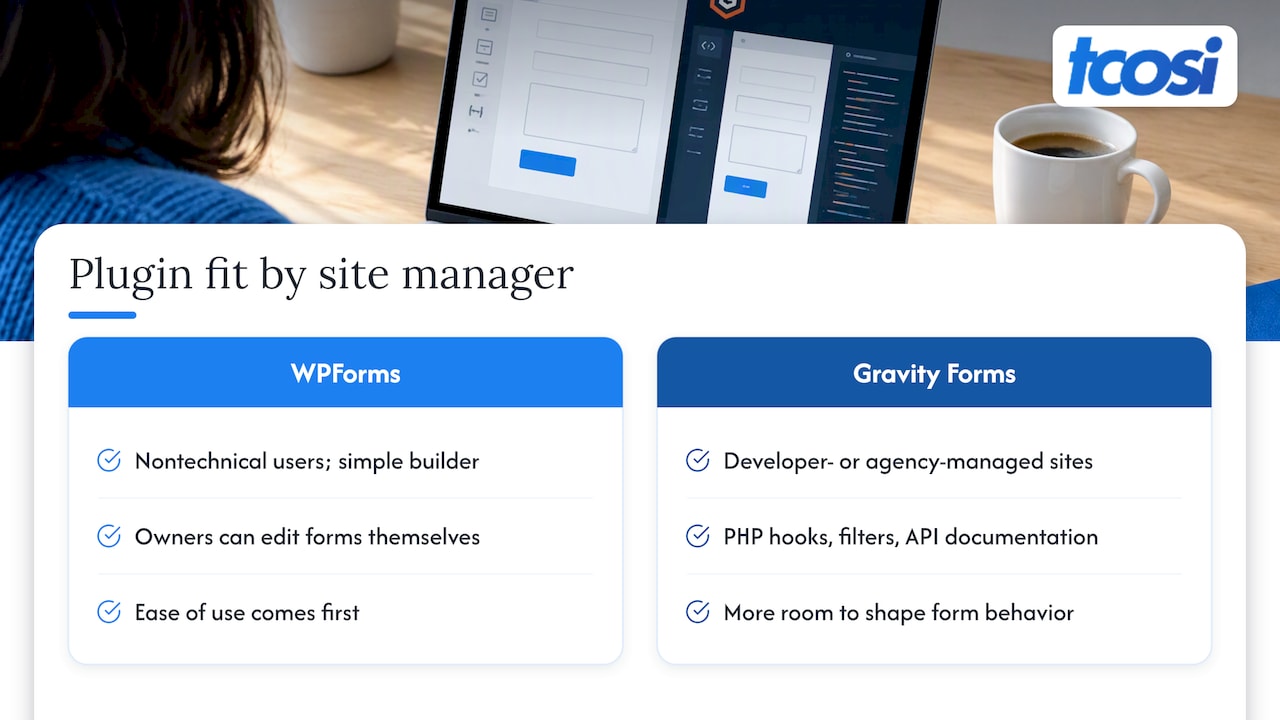
WPForms is aimed at non-technical users. The builder is simple, templates get you started quickly, and a business owner can usually edit a form without calling anyone. Gravity Forms is frequently cited as the developer’s choice because of its extensive PHP hooks, filters and API documentation, while WPForms puts ease of use first.
Neither is hard. But if the person managing the site is the owner, WPForms will feel friendlier. If a developer or agency manages the site, Gravity Forms gives them more room to shape what happens behind the form.
Features that matter for a business site
Conditional logic
Conditional logic shows or hides fields based on earlier answers. It is available in all paid WPForms plans and all Gravity Forms plans. On WPForms, it is a paid feature rather than part of the free Lite version, so plan for that if you start free.
Integrations
Both connect to Zapier. Gravity Forms offers more direct integrations with services such as Twilio and several CRMs. If you want leads to land straight in your CRM without a middle layer, that matters.
On the Gravity Forms side, Basic includes HubSpot, Mailchimp, Active Campaign and Campaign Monitor add-ons, Pro adds Stripe, Dropbox, Square, Zapier and Trello, and Elite adds user registration, conversational forms, partial entries, polls, signatures and surveys. On WPForms, higher tiers add templates, analytics, surveys and polls, save-and-resume, digital signatures, geolocation, payment and marketing integrations, and CRM or automation capabilities.
If HubSpot is your CRM, my walkthrough on setting up HubSpot with WordPress shows how to test the connection before you rely on it.
Entries
Entries are the submissions you keep. Paid WPForms licenses give you access to entries in the WordPress dashboard, and Lite Connect lets you back up and restore entries after upgrading. One comparison notes that Gravity Forms stores all entries in the WordPress database on every license, including Basic.
Why does this matter? If a notification email lands in spam, the entry is your safety net. Whichever plugin you choose, confirm that entries are being saved before you launch.
Spam protection
Both cover the basics. WPForms has built-in anti-spam protection based on a honeypot, plus reCAPTCHA and Akismet integrations in any version, including Lite. Gravity Forms includes honeypot, CAPTCHA and Akismet across all license levels.
Side by side
| What you need | WPForms | Gravity Forms |
|---|---|---|
| Free version | Yes (Lite) | No |
| Best fit | Owners who edit their own forms | Developers and complex workflows |
| Conditional logic | Paid plans | All plans |
| Direct CRM and messaging integrations | Fewer, Zapier available | More direct options |
| Entries in the dashboard | Paid licenses | All licenses |
| Spam protection | Honeypot, reCAPTCHA, Akismet | Honeypot, CAPTCHA, Akismet |
| Entry price per year | $49.50 intro, $99 renewal | $59 |
How I choose between them
I ask four questions before I install anything.
- Who will edit the form after launch? If it is the owner, I lean toward WPForms.
- What happens to a submission? If it just emails the team, either plugin works. If it must create a CRM record, text someone, or trigger a workflow, I look hard at Gravity Forms.
- How many sites? One site with a simple contact form rarely needs more than an entry plan. An agency running many sites should compare the unlimited-site tiers.
- What will it cost in year two? I add up the renewal, not the sale price.
Other plugins are worth a look too. Fluent Forms is often chosen for value, Formidable Forms for data-driven applications, and Ninja Forms for flexible, modular setups, according to a 2026 roundup of WordPress form builders. For most small business sites, though, the decision comes down to the two in this article.
Our perspective
We see the plugin choice as the smaller decision. The bigger one is what the form is for and who will keep it working. A form that sends leads to the wrong inbox, or breaks after a plugin update, costs more than any license fee.
That is why we pick the plugin around the business: how the owner works, where leads need to go, and who will maintain the site. We set the form up, test it on a phone, confirm entries are saved, and explain it in plain language so you are never guessing.
Our approach is built to last. A clear process, careful testing and responsive communication matter more to us than any one tool.
Tommy Cosimano
Design a form that gets completed
The plugin gives you the tools. The design decides whether people finish.
Ask for less
The W3C guidance, as summarized by ThriveWP, supports asking only for what the visitor’s task needs. For a basic contact form, that usually means a name, an email address and a message. For more on keeping forms short and reducing abandonment, see this piece on forms that convert.
Label every field
Every field needs a visible, specific label tied to its control in the code. Placeholder text should not be the only label, because it disappears as soon as someone starts typing. Good labels also help users of assistive technology, which ties into the wider link between web accessibility and SEO.
Keep it to one column on phones
A single-column layout follows a natural top-to-bottom flow and is easier to use on mobile. If you use WPForms’ Layout field, its documentation says columns adjust to the screen size and offer a preview for testing.
Also use native input types, such as a telephone field for phone numbers, and give buttons room. Large tap targets and testing across devices keep fields usable without zooming. Finally, test the whole form on a real phone, including whether the on-screen keyboard hides the submit button.
Write helpful errors and confirmations
Good error messages are specific, explain what went wrong and keep the visitor’s other answers. Show a clear success message, and separately check that the submission actually reaches your business.
Multi-step forms
A multi-step form splits a long form into short pages with a progress indicator. It suits applications, surveys, registrations, onboarding and support requests, not simple forms with four or five fields.
In WPForms, you add Page Break fields to group the form into sections, then set Previous and Next controls and a progress indicator. WPForms recommends roughly three to five fields per step. Gravity Forms also supports multi-page forms.
Keep each step focused. Smashing Magazine argues that effective multi-step forms group related questions, minimize steps and validate each step before letting the visitor continue.
A caution on accessibility: WPForms’ developer documentation says that fixing a single issue, such as the progress bar’s accessible name, does not make the whole form WCAG-compliant. Test with a keyboard and a screen reader.

Keep your forms working
Forms break quietly. A plugin update, a changed email setting or a spam filter can stop leads without any warning. I recommend a monthly test submission and a look at your saved entries. Updating plugins on a staging copy first is the safest habit, and my guide to WordPress plugin management walks through it. If you would rather hand that off, see what website maintenance costs for a small business.
Need help choosing and setting it up?
If you want a site where the forms are set up, tested and connected to the tools you use, I can build it with you. My website packages are published at tcosi.com/website-pricing: Essentials is $1,200, Growth is $2,400 and Premium is $4,800, all one-off. Ongoing Maintenance is $100 per month if you want someone watching the site after launch.

Tell me what your forms need to do, and I will recommend the plugin that fits. You can start on the tcosi homepage. If you are planning a bigger project, my WordPress SEO checklist is a good companion read.
FAQ
Are Gravity Forms free?
No. Gravity Forms is sold as a paid plugin, with plans starting at $59 per year for one site. If you want to start free, WPForms Lite is available from the WordPress plugin directory.
Is WPForms good enough for a small business?
Yes, for most contact, quote and payment forms. Paid plans include unlimited forms and submissions, with site limits depending on the plan. Just plan for the renewal price, which is higher than the introductory price.
Which is better for developers?
Gravity Forms is usually the developer’s pick because of its PHP hooks, filters and API documentation. WPForms focuses on ease of use for non-technical users.
What are good alternatives to WPForms?
Fluent Forms, Formidable Forms and Ninja Forms are common choices, according to a 2026 comparison of WordPress form builders. Fluent Forms is often picked for value, Formidable for data-driven applications, and Ninja Forms for modular setups.
Do I need a multi-step form?
Only for longer forms such as applications or onboarding. For a simple contact form with four or five fields, one short page converts more simply and is easier to maintain.
Sources
- WPForms homepage
- WPForms Pricing and Plans
- WPForms Lite on WordPress.org
- A Complete Guide to Form Entries (WPForms)
- How to Prevent Spam in WPForms
- Using the Layout Field (WPForms)
- How to Create a Multi Step Form in WordPress
- Improving the Accessibility of the WPForms Progress Bar
- Gravity Forms homepage
- Gravity Forms Pricing
- WPForms vs Gravity Forms: Honest Comparison (Gravity Forms blog)
- Gravity Forms vs WPForms (2026): Compared + How to Switch
- WPForms vs Gravity Forms (2026) at WP School
- Best Form Plugins for WordPress in 2026
- Make Your WordPress Contact Form Easier to Use (ThriveWP)
- Top 22 Contact Form Best Practices (Jetpack)
- Creating An Effective Multistep Form (Smashing Magazine)
- Forms that convert (Vaultio)
- Web accessibility and SEO impact