SiteGround is the better host for most business WordPress sites, and Bluehost is the better fit if your first-year budget and a bundled free domain matter most. Independent tests put SiteGround ahead on speed, uptime and support. Bluehost renews at a much lower price. This guide walks through both, plus the third name that keeps showing up in these searches: Cloudways.
I build and maintain WordPress sites for small businesses, so I see what happens after launch, when a slow server or a surprise renewal bill lands on a client’s desk. That is the lens here.
TL;DR
- Performance: SiteGround wins in the tests I reviewed, with faster load times and higher uptime than Bluehost.
- Support: SiteGround’s agents are consistently rated higher, and Bluehost’s chat waits get more complaints.
- Price: Both advertise a low intro rate. SiteGround’s renewal jump is steeper, so Bluehost is cheaper over the long run.
- Cloudways: Consider it once your site hits resource limits or your SiteGround renewal approaches a cloud server’s price.
- Hosting is not the whole story: A fast host will not rescue a heavy, poorly built site.
Table of Contents
- SiteGround vs Bluehost at a glance
- Speed and uptime: where SiteGround pulls ahead
- Support: the part you notice at 9 p.m. on a Sunday
- Pricing: the intro rate is not the price
- Where Cloudways fits
- Which one should you pick?
- Our perspective: the host is one piece
- Getting the site right once you have a host
- FAQ
- Sources
SiteGround vs Bluehost at a glance
Here is the short version, using figures from the comparison pages I checked. Hosting prices change often, so confirm them at checkout.
| SiteGround | Bluehost | |
|---|---|---|
| Intro price (entry plan) | About $2.99/mo | About $2.95 to $3.99/mo |
| Renewal price (entry plan) | About $17.99/mo | About $9.99 to $11.99/mo |
| Infrastructure | Google Cloud with custom caching | Its own hardware stack |
| Typical load time | 312 ms to 1.1 s | 462 ms to 1.4 s |
| Uptime in monitoring | 99.98% | 99.91% to 99.94% |
| Support | Chat, phone and tickets, 24/7 | Chat and phone, 24/7 |
| Best for | Small to mid-size business sites that need speed and help | Beginners and tight first-year budgets |
The speed, uptime and renewal figures come from Northiscale’s 2026 comparison and WPressBlog’s review. Test results vary by plan, location and test method, so treat them as direction, not guarantees.
Speed and uptime: where SiteGround pulls ahead
This is the clearest gap. In the tests Northiscale reports, SiteGround’s time to first byte sits around 200 to 265 ms, while Bluehost averages roughly 360 to 380 ms. Over the same monitoring periods, SiteGround held 99.98% uptime against Bluehost’s 99.91% to 99.94%.

The reason is mostly architecture. SimonHosting’s comparison notes that SiteGround runs on Google Cloud with custom NGINX caching and a spread of global data centers. Bluehost’s performance is often tied to a single primary US data center. If your customers are mostly in one US region, that matters less. If you serve visitors in several countries, it matters more.
A fair caveat: SiteGround’s own page claims most sites moved from Bluehost get faster. It is SiteGround’s head-to-head page, so it is marketing, not an independent test. I mention it because it points the same direction as the independent numbers, not because I would lean on it.
Why a few hundred milliseconds matter
Speed shows up in search visibility and in whether a visitor stays long enough to call you. For a plumber, a law firm or a nonprofit with a donation page, the site is often the first impression. Faster pages tend to support better engagement, which is the argument made in this piece on website speed and conversions.
The savings from the cheaper host are real, but small. Northiscale’s analysis estimates Bluehost could save a business roughly $6 to $12 a month in renewal fees. One lost lead a month can cost more than that.
Support: the part you notice at 9 p.m. on a Sunday
Both hosts offer 24/7 support. The difference is depth. Reviews summarized by WPressBlog describe SiteGround’s agents as more technical and quicker to resolve tickets, while Bluehost users report 10 to 15 minute chat waits and more scripted, first-tier answers. Review-platform scores cited there range around 4.6 out of 5 for SiteGround’s support, while Bluehost’s have been as low as 1.8 in some sources.
Treat those scores as sentiment, not a lab result. They do match what I hear from business owners: when something breaks, they want someone who understands WordPress, not someone reading a script.
If you have no developer, that gap is a real cost. If you do have someone looking after your site, it shrinks, because you will rarely need host support.
Pricing: the intro rate is not the price
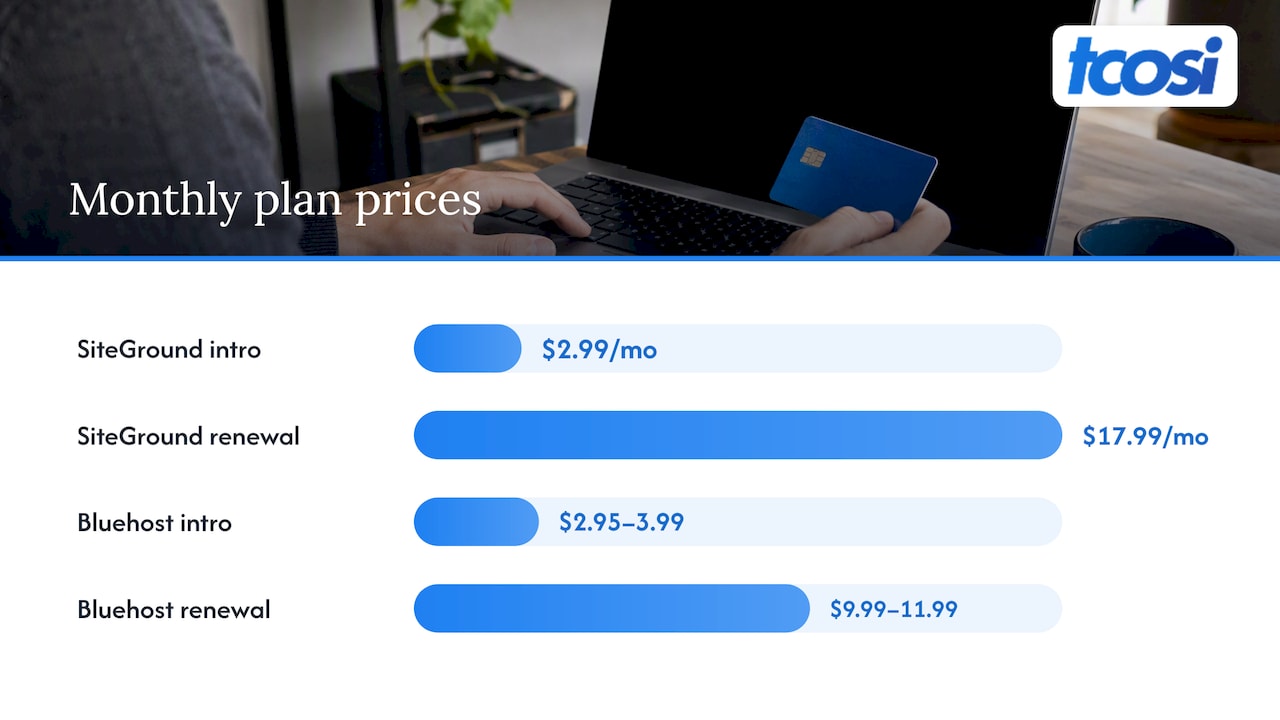
This is where most comparisons mislead. Both hosts use a deep intro discount to get you signed up. The renewal is the number to plan around.
- SiteGround: StartUp starts near $2.99/mo and renews near $17.99/mo, according to WPressBlog. That is a jump of roughly 5x to 7x.
- Bluehost: The entry plan starts near $2.95 to $3.99/mo and renews near $9.99 to $11.99/mo, about 2.5x the intro rate.
SimonHosting adds that SiteGround renews on a 12-month prepayment, while Bluehost tends toward longer terms with a flatter cost curve over three years.
One Reddit user described the sting in a thread about switching hosts, saying Bluehost cost about 40 euros in year one and then asked for 250 at renewal. Plans differ, so check your own cart. Still, it shows why you should read the renewal terms before you pay.
A worked three-year picture
Using the entry-plan figures above, a rough comparison looks like this. These are list prices, with no promo codes or longer prepay terms, so your actual bill will differ.
| Year 1 | Years 2 and 3 | |
|---|---|---|
| SiteGround StartUp (about $17.99/mo at renewal) | Intro rate | About $215.88 per year |
| Bluehost entry plan (about $11.99/mo at renewal, top of range) | Intro rate | About $143.88 per year |
The renewal annual figures are simple arithmetic: 12 times the monthly renewal price. Bluehost is cheaper by roughly $72 a year at the top of its quoted range. Whether that is worth slower pages and thinner support is the real question.
Where Cloudways fits
People searching this topic often add a third option. Cloudways is a managed cloud host, which means you rent resources on cloud servers instead of sharing a plan with many other sites. It is a different product from both SiteGround and Bluehost.
The pricing model is the big contrast. HostingStep’s test lists Cloudways DigitalOcean Standard at a flat $11.00 a month, with no renewal jump. It lists SiteGround StartUp at $3.99 a month, renewing at $17.99. By its three-year math, SiteGround is cheaper in year one and more expensive by month 36.
HostingGuider frames the choice well. SiteGround suits simple, all-included hosting with email and phone support. Cloudways wins once you need dedicated resources or your SiteGround renewal nears a cloud server’s price. It also advises that sites hitting CPU limits often should move to managed cloud earlier, rather than climbing to the top SiteGround tiers.
The tradeoff is that Cloudways is less hand-holding. You manage more yourself, and email is not bundled the way it is with SiteGround. That is why it tends to suit agencies, developers and growing sites, and less often a first-time site owner.
Which one should you pick?
Here is how I would sort it for the business owners I work with.
- Pick SiteGround if you run a lead-generation or service site, want fast pages and real WordPress help, and can budget for the renewal price from day one.
- Pick Bluehost if you are launching a first site on a very tight budget, want the simplest onboarding and a bundled domain, and accept slower performance and more variable support.
- Pick Cloudways if your traffic is growing, you hit resource limits, or you have a developer or agency managing the server side.
- Skip all three for now if your site is mostly static and tiny. Many hosts can handle that, and the bigger win is usually fixing the site itself.
Two checks before you buy anything:
- Open the checkout and find the renewal price and term. Write it down.
- Ask how migration works. Bluehost advertises one free migration, per Northiscale’s table, while SiteGround relies on a WordPress migrator plugin.
Our perspective: the host is one piece
We see hosting questions from clients almost every week, and our view is simple: the host sets the ceiling, but the site sets where you land under it. A fast server will not fix oversized images, a bloated theme or a pile of unused plugins. A slow host will hold back even a well-built site.
That is why we tell clients to fix the foundation first, then optimize. Our write-up on hosting and WordPress speed covers the order we work in. Image weight is usually the next biggest lever, which we cover in WordPress image optimization.
On the host choice itself, we lean toward paying a bit more for a platform with strong WordPress support, as long as you know the renewal price up front. The cheapest plan is rarely the cheapest outcome. If you manage a site for others, the calculation is different, and a cloud option with predictable pricing can be a better base.
We do not sell hosting. That keeps our advice clear of any commission, and it means we can work with whichever host you land on.
— Tommy Cosimano
Getting the site right once you have a host
Picking a host is a few hours of work. Building a site that earns its keep takes longer. If you want help with that, I design and develop custom WordPress sites for small businesses, nonprofits and agencies. The published website pricing starts with Essentials at $1,200, one-off, with Growth at $2,400 and Premium at $4,800. Ongoing Maintenance is $100 per month and covers keeping your site updated and secure.
If you are not sure where you stand, get in touch through tcosi and we can talk through your site and your hosting setup.
FAQ
Is SiteGround better than Bluehost for WordPress?
In most of the independent tests I reviewed, yes. SiteGround shows faster load times, higher uptime and better-rated support. Bluehost is easier on the first-year budget and renews for less. Pick based on whether performance or long-term cost matters more to your business.
Why is SiteGround so expensive?
The entry plan’s intro rate is low, but it renews around $17.99 a month, as WPressBlog reports. You are paying for Google Cloud infrastructure, custom caching and WordPress-trained support. If you want a flat monthly rate instead, a managed cloud host is the usual alternative.
What are the downsides of Bluehost?
The main ones are slower measured performance, slightly lower uptime in monitoring and support that reviewers describe as more scripted. Its strengths are a low entry price, a flatter cost curve over three years and beginner-friendly setup. For a basic personal site those downsides may not matter.
Should I choose Cloudways instead?
Choose Cloudways if your site is growing, you need dedicated resources or you have someone to manage the server. It has flat pricing instead of a renewal jump, but it asks more of you. For a small, steady business site that wants email and phone support included, SiteGround is usually simpler.
Sources
- SiteGround vs Bluehost: Speed Test & Pricing (2026), Northiscale
- Bluehost vs SiteGround 2026: Performance, Support, Pros & Cons, WPressBlog
- SiteGround vs Bluehost 2026: Which Host Wins?, SimonHosting
- SiteGround vs. Bluehost head-to-head comparison, SiteGround
- I switched from Bluehost to SiteGround, r/Hosting
- Cloudways vs SiteGround 2026: 10 Months of Test Data, HostingStep
- SiteGround vs Cloudways: When to Move From Shared to Cloud, HostingGuider
- Boost SEO and conversions with faster website speed