Most website projects take from a few weeks up to several months, with timing mostly depending on content readiness and speed of stakeholder approvals. Smaller brochure sites tend to complete on the shorter end, mid-size marketing sites usually take several weeks to months, ecommerce sites often require a few months, and complex or SaaS projects generally take the longest. Pick the sample timeline below that matches your project type, then build in buffers before you commit to a launch date.
TL;DR:
- Content delays and slow approvals are the main causes of schedule overruns, especially during content creation and migration phases.
- Development timelines vary significantly based on project complexity, from 2 to 8+ weeks for simple sites to over 24 weeks for complex SaaS platforms.
- Establishing a strict content freeze and clear sign-offs before starting development helps prevent schedule slips caused by late asset delivery.
- Building a detailed timeline with owners, milestones, and buffers, anchored to the kickoff date, ensures better project control and realistic expectations.
- Regular weekly reviews and sharing live project links help keep stakeholders aligned and allow for timely adjustments during the project.
Table of Contents
- Website Project Timeline Phases: What Happens and How Long Each Takes
- Sample Website Launch Timelines You Can Copy Into a Gantt
- What Should a Website Timeline Template Actually Include?
- Top-Down, Bottom-Up, or PERT: Which Estimation Method Fits?
- Pre-Launch Checklist and 30 to 90 Day Monitoring Plan
- A Real Project Timeline: What Actually Happened
- Scheduling Discipline Is What Actually Keeps a Timeline Honest
- Ready to Put a Timeline on Your Own Website Project?
- Sources
- FAQ
Website Project Timeline Phases: What Happens and How Long Each Takes
I break every project into eight phases. Some overlap, and a few can run in parallel if you plan them that way. Here’s what each one actually requires and how long it realistically takes.
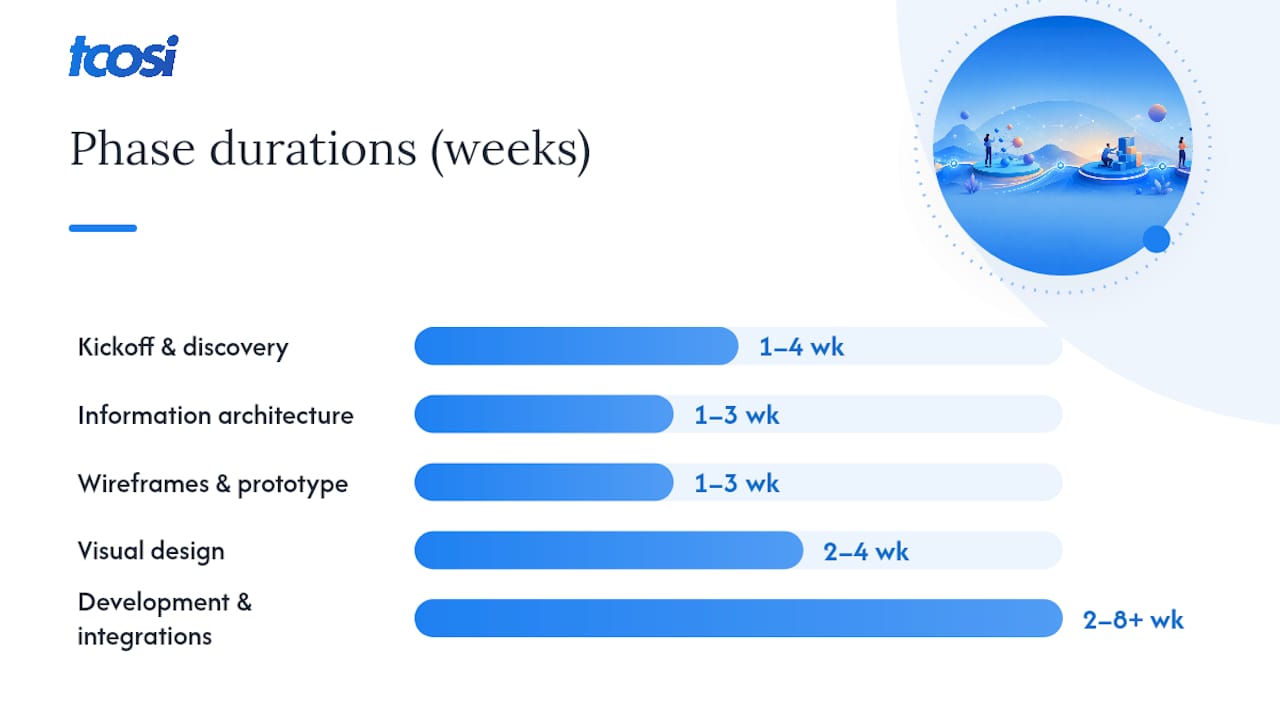
Kickoff and discovery (1 to 4 weeks). This is where I audit the existing site, pin down goals, and set KPIs with the client. Scope gets locked here, which matters because scope changes later are the number one killer of a clean schedule. Output: a written scope document, a goals list, and sign-off from whoever holds budget authority.
Information architecture and content planning (1 to 3 weeks). Sitemap, URL structure, and a content inventory get built here. This is also where I flag exactly which pages need net-new copy versus a light edit, because that decision drives the content phase later.
Wireframes and prototype (1 to 3 weeks). Low-fidelity layouts get validated before anyone touches color or typography. Sign-off at this stage is cheap. Sign-off after full visual design is expensive, because revisions mean redoing finished work.
Visual design (2 to 4 weeks). This includes the UI, a design system if the site needs one, and typically two to three rounds of revisions. I’ve found that clients who review design in one focused session, rather than piecemeal over email, cut a full week off this phase.
Content creation and migration. This is the phase most schedules quietly blow up. According to Ulement’s guide to web design timelines, missing content and slow approvals cause more delays than any coding challenge. Migrating existing content from page builders like Elementor or Divi tends to run slower than migrating clean HTML, since AIRA’s agency rebuild estimates show builder-specific markup adds real cleanup time. Run content work in parallel with design whenever you can, not after it.
Development and integrations (2 to 8+ weeks). CMS build, template coding, and any third-party API work (payment processors, booking tools, CRMs) happen here. Complexity is the swing factor. A brochure site with a contact form takes a fraction of the time an ecommerce build with inventory sync requires.
QA, accessibility, and SEO prep (1 to 2 weeks). Before launch, someone needs to build a redirect map, check metadata carried over correctly, and run accessibility spot checks across devices.
Launch and immediate post-launch (ongoing). The site goes live, then gets watched closely for the first several weeks.
- Kickoff and discovery: 1 to 4 weeks
- IA and content planning: 1 to 3 weeks
- Wireframes and prototype: 1 to 3 weeks
- Visual design: 2 to 4 weeks
- Content and migration: runs parallel, but often the longest pole
- Development and integrations: 2 to 8+ weeks
- QA, accessibility, SEO prep: 1 to 2 weeks
Pro Tip: Freeze content scope the same day you freeze design scope. If content is still “in progress” when development starts, it will bleed into every phase after it.
Sample Website Launch Timelines You Can Copy Into a Gantt
Here are four real-world shaped timelines. Adjust the week counts to your own scope, but keep the sequence and the parallel tracks intact.
- Small brochure site, 4 weeks. Week 1: discovery and sitemap. Week 2: wireframes and content drafting starts in parallel. Week 3: design and content finalize together. Week 4: build, QA, and launch. This only works if the client already has most copy and photos ready at kickoff.
- Medium marketing site, 8 to 12 weeks. Weeks 1 to 2: discovery and IA. Weeks 3 to 5: design while content writing runs in parallel on a separate track. Weeks 6 to 9: development. Weeks 10 to 12: QA, content loading, and launch. Repsona’s editable redesign template lays out this exact structure and lands a typical marketing redesign around three months.
- Ecommerce site, 10 to 16+ weeks. Add product catalog migration and payment gateway integration as their own tracks starting around week 4, running alongside design. Testing checkout flows and shipping rules typically eats 2 to 3 weeks on its own, separate from general QA.
- Complex or SaaS platform, 12 to 24+ weeks. These run in sprints rather than linear phases. Expect a discovery and technical architecture phase of 3 to 4 weeks, then 2-week development sprints with user acceptance testing (UAT) built into each cycle, plus a dedicated security review pass before launch.
| Project Type | Typical Duration | Biggest Time Risk |
|---|---|---|
| Small brochure site | 2 to 3 weeks | Content not ready at kickoff |
| Content-heavy business site | 6 to 10 weeks | Approval delays |
| Ecommerce | 10 to 16+ weeks | Product migration, payment testing |
| SaaS or complex platform | 12 to 24+ weeks | Integration scope, security review |
Duration ranges reflect typical patterns Ulement documents across site types; your actual timeline still depends on scope and how fast approvals move.
What Should a Website Timeline Template Actually Include?
Keep the structure simple: phases as swimlanes, tasks underneath each phase, an owner assigned to every task, milestones marked as diamonds, and a buffer row built into each phase rather than tacked on at the end. A timeline built this way becomes what one practitioner guide rightly calls the project’s single source of truth, meaning every new request gets measured against it instead of just getting squeezed in.
Anchor the whole timeline to your kickoff date, not a fixed calendar date, so shifts early on ripple forward accurately instead of creating a false sense of being behind.
- Keep a critical path view so everyone sees which tasks actually block launch by leveraging AI for Agencies productivity workflows to streamline coordination and reduce scheduling friction.
- Keep an owner view so nobody has to ask “whose task is this.”
- Keep an open tasks filter for weekly check-ins.
- Export a snapshot before every stakeholder review so approvals are tied to a specific version, not a moving target.
Pro Tip: Share the live timeline link, not a static screenshot, so stakeholders always see the current state rather than an outdated plan from three weeks ago.
Top-Down, Bottom-Up, or PERT: Which Estimation Method Fits?
Top-down estimating starts with a deadline and works backward, which works fine for fixed-date launches but tends to under-scope real work. Bottom-up estimating adds up every task’s individual estimate, which is more accurate but takes longer to build. PERT estimating splits the difference by weighting three guesses per task: optimistic, most likely, and pessimistic.
The PERT formula is (optimistic + 4 × most likely + pessimistic) ÷ 6. Say content writing could take 5 days optimistically, 8 most likely, and 15 in a worst case. That’s (5 + 32 + 15) ÷ 6, or about 8.7 days, a more honest number than just guessing “a week.”
Toggl’s project planning guidance recommends assigning a clear owner to every estimate and tracking actual time spent, since that history sharpens every future estimate you make.
- Add a 15 to 20% buffer per major phase, a figure commonly recommended by practitioner templates.
- Build catch-up days between milestones, not just at the very end of the project.
- Fold approval turnaround time directly into task estimates. A design that “takes 3 days” but sits with a client for a week is really an 10-day task.
Pre-Launch Checklist and 30 to 90 Day Monitoring Plan
Run through this sequence before flipping any site live:
- Build a full redirect map so old URLs point to their new equivalents.
- Confirm DNS and hosting are configured and staging matches production settings.
- Resubmit your XML sitemap and verify metadata carried over from the old site.
- Test every form, checkout flow, and third-party integration on staging.
- Run accessibility spot checks across major browsers and screen sizes.
- Push staging to production with a documented rollback plan in case something breaks.
- Announce the launch on a schedule that gives your team a window to fix anything urgent.
Post-launch, Codeable’s redesign guidance recommends watching Search Console, Core Web Vitals, and analytics for 30, 60, and 90 days after go-live, since ranking and performance issues often only surface once real traffic hits the new site. Assign one person to own this monitoring and log every issue in a shared tracker, not a scattered email thread. If you want a printable version of the full sequence, tcosi’s website launch checklist for small businesses walks through it step by step.
Pro Tip: Set your 30-day check for the same day of the week as launch. It makes it far easier to compare traffic and conversion numbers apples to apples.

A Real Project Timeline: What Actually Happened
One recent website redesign was scoped for 10 weeks: discovery, IA, and design in the first 5 weeks, development and content migration in weeks 6 through 8, QA and launch in weeks 9 and 10. Content readiness slipped the plan by nearly 2 weeks, mostly because staff photos and updated service copy arrived later than the content freeze date allowed.
- The buffer built into the development phase absorbed most of the delay without pushing the launch date.
- Weekly timeline reviews caught the content gap in week 4, not week 8, giving the client time to course-correct.
- Lesson: a hard content freeze date, enforced from week one, would have prevented the slip entirely.
Scheduling Discipline Is What Actually Keeps a Timeline Honest
Name who signs off on each phase, in writing, before kickoff. Enforce the content freeze date even when it’s uncomfortable. Migration and content are what push launches back, not code. Review the timeline together every week, and it stays a plan instead of becoming a guess.
— Tommy Cosimano
Ready to Put a Timeline on Your Own Website Project?
You’ve seen what a realistic timeline looks like phase by phase. Building one and holding to it is a different skill, and it’s the one tcosi handles for clients every week. Whether you need a custom WordPress build from scratch, a full website redesign, or ongoing support after launch, tcosi structures every proposal with named phases, owners, and buffers built in from day one, not added after something slips.

That means the schedule you agree to at kickoff is the schedule you should expect at launch, buffers and all, with weekly check-ins to keep it that way. If you’re ready to see what a real timeline looks like for your project, request a timeline estimate through tcosi’s contact page and get a phase-by-phase plan built around your actual scope, not a generic template.
Sources
- How to create a website project plan – Toggl Blog
- Website Redesign Timeline Template (Free, Editable) – Repsona
- Web Design Timeline: A Complete Guide to Project Planning – Ulement
- WordPress website redesign from audit to launch – Codeable
FAQ
What Are the 7 Stages of Web Development?
Most projects break into discovery, information architecture, wireframes, visual design, content creation, development, and QA/launch, though some teams count post-launch monitoring as an eighth stage.
How Do I Create a Website Project Timeline?
Start by breaking scope into phases, estimate each task using top-down, bottom-up, or PERT methods, assign an owner to every task, then build in a 15 to 20% buffer per phase before setting your launch date.
What Are the 7 C’s of Website Design?
Definitions vary across sources, so there’s no single agreed-upon list; rather than guess at one, focus on the phase-based structure covered above, which reliably predicts how long a build takes.
What Is a Project Timeline?
A project timeline is a visual schedule that maps phases, tasks, owners, and milestones against dates, giving everyone on the project a shared, current view of what’s due and when.
How Long Does a Typical Website Redesign Take?
Most marketing-site redesigns take 8 to 12 weeks, though a small brochure redesign can close in about 4 weeks and an ecommerce redesign often runs 10 to 16 weeks or more depending on migration scope.