A content audit for a website is a structured inventory plus evaluation that tells you which pages to keep, update, consolidate, or remove, and it ends with a prioritized action plan, not a spreadsheet that nobody opens again. Expect a small site to take about a week or two, and a larger site several weeks, phased by section. Pull data from GA4 and Google Search Console, score quality against a rubric, and you’ll walk away with 30/60/90 day actions tied to real owners.
TL;DR:
- Most content audits should be performed annually, with mini-audits for frequently updated sites or after major changes like a redesign or migration.
- Use crawl tools like Screaming Frog or Sitebulb to collect URL data, then join that with metrics from GA4 and Search Console for a comprehensive view.
- Score pages based on criteria like accuracy, depth, readability, brand fit, and E-E-A-T signals, adjusting scores relative to page type and content length.
- Divide scored pages into quartiles to decide whether to keep, update, consolidate, or remove, prioritizing quick wins like metadata fixes first.
- Address technical issues such as broken links, redirect chains, and indexability before making content updates to ensure ranking improvements.
Table of Contents
- What Is a Content Audit for a Website, and Why Does It Matter?
- When Should You Run a Website Content Audit?
- How Do You Build a Content Inventory and Collect Metrics?
- How Do You Score Content Quality Fairly Across Page Types?
- How Do You Turn Audit Scores Into Keep, Update, or Remove Decisions?
- What Technical Checks Belong in a Content Audit?
- Which Tools and Templates Should You Use for an Audit?
- How Do You Turn Audit Findings Into a 30/60/90 Plan?
- Practical Lessons From Running Content Audits on Small Teams
- What Does a Content Audit Look Like Before and After?
- The Part of a Content Audit Most Guides Skip
- How tcosi Can Help You Act on Audit Findings
- Where to Go Deeper on Content Auditing
- Sources
- FAQ
What Is a Content Audit for a Website, and Why Does It Matter?
A content inventory and a content audit are not the same thing, and mixing them up is the fastest way to stall a project. An inventory catalogs what exists: URLs, titles, page type, publish date. A content audit goes further and evaluates each page against performance and quality standards, then assigns a verdict. Most teams build both in one spreadsheet, since the inventory columns feed directly into the audit columns.
Why bother? Three business reasons show up again and again:
- Traffic and conversions. Pages that used to rank slip quietly, and nobody notices until revenue drops.
- Brand accuracy. Old pricing, discontinued services, and outdated screenshots erode trust fast.
- AI visibility. Thin or duplicate pages confuse both search crawlers and AI answer engines that summarize your site.
Before you touch a spreadsheet, define what success looks like. That might be a notable lift in organic sessions to a content hub, a measurable click-through-rate improvement on your highest-impression pages, or simply retiring many outdated blog posts that no longer reflect your services. Write the goal down first. An audit without a target metric turns into an academic exercise, and academic exercises don’t get funded twice.
When Should You Run a Website Content Audit?
Most audits get triggered by an event rather than a calendar reminder. Common triggers include a site redesign, a CMS migration, a sudden traffic decline, or the passage of significant time since the last review.
Scope depends on site size and risk tolerance:
- Full-site audits fit smaller sites (under a few hundred URLs) or sites facing a redesign, where every page needs a keep/update/remove decision.
- Phased audits work better for large sites. Break the work by subfolder or content type so crawlers and reviewers don’t choke on incomplete data sets.
- Focused mini-audits suit top-performing sections, like a blog or resource library, when you only need to sharpen what’s already working.
A reasonable cadence is to perform one full audit annually, with periodic mini-audits for high-output sites publishing new content frequently. If your organic sessions dropped after a migration, don’t wait for the calendar. Audit now, and check how technical SEO issues might be compounding the problem.
How Do You Build a Content Inventory and Collect Metrics?
Start with a crawl. Tools like Screaming Frog or Sitebulb will pull every indexable URL on the site, along with title tags, meta descriptions, word counts, and status codes. Export that crawl, then pull a parallel export from your CMS to catch anything the crawler missed, like orphaned pages with no internal links pointing to them. Deduplicate by canonical URL so you’re not scoring the same page twice under two different parameters.
Here’s the practical sequence:
- Run the crawl and export to CSV.
- Export your CMS content list (author, publish date, category).
- Pull GA4 organic sessions and engagement metrics for each URL.
- Pull Google Search Console impressions, clicks, average position, and CTR.
- Add backlink counts from a tool like Ahrefs or Semrush.
- Join everything into one master sheet, matched by URL path.
Essential columns for that master sheet: URL, HTTP status, impressions, clicks, sessions, average position, CTR, backlink count, word count, and last-updated date. That last column matters more than people think. A page updated three years ago competing against fresh competitor content is rarely an accident when it underperforms.
Watch for two common pitfalls. Parameterized URLs (like tracking tags or filtered category pages) can inflate your row count and split metrics across duplicates that should be one page. Paginated series (page 2, page 3 of a blog archive) often need to be grouped and evaluated together rather than individually.
Pro Tip: Match URLs by stripping query parameters before you join your crawl data to your GSC export. Skip this step and you’ll spend an afternoon chasing “duplicate” rows that are actually the same page with three different tracking tags.
How Do You Score Content Quality Fairly Across Page Types?
Comparing a 3,000-word guide to a 400-word service page on raw metrics alone isn’t fair to either one. You need a rubric that scores quality independent of length or format, then a normalization step that puts every page on the same scale.
Build your qualitative checklist around five criteria:
- Accuracy — is the information still true today?
- Depth — does it actually answer the question, or skim the surface?
- Readability — can a real visitor get through it without fighting the prose?
- Visual and brand fit — does it match current design and messaging standards?
- E-E-A-T signals — experience, expertise, authority, and trust cues like author bylines and citations.
Score each criterion on a simple 1 to 5 scale, then normalize. One workable method: convert each page’s raw metrics (sessions, backlinks, CTR) into percentiles relative to the rest of the content set, then apply weights. Multiply, sum, and you get one total score per URL that a spreadsheet can sort.
Analysis paralysis kills more audits than bad data does. For low-value pages, like thin blog posts under 300 words with zero traffic, use a sample process instead of scoring every single one individually. Pull ten, apply the pattern to the rest, and move on.
Pro Tip: Delegate subject-matter checks to whoever actually knows the topic. A marketer can spot a broken link, but only your lead technician can tell you if that “how it works” page is describing a process you retired two years ago.
How Do You Turn Audit Scores Into Keep, Update, or Remove Decisions?
Quartiles make this simple. Split your scored pages into four groups and map each to a default action:
- Top quartile: keep as-is, maybe promote internally with more links.
- Second quartile: update. Refresh dates, add depth, tighten the intro.
- Third quartile: consolidate. Merge two thin, overlapping pages into one stronger one.
- Bottom quartile: remove or noindex, depending on backlink risk.
Layer an impact-versus-effort view on top of the quartiles. A high-impression, low-CTR page sitting on page one of Google is a quick win. A rewrite a title tag, tighten a meta description, and you can see movement within weeks. Save the heavy rewrites and full page merges for the second and third months of your plan, once the quick wins are shipped and you have momentum.
Never delete a page with inbound backlinks without redirecting it. That backlink equity took time to earn, and a hard 404 throws it away permanently. When you’re not sure whether a page still serves a purpose, noindex it and watch performance for a month before committing to deletion. Consolidation candidates almost always need a 301 redirect pointed from the losing URL to the surviving one.
What Technical Checks Belong in a Content Audit?
Content decisions made on top of broken technical foundations tend to fail quietly. Before you approve any update, run these checks:
- Indexability: confirm the page isn’t accidentally blocked by robots.txt or a stray noindex tag.
- Status codes: flag any 4xx or 5xx responses hiding in your crawl.
- Canonical tags: verify they point where you think they do, especially after a migration.
- Redirect chains: a page that redirects three times before landing is a page losing authority at every hop.
- Broken links: internal and outbound links that 404 hurt user trust and crawl efficiency alike.
- Core Web Vitals: a slow-loading page can suppress content gains no matter how good the writing is.
For sites built with heavy client-side rendering, standard crawlers can miss dynamically injected content entirely. Configure your crawler to render JavaScript, and cross-check with Google Search Console’s URL Inspection tool to see exactly what Google’s own renderer sees. A robust audit pairs content evaluation with these technical checks, because a beautifully rewritten page still won’t rank if it’s stuck behind a redirect chain or a rendering gap.
Which Tools and Templates Should You Use for an Audit?
You don’t need a dozen subscriptions to run a solid audit. Four tool categories cover almost everything:
- Crawling: Screaming Frog or Sitebulb for technical inventory.
- Analytics: GA4 for sessions, engagement, and conversions.
- Search performance: Google Search Console for impressions, clicks, and position.
- Backlink data: Ahrefs or Semrush for authority signals.
For the spreadsheet itself, the AMA’s Website and SEO Content Audit Template is worth starting from. It keeps SEO metrics and content-quality fields on separate tabs so a reviewer scoring readability isn’t scrolling past twelve columns of impression data.
| Column category | Example fields | Why it matters |
|---|---|---|
| Identification | URL, title, page type, owner | Ties every decision to a real person |
| Performance | Sessions, clicks, CTR, position, backlinks | Grounds decisions in real traffic |
| Quality | Accuracy score, depth score, E-E-A-T notes | Captures what metrics alone miss |
| Action | Decision, priority, redirect target, review date | Makes the audit executable |
Automate what you can. Scheduled exports from GA4 and GSC, or a direct API pull, keep your master sheet current without manual re-downloads every quarter. Keep one “last updated” field synced across the whole tracker so nobody is working from a stale version.
How Do You Turn Audit Findings Into a 30/60/90 Plan?
Findings that sit in a spreadsheet don’t move traffic. A phased plan does.
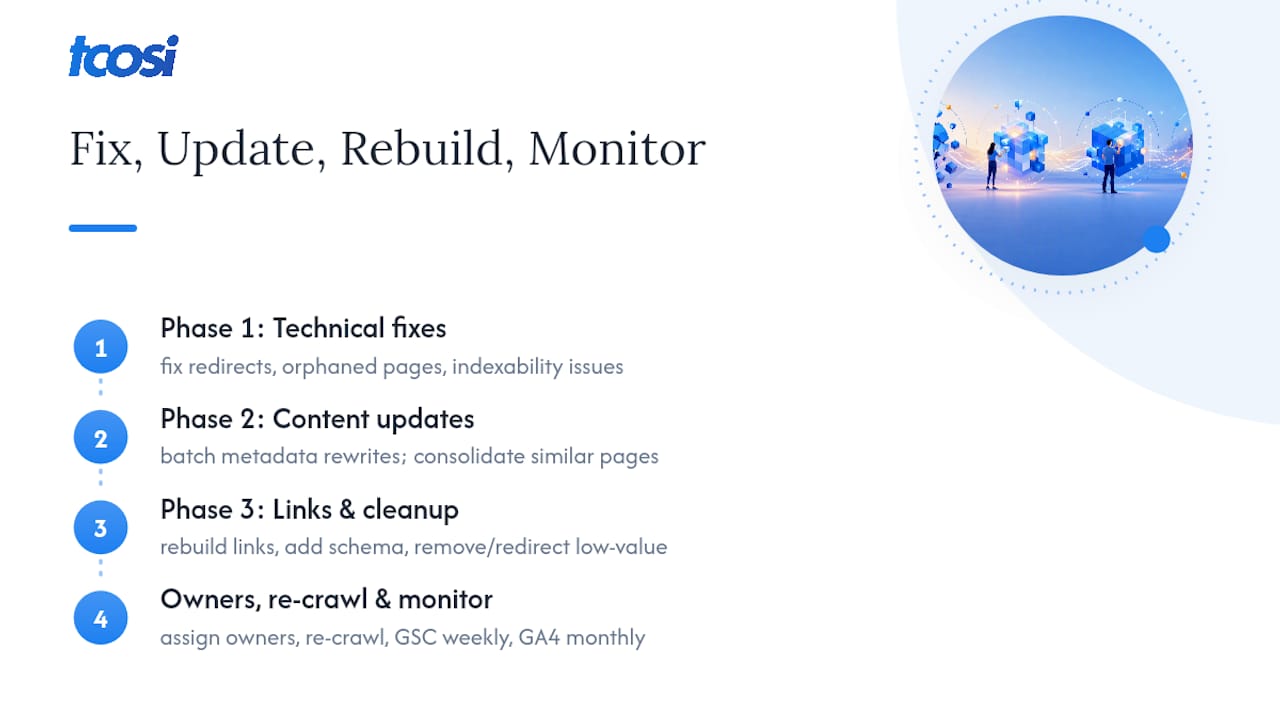
Begin by promptly fixing technical blockers such as broken redirects, orphaned pages, and indexability issues, as these are prerequisites for everything else.
Next, update and consolidate content, batching similar fixes, like metadata rewrites on groups of product pages, rather than tackling them one at a time.
Finally, rebuild internal links and schema markup for updated pages, then remove or redirect the pages identified as least valuable in your audit.
Assign an owner to each task, not just each phase. After implementation, re-crawl the site to confirm redirects resolve correctly and nothing new broke. A stepwise audit process that ends in monitoring is what separates a useful audit from a one-time report. Track GSC impressions and clicks weekly for the first month, then move to monthly GA4 engagement reviews. Most content changes take four to eight weeks to show measurable movement in search, so resist judging results too early.
Practical Lessons From Running Content Audits on Small Teams
Small teams don’t have the headcount to score five hundred pages by committee, so phase the work and assign clear owners at each stage. I’ve found the audits that actually finish are the ones scoped tightly from day one, not the ones trying to be exhaustive.
A few habits that make the difference:
- Prioritize backlinked pages first. That’s where lost equity does the most damage if handled wrong.
- Batch metadata fixes in groups of ten to twenty rather than one-off edits scattered across weeks.
- Keep a running implementation log next to your audit sheet, so six months later you can see exactly what changed and when.
- Get stakeholder signoff at the decision stage, before implementation starts, not after pages are already live.
What Does a Content Audit Look Like Before and After?
Picture a regional service business with 180 blog posts published over six years, half of them thin how-to articles under 400 words with zero backlinks and near-zero traffic. Before the audit, their organic sessions had been flat for eighteen months, and nobody could say why.
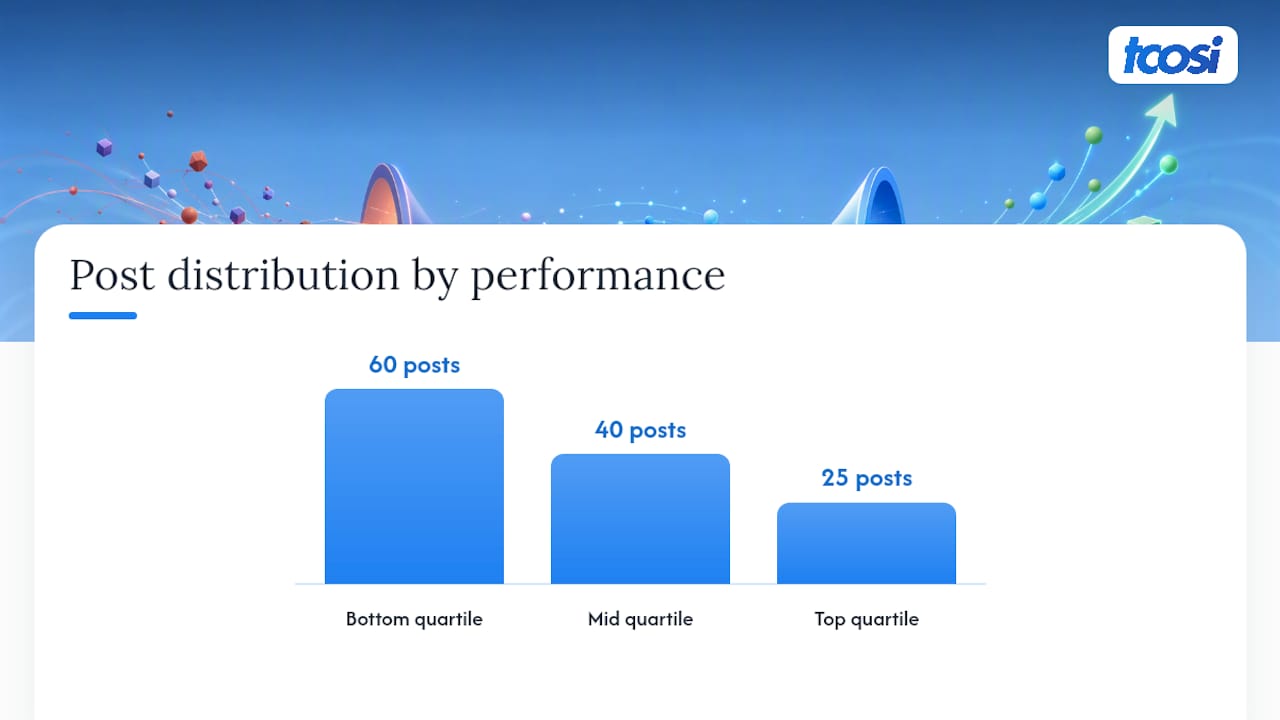
The audit surfaced the pattern fast once metrics were joined into one sheet. Roughly 60 posts sat in the bottom quartile: low impressions, low CTR, no backlinks, no internal links pointing to them. Another 40 were mid-quartile, ranking on page two of Google for decent keywords but held back by thin content and outdated statistics. The top quartile, about 25 posts, was already driving most of the site’s organic traffic and just needed minor internal-linking cleanup.
The resulting plan consolidated the 60 weakest posts into eight comprehensive guides, redirected the old URLs, and rewrote titles and intros on the 40 mid-tier posts to target the exact queries showing up in Search Console impression data. Technical fixes came first: a batch of broken internal links and two redirect chains left over from a prior migration.
Within three months, impressions on the updated posts climbed noticeably and several previously stalled pages moved from page two to page one. The lesson isn’t that consolidation is magic. It’s that the audit told them exactly where 60 posts of dead weight were sitting, and gave them a defensible reason to act instead of guessing.
The Part of a Content Audit Most Guides Skip
Most advice on this topic treats a content audit like a one-time cleanup project: run it, fix a batch of pages, move on. That undersells what a good audit actually does, which is build a repeatable decision system you can run again next quarter without starting from scratch.
The conventional wisdom also overweights the crawl and underweights the rubric. Anyone can export a thousand URLs from Screaming Frog. The harder, more valuable work is building a scoring model that a marketer, a designer, and a subject-matter expert can all apply consistently, so the “keep or remove” call doesn’t depend on whoever happens to review the page that day.
If you’re starting from zero, don’t try to score every page with equal rigor. Triage first. Find your bottom quartile fast using traffic and backlink data alone, apply a light-touch decision there, then spend your real scoring effort on the middle two quartiles, where the judgment calls actually matter. That’s where a good rubric earns its keep, not on the pages that were obviously never going to perform.
— Tommy Cosimano
How tcosi Can Help You Act on Audit Findings
Running the audit is half the job. Implementing it, correctly, without breaking redirects or losing rankings, is where a lot of in-house teams stall out. Experienced website design and development agencies can build the inventory spreadsheet, apply the scoring rubric, and execute the resulting 30/60/90 plan directly on your WordPress site, so the audit doesn’t just sit in a shared drive collecting dust.

Typical engagements start with a master spreadsheet covering every URL, quantitative and qualitative scores, and a clear keep/update/consolidate/remove call on each one. From there, tcosi handles the implementation sprint: redirects mapped correctly, metadata rewritten in batches, and internal links rebuilt so the pages you’re keeping actually support each other. Ongoing monitoring catches anything that slips after launch.
If your site needs more than a content refresh, maybe the structure itself is holding you back, a full redesign might be the better next step, and the audit findings become your blueprint for what the new site needs to fix. Either way, the next move is simple: request an audit consult and get a real plan instead of a pile of exported spreadsheets.
Where to Go Deeper on Content Auditing
A few sources are worth bookmarking if you’re building this process for the first time:
- Content Inventory and Auditing 101, for a clear breakdown of inventory versus audit and recommended spreadsheet fields.
- The AMA Website and SEO Content Audit Template, a ready-made spreadsheet combining SEO and quality tabs.
- Semrush’s content audit guide, useful for technical check lists and tool recommendations.
- Timothy Prestianni’s step-by-step audit process, which walks through goal setting, metrics, and a 30/60/90 implementation plan.
Sources
- Content Inventory and Auditing 101
- Website and SEO Content Audit Template — American Marketing Association
- How to do a website content audit in 2026 (with template) — Semrush
- Website Content Audit: Step-by-Step Process, Template & AI Checklist (2026) | Timothy Prestianni Consulting
FAQ
How Much Should a Website Audit Cost?
Cost depends heavily on site size and scope. A DIY audit using free tools like GA4 and Google Search Console costs only your time, while hiring an agency for a full content and technical audit on a mid-size site typically runs into the low thousands of dollars, scaling with page count and depth of the scoring process.
Can ChatGPT Do an SEO Audit?
AI tools like ChatGPT can help draft metadata or summarize page content, but they can’t run a full audit alone because they don’t have native access to your live GA4, Search Console, or backlink data. Treat AI as a drafting assistant inside the process, not a replacement for pulling real analytics.
How Can I Audit My Website’s Content?
Start by crawling the site with a tool like Screaming Frog, join that data with GA4 and Search Console metrics, then score each page against a quality rubric covering accuracy, depth, and E-E-A-T signals before assigning a keep, update, consolidate, or remove decision.
What Is the Purpose of a Content Audit?
A content audit exists to tell you, with evidence rather than guesswork, which pages are helping your site and which ones are quietly holding it back, and to produce a prioritized plan for fixing the gap.
How Often Should I Run a Content Audit?
Most sites benefit from one full audit annually, with quarterly mini-audits for high-output sites that publish new content weekly, plus an unscheduled audit any time you see a traffic decline or plan a redesign.