Astra is the safer pick if you want a huge library of ready-made starter sites and the freedom to use almost any page builder. Kadence is the better pick if you want to build with native WordPress blocks and get a full header and footer builder without paying. GeneratePress is the one to look at if raw speed and a lean, developer-friendly build matter most. All three are solid, and the right one depends on how you will build and maintain your site.
I built this comparison for business owners, not theme hobbyists. I’ll cover what each theme does, how they test on speed, what they cost in the US today, and what to check before you switch from one to another.
TL;DR
- Astra: the widest range of starter templates and builder support. Pro starts at $69 a year, with a $249 one-time option.
- Kadence: built around WordPress blocks, with a free header and footer builder. Paid plans run $99 to $499 a year.
- GeneratePress: the lightest of the three in most speed tests, with a modular approach that suits people who like to assemble their own toolkit.
- Speed: all three score well. Differences are small, and your hosting, images and plugins will matter more than the theme.
- Switching: content usually survives a theme change, but layout settings, menus and custom CSS often need rebuilding. Always test on staging first.
Table of Contents
- The quick answer: how the three themes differ
- Astra in plain terms
- Kadence in plain terms
- GeneratePress: the third name in the search
- Which one is faster?
- What each theme costs in the US
- Which theme fits which kind of business?
- What I’d weigh before choosing
- Switching from Astra to Kadence or GeneratePress
- How I can help with the decision
- FAQ
- Sources
The quick answer: how the three themes differ
The simplest way to think about it: Astra is the broadest, Kadence is the most block-focused, and GeneratePress is the leanest. One comparison of the three business themes sums it up the same way: Astra for builder compatibility and starter designs, Kadence for teams building around WordPress blocks, and GeneratePress for people who want a deliberately selected toolkit.
Here is the side-by-side view.
| Astra | Kadence | GeneratePress | |
|---|---|---|---|
| Best known for | Starter templates, builder flexibility | Block-based design, free header/footer builder | Speed, modular build |
| Free version | Yes | Yes | Yes |
| Paid entry price | $69/year (Astra Pro) | $99/year (Essentials) | $99/year (GeneratePress One, one site) |
| One-time option | $249 for Astra Pro | Lifetime plans listed by third parties | $596 once, up to 100 sites |
| Starter templates | 300+ across builders | 200+ with Essentials | 80+ starter sites |
| Page builder approach | Works with Elementor, Gutenberg, Beaver Builder, Brizy | Gutenberg-focused | Block-focused with GenerateBlocks |
Prices come from the vendors and recent comparisons, listed in the pricing section below. Check each vendor’s page before you buy, because plans change.
Astra in plain terms
Astra is made by Brainstorm Force and has been installed more than a million times. Its WordPress.org listing shows over 1 million active installs and a 4.9-star rating. It was also the first non-default WordPress theme to pass a million active installs, and it is builder-agnostic, meaning it works cleanly with Elementor, Gutenberg, Beaver Builder and Brizy.
Why that matters to you: if your site was built in Elementor, or you expect a future designer to use a particular builder, Astra rarely forces a change. It is also generous with starting points. Astra’s own site lists Starter Templates (300+), Astra Free, Astra Pro and the Spectra page builder plugin.
Astra also leans on the Customizer. One comparison with GeneratePress notes that Astra offers more built-in design options, which reduces the need for custom CSS on typical business sites.
The flip side is feature density. Astra adds modules over time, so it pays to switch off the ones you don’t use to keep pages quick. That is a five-minute job when someone knows where to look.
Kadence in plain terms
Kadence has grown from a theme into an ecosystem. Kadence describes itself as a site builder platform combining a premium theme, page builder, WooCommerce tools, security, backups and memberships, and says it has powered 600,000+ websites. The free theme on WordPress.org has 500,000+ active installations and a 4.9-star rating, and includes a drag-and-drop header and footer builder, global font and color controls and starter templates.
The free header and footer builder is the headline feature. According to WPSchool’s comparison, Kadence offers a robust header and footer builder in its free version, something often locked behind premium tiers elsewhere. That comparison also counts 40+ mainly Gutenberg-focused templates in the free theme, against Astra’s 180+ starter demos.
If you like editing pages with native blocks and want colors and fonts to follow you across the whole site from one set of global settings, Kadence is a comfortable fit. For stores, Kadence’s Shop Kit adds WooCommerce extras. Its Pro plan is listed with Security, Backups, Shop Kit and Memberships.
GeneratePress: the third name in the search
Many people searching for Kadence or Astra also search for GeneratePress, so it belongs here. GeneratePress is founder-owned, with no investors, since 2014, and reports 11 million+ downloads on WordPress.org and 120,000+ customers.
Its free theme includes the core theme, Container, Grid, Headline, Text, Button, Image, Shape and Query blocks, 80+ starter sites, header, footer and template building through Elements, WooCommerce styling and blog layouts. The paid GeneratePress One adds GeneratePress AI, design tokens, custom breakpoints, forms, popups and 200+ patterns.
The comparison with Astra comes down to this: Astra is more feature-dense by default, while GeneratePress takes a modular, developer-friendly approach with minimal front-end overhead. If you want to click through lots of ready-made options, Astra feels easier. If you or your developer prefer to add only what’s needed, GeneratePress feels cleaner.
Which one is faster?
All three are fast. The honest answer is that GeneratePress usually wins on paper, Kadence and Astra trade places, and the gap is small enough that most visitors would never notice it.
Here is what several independent tests found.
| Test | GeneratePress | Kadence | Astra |
|---|---|---|---|
| WP Glossy (GTmetrix): LCP | 503 ms | 719 ms | 807 ms |
| WP Glossy: requests | 9 | 15 | 12 |
| WP Symposium (throttled mobile): LCP | 1.06 s | 1.36 s | 1.21 s |
| WP Symposium: data transferred | 51.0 KB | 70.3 KB | 68.4 KB |
A few things stand out. In the WP Glossy test, GeneratePress and Kadence both scored 100% on GTmetrix and Astra scored 99%. That test ran on Cloudways hosting with PHP 8.3 and no CDN, caching or image optimization plugins. In the WP Symposium test, all three scored 100 on Lighthouse mobile for both homepage and a blog post.
The order also changed between tests. Kadence was slightly lighter than Astra in one and slightly slower in the other. WP Symposium found Kadence light on the homepage at 70 KB but heavier on a blog post, at 91 KB and 16 requests, because its related posts feature loads a carousel script and styles. That is a setting you can adjust with the right know-how.
What do I take from this? Test conditions drive results: the hosting, the PHP version, whether a starter template is loaded, and what plugins are active. A clean test site is not your site. Once you add real photos, a form plugin, analytics and a chat widget, the theme is a small part of the total weight.
If page speed is a priority for you, and it should be since it affects search visibility and how your site feels on a phone, put your effort into hosting, image sizing and caching first. I cover the practical side in our guide to performance-first technical SEO for WordPress, and in the guide to rolling out WebP images safely.
What each theme costs in the US
All three have a free version that is good enough to launch a simple site. The paid plans add features, support and updates. Here are current prices as published by the vendors and recent comparisons.
Kadence (per Kadence’s pricing):
- Essentials: $99 a year, with the theme, 30+ blocks and 200+ starter templates
- Pro: $299 a year, adding Security, Backups, Shop Kit for WooCommerce and Memberships
- Elite: $499 a year, adding Kadence Central multi-site management, white labeling and A/B testing
GeneratePress One (per GeneratePress pricing):
- $99 a year for one site, $149 a year for up to 10 sites, $199 a year for up to 100 sites, or $596 once for up to 100 sites
- Includes GP Premium, GenerateBlocks Pro, GenerateCloud, GeneratePress AI and priority email support, with a 30-day refund policy
Astra (per WP Symposium’s October 2026 test):
- Astra Pro: $69 a year or $249 one time
Astra also sells bundles with extras. Compare the current bundle contents on Astra’s own site before you decide, because they change more often than the base theme.
One practical point: the theme license is the small cost. A professionally built site has design, content, SEO setup and ongoing care on top. For context, my own published pricing starts with a Base Website at $875 and packages from $1,200, and ongoing maintenance is $100 a month. For a wider view of what upkeep costs, see our breakdown of website maintenance costs for US small businesses.

Which theme fits which kind of business?
A local service business or professional firm
You need a clear site, fast pages, a contact form and local search basics. Any of the three will do the job. Astra’s large template library gives you a quick starting layout. Kadence gives you tidy global styling so every page matches your brand. The better question is who will maintain it and how.
A startup launching a brand
You will probably change your design several times in the first year. Kadence’s global color and typography controls make site-wide updates easy. One agency write-up says those controls can help teams deliver client work faster. Astra’s builder flexibility helps if a marketer wants to use a visual builder they already know.
An online store
Both Kadence and Astra support WooCommerce. Kadence’s Pro plan adds Shop Kit features like custom product layouts, variation swatches and custom checkout fields. Astra has its own store-focused options. Think about what your checkout needs before comparing prices.
An agency building for clients
This is where license terms matter. GeneratePress One covers up to 100 sites at $199 a year, and Kadence Elite adds white labeling at $499 a year. If you are an agency that needs extra development capacity, I also do white-label WordPress development.
What I’d weigh before choosing
I’d skip the feature checklists and ask five plain questions:
- How will pages be edited? Native blocks point to Kadence or GeneratePress. A visual builder like Elementor points to Astra.
- Who will maintain it? If it is you, favor the one whose settings feel clear. If it is a developer, favor whichever they know well.
- Do you need a store, memberships or multi-site work? Check the paid tier that includes those features, not just the free theme.
- How many sites will use the license? One site and ten sites price very differently.
- What will you do with the design in a year? A theme should still suit the site after you add content and services.
Perspective: pick the theme last
Most business owners start by asking which theme is best. We think that is the second question. The first is what your website has to do for the business: bring in calls, book appointments, sell products, or give credibility to people who found you through a referral.
Once that is clear, the theme choice is usually easy. Astra, Kadence and GeneratePress are all well-made and all keep content in standard WordPress, so you are not locked into a decision forever. What damages a site is rarely the theme. It is a messy structure, slow images, no backups, unclear page goals and nobody looking after updates.
That is why we focus on the gap between business owners and the technical side of the web. We explain the choices in plain language, work with you on what matters, and build something made to last and support real growth. If you want a second opinion on a theme, a redesign or a switch, I am glad to talk it through.
Tommy Cosimano
Switching from Astra to Kadence or GeneratePress
The good news is that switching is usually less scary than people think. PressLayouts explains that because these themes lean on the native block editor, content is standard HTML rather than proprietary shortcodes, so moving from Astra to Kadence doesn’t break your content. WPSchool agrees that content stays intact and only theme-specific settings, such as the header, footer and global styles, need to be rebuilt.
What does not carry over is the part that sits in the old theme. WordPress.com’s support documentation warns that after a theme change your homepage may get the new theme’s default layout, menus may need reassigning, custom CSS does not transfer because it is theme-specific, and sidebar or footer widget areas can stop appearing when you move to a block theme. A critical error after a switch usually points to a conflict between the new theme and a plugin or customization.
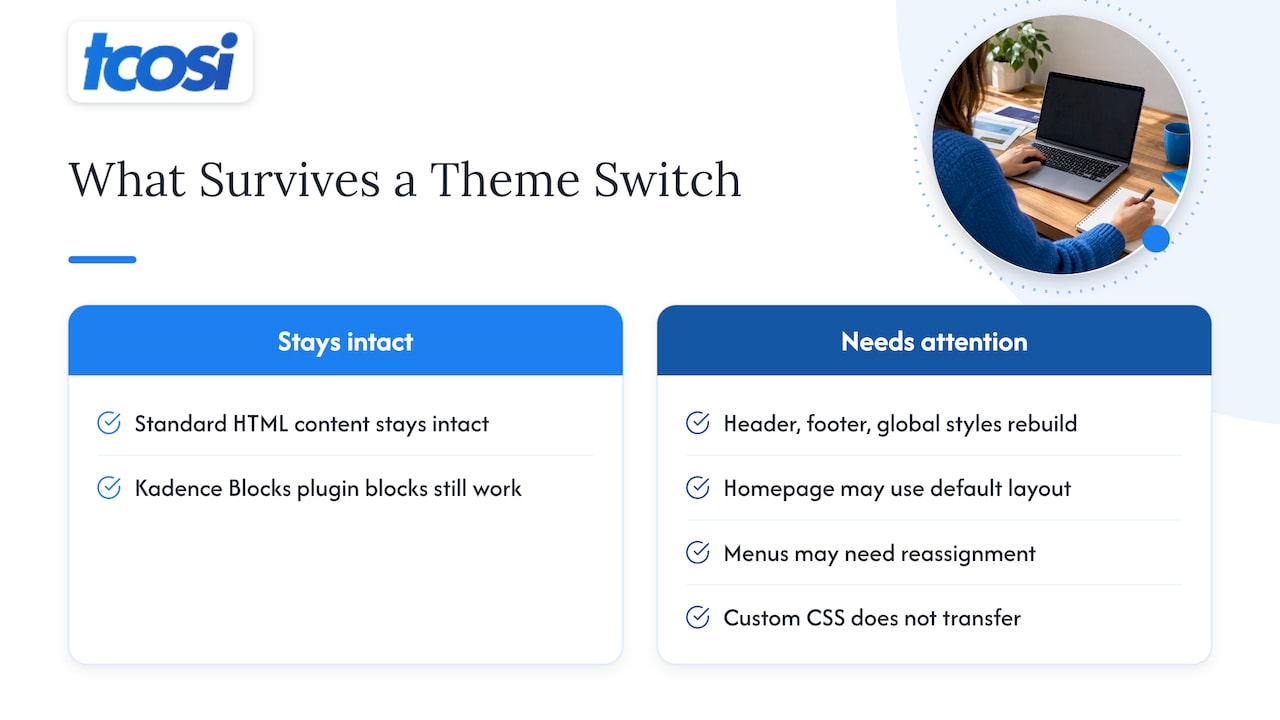
GeneratePress’s own forum gives the same picture for Astra. In a staff answer on moving from Astra to GeneratePress, Astra layout settings may stop working, sections made with Astra may need to be recreated, and blocks made with the Kadence Blocks plugin should still work. The advice there is to test on a staging site first.
A safe switching checklist
- Back up everything. Keep a full copy of files and database. I explain how in our WordPress backup strategy.
- Build a staging copy. Do the switch there, not on your live site. Here is how to set up a WordPress staging site.
- Audit custom code. Jetpack’s guide advises checking functions.php and theme options for custom PHP and CSS, and noting any built-in page builders, custom post types and shortcodes your old theme supplied.
- Save your tracking. Copy Google Analytics and any ad pixels, and snapshot widget areas.
- Take a speed baseline. Run PageSpeed Insights or GTmetrix before and after.
- Protect search visibility. If URLs or page structure will change, use our SEO migration checklist. A broader website audit checklist is also handy for catching technical problems before launch.
- Review every key page. Check the homepage, contact form, menus, mobile view and checkout if you sell online, then go live.
If you manage several client sites, try the new theme on a single site first, then standardize the process before rolling it out further.
How I can help with the decision
If you are comparing themes because you are planning a new site or a redesign, you don’t have to settle this alone. I build custom WordPress websites for small businesses, startups, nonprofits, professional firms and agencies across the US, and I keep the process clear so you understand each decision.
My packages are published openly: Essentials at $1,200, Growth at $2,400 and Premium at $4,800, with add-ons like SEO Setup at $375, a Style Guide at $300 and Wireframes at $175. See the details on the website pricing page.

Already have a site and just want it looked after? Ongoing Maintenance, Content Updates and Plugin & Security Management are each $100 a month. If you are thinking about a bigger change, start with our redesign playbook, or get in touch through tcosi.com and tell me what your site needs to do.
FAQ
Is Kadence better than Astra?
Neither is better for everyone. Kadence suits people who want to build with WordPress blocks and use a free header and footer builder. Astra suits people who want the biggest template library and flexibility with page builders like Elementor.
Is Astra or GeneratePress better?
Astra is more feature-rich out of the box, with more design controls in the Customizer. GeneratePress is more lightweight and modular. In most speed tests GeneratePress comes out slightly ahead, but all three score well.
Will I lose my content if I switch from Astra to Kadence?
Your posts and pages should stay intact because these themes use standard WordPress content. What you may need to rebuild is the header, footer, global styles, menus and any custom CSS. Do the switch on a staging copy with a fresh backup first.
Is the free version enough for a business website?
For a simple site, often yes. Each theme’s free version covers the basics, and Kadence even includes a header and footer builder. Paid plans make sense when you need extras such as WooCommerce features, security tools, or more starter templates.
Does the theme decide how fast my site is?
It contributes, but it is rarely the biggest factor. Hosting, image sizes, caching and plugins usually have more effect on real-world speed than the difference between these three themes.
Sources
- Astra on WordPress.org
- Astra
- Kadence on WordPress.org
- Kadence WP
- GeneratePress
- GeneratePress One pricing
- Business WordPress Themes: Astra vs Kadence vs GeneratePress
- Kadence vs Astra (2026), WPSchool
- Kadence vs GeneratePress vs Blocksy vs Astra, Responsive Miracle
- Astra vs GeneratePress vs Kadence Speed Tests, WP Glossy
- Fastest WordPress Theme 2026, WP Symposium
- Astra vs GeneratePress 2026, PluginTheme.net
- Astra vs Kadence, DigiPixInc
- Multipurpose vs. Framework Themes, PressLayouts
- Change your WordPress theme, WordPress.com Support
- Astra to GeneratePress: what happens to Astra templates and blocks
- How to Change WordPress Themes Without Losing Content, Jetpack