Motion design is defined as the practice of using purposeful animation to communicate interface changes, guide user attention, and improve how people understand and interact with a website. This is different from decorative animation, which adds visual flair without serving a function. The role of motion design in websites is fundamentally about usability. When a button pulses to confirm a click, when a menu slides in to show hierarchy, or when a loading bar tells you something is happening, that is motion design doing its job. This guide covers why it matters, how to use it well, and what the latest standards say about getting it right.
How does motion design improve usability and user comprehension?
Motion design clarifies spatial relationships and interface hierarchy, making complex navigation intuitive without requiring textual explanation. When a sidebar expands with a smooth transition, users immediately understand where they are in the interface. That spatial context reduces confusion and keeps people moving forward.
Users process interface changes 70% faster when motion indicates transitions compared to static swaps. That is a significant gain in comprehension speed, and it matters most on pages with complex interactions, like multi-step forms, dashboards, or product configurators.

Motion also reduces cognitive load by visually connecting related elements. When a product image zooms into a cart icon after clicking “Add to Cart,” users do not need to wonder if the action worked. The animation confirms it. That kind of feedback loop is what separates a site that feels responsive from one that feels broken.
Here are the core ways motion improves usability:
- State changes: Animations confirm that a button was clicked, a form was submitted, or a filter was applied.
- Spatial orientation: Transitions show users where new content is coming from, preventing disorientation.
- Attention guidance: Motion draws the eye to the most important element on the screen at any given moment.
- Error feedback: Shake animations on incorrect form fields communicate failure faster than a text label alone.
Pro Tip: Use motion to answer the question “Did that work?” before the user has to ask it. Every interaction that leaves a user uncertain is a missed opportunity.
What are the best practices for effective motion design?
The most important principle in motion design is that animation without communicative purpose increases cognitive load and harms UX. If an animation does not tell the user something useful, it should not be there. This is where most websites go wrong. They add motion because it looks good in a demo, not because it helps the person using the site.
Follow these principles to keep motion purposeful and effective:
- Animate with intent. Every animation should answer a question or confirm an action. If you cannot explain what the animation communicates, remove it.
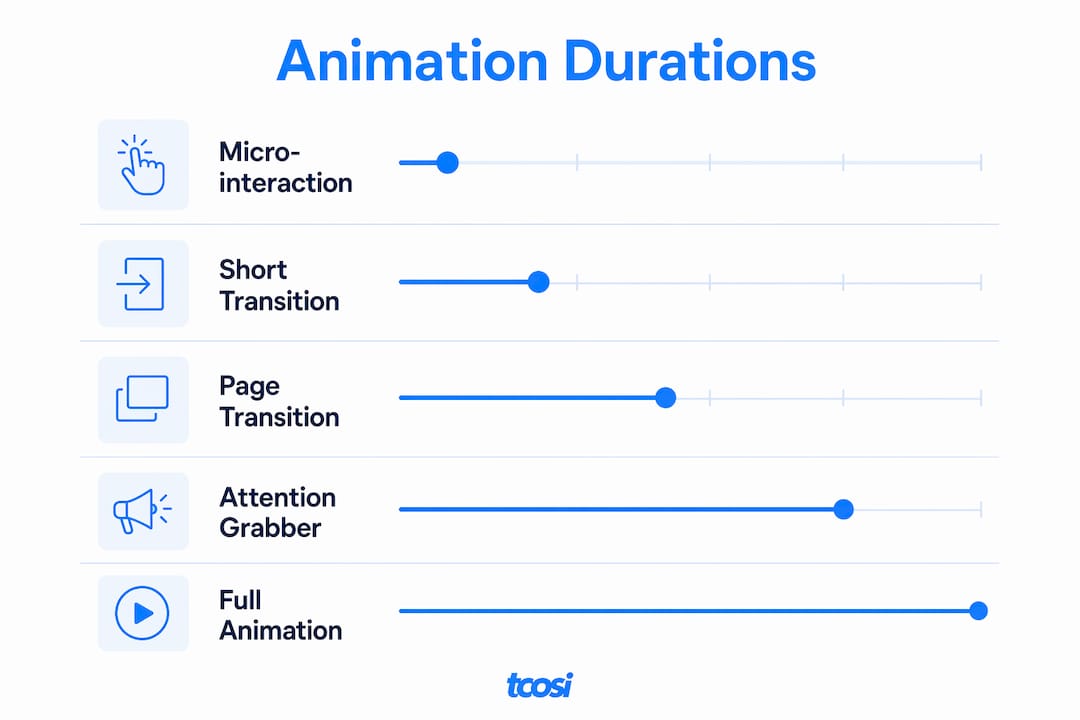
- Respect timing constraints. Functional micro-interactions should last between 100 and 500 milliseconds, with 200ms as a common baseline. Animations shorter than 100ms feel invisible. Animations longer than 500ms feel slow.
- Never block user interaction. Animations must be interruptible and state-driven. If a user clicks a button while an animation is still playing, the interface must respond.
- Support accessibility. The
prefers-reduced-motionCSS media query detects when a user has requested less motion in their operating system settings. Adapting rather than disabling motion for these users improves accessibility without sacrificing usability. - Document your motion system. Treating motion as a principled discipline with written guidelines prevents inconsistency across a site and keeps animations from becoming a distraction.
Pro Tip: Test every animation at 0.25x speed. If it looks awkward or confusing in slow motion, it will feel off at normal speed too. Slow-motion review catches easing problems that real-time playback hides.
Here is a quick reference for motion timing by use case:
| Animation type | Recommended duration | Purpose |
|---|---|---|
| Micro-interaction (button, toggle) | 100–200ms | Confirm immediate user action |
| Page section reveal | 200–400ms | Orient user to new content |
| Modal or drawer open | 250–350ms | Show layered content clearly |
| Loading indicator | Looping, 1–2 seconds | Signal background processing |
| Page transition | 300–500ms | Maintain spatial context between pages |
How can motion design increase engagement and business visibility?
Motion design builds brand credibility before a visitor reads a single word. Good motion is felt but not consciously noticed, acting as a kind of digital handshake that signals quality and care. A site with well-timed, purposeful animation feels trustworthy. A site with no motion or clunky animation feels outdated.
The marketing case for motion is equally strong. Content with video or motion elements is shared up to 1,200% more than static text and images combined. That figure reflects how much more attention motion captures across social platforms and email, not just on the website itself. Visual content in marketing consistently drives significantly more views than static alternatives, reinforcing why motion belongs in your content strategy, not just your design system.
“Motion design is not about making your website look cool. It is about making your website feel alive. When a site responds to you, guides you, and confirms your actions without you having to think about it, that is motion design working exactly as it should. That feeling of responsiveness is what keeps people on a page and brings them back.”
Specific motion techniques that retain visitor attention include:
- Scroll-triggered animations: Content fades or slides in as the user scrolls, rewarding exploration and keeping attention moving down the page.
- Hover effects: Subtle scale or color shifts on interactive elements signal clickability without requiring labels.
- Parallax backgrounds: Layered depth on scroll creates a sense of dimension that static layouts cannot replicate.
- Animated data visualizations: Charts that build on load are far more memorable than static graphs, especially for business and nonprofit sites presenting impact data.
What tools and strategies help web professionals implement motion design?
Motion design belongs in your design system from day one, not as an afterthought. Motion should be integrated early in the design phase using motion tokens, which are documented values for duration, easing curves, and delay, just like color tokens and type scales. Without this structure, animations end up inconsistent across pages and components.
Here is how the main implementation tools compare by use case:
| Tool | Best for | Skill level |
|---|---|---|
| CSS transitions and keyframes | Simple hover effects, reveals, and micro-interactions | Beginner to intermediate |
| Web Animations API | JavaScript-controlled, state-driven animations | Intermediate |
| GSAP (GreenSock Animation Platform) | Complex timelines, scroll-triggered sequences | Intermediate to advanced |
| WordPress page builder motion modules | Quick implementation without custom code | Beginner |
CSS handles the majority of functional motion on most websites. The Web Animations API gives JavaScript developers fine-grained control over timing and playback. GSAP is the industry standard for complex, timeline-based animation sequences, particularly for scroll-driven storytelling. If you are building on WordPress, many page builders include built-in animation controls that cover common use cases without writing a line of code.
Performance matters as much as aesthetics. Animations that trigger layout recalculations, specifically those that animate properties like width, height, or top, cause frame drops. Stick to animating transform and opacity properties, which the browser can handle on the GPU without repainting the layout. This keeps animations smooth at 60 frames per second even on lower-powered devices.
Pro Tip: Always test motion on a mid-range Android device, not just a high-end laptop. What runs smoothly in Chrome DevTools can stutter badly on real hardware. That test will tell you more than any performance audit tool.
For mobile-friendly websites, motion must be even more deliberate. Touch interfaces respond differently than mouse-driven ones, and animations that feel elegant on desktop can feel sluggish or intrusive on a phone. Keep mobile animations shorter and simpler than their desktop counterparts.
Motion also supports web storytelling in a direct way. Scroll-triggered reveals, animated section headers, and sequenced content builds all help guide a reader through a narrative arc without requiring them to read a wall of text.
Key Takeaways
Motion design is the most underused tool for improving both usability and engagement on a website, and the sites that get it right feel noticeably better than those that treat it as decoration.
| Point | Details |
|---|---|
| Motion serves communication | Every animation should confirm an action, show a state change, or guide attention. |
| Timing is precise | Functional micro-interactions run between 100 and 500ms, with 200ms as the standard baseline. |
| Accessibility is non-negotiable | Adapt motion for prefers-reduced-motion users rather than removing all feedback. |
| Motion drives engagement | Motion-rich content is shared up to 1,200% more than static content. |
| Build a motion system | Document motion tokens alongside color and type in your design system from the start. |
Why motion design deserves more respect than it gets
Most of the websites I review treat motion as a finishing touch, something added in the last week of a project to make things feel polished. That approach almost always produces animation that feels random or excessive, because it was never planned as part of the communication system.
The sites that use motion well planned it from the wireframe stage. They asked, “What does the user need to understand at this moment?” before they asked, “What should this look like?” That order of operations makes a real difference. Motion that answers a user’s question before they ask it builds trust. Motion that exists to impress the client’s boss usually annoys the actual visitor.
I have also seen the opposite problem: business owners who are afraid of motion entirely because they associate it with slow, flashy websites from the early 2000s. That fear is understandable, but it is outdated. Modern CSS and GPU-accelerated properties make well-implemented animation faster than many static page loads. The performance risk is real, but it is manageable with the right approach.
The most important shift I would encourage is treating motion as a behavior system, not a visual effect. When you document your motion tokens the same way you document your brand colors, you stop making animation decisions on a case-by-case basis. You build consistency. And consistency is what makes a site feel professional rather than patched together.
— Tommy Cosimano
How tcosi approaches motion design in web projects
Building a website that uses motion well takes more than adding a few CSS transitions. It requires planning, testing, and a clear understanding of how animation affects both user experience and site performance.
At tcosi, motion design is part of the broader conversation about how a site should feel and function, not a feature bolted on at the end. Whether you need a custom WordPress build with thoughtful animation built in from the start, or ongoing support to refine and improve an existing site, tcosi brings the same attention to detail to every project. If your site feels flat, slow, or disconnected from your brand, that is worth a conversation. Reach out through tcosi.com to talk through what better motion and design could do for your business.
FAQ
What is the role of motion design in websites?
Motion design communicates interface changes, confirms user actions, and guides attention through purposeful animation. It improves usability and makes websites feel responsive and trustworthy.
How long should website animations last?
Functional micro-interactions should run between 100 and 500 milliseconds, with 200ms as the standard baseline. Animations longer than 500ms feel slow and can frustrate users.
Does motion design hurt website performance?
Motion design hurts performance only when implemented poorly. Animating CSS transform and opacity properties keeps animations GPU-accelerated and smooth without triggering layout repaints.
How does motion design affect accessibility?
The prefers-reduced-motion media query detects users who have requested less motion in their system settings. Best practice is to adapt animations for these users, not remove all feedback entirely.
Can motion design improve marketing results?
Content with motion or video elements is shared up to 1,200% more than static content. Motion also builds perceived site quality, which directly affects how long visitors stay and whether they return.