A call to action is the button, link, or line of text that tells a visitor exactly what to do next, and the single rule that makes it work is this: pair a clear action verb with a real benefit, and make sure both match what’s waiting on the other side of the click. Get that alignment right, and you don’t need tricks. Get it wrong, and no amount of button color will save it.
TL;DR:
- Small wording changes, such as replacing “Learn More” with a benefit-specific phrase, can more than double CTA conversion rates.
- Placement above the fold and repeated at natural decision points on the page significantly increase click-through and micro-conversion rates.
- CTAs should clearly name the action, match the landing page’s content, and avoid vague or duplicated prompts to prevent visitor hesitation.
- Testing one variable at a time, especially copy and color, provides reliable insights into improving CTA effectiveness over time.
- Focus on a single, well-crafted primary CTA per page, with microcopy addressing objections and matching visitor intent, to reduce decision fatigue.
Table of Contents
- What Is a Website Call to Action, and Where Does It Belong?
- Why CTAs Carry More Weight Than Most Site Owners Think
- CTA Examples for Every Common Website Goal
- Best Practices for Writing CTA Copy That Converts
- Design and Placement Rules That Make CTAs Click-Ready
- A Simple Framework for Writing Any CTA From Scratch
- How to Test and Improve Your CTAs Over Time
- How tcosi Approaches CTA-Driven Website Design
- Common CTA Mistakes That Quietly Kill Conversions
- Real CTAs That Fall Flat, and Why
- Tailoring CTAs to Different Visitors and Segments
- What I’d Prioritize First if I Were Starting From Scratch
- Sources
- FAQ
What Is a Website Call to Action, and Where Does It Belong?
A call to action, or CTA, is any element on your site that prompts a visitor to take a specific step: buying, subscribing, booking, downloading, or reaching out. It can be a button, a plain text link, a banner across a hero image, or a single line tucked inside a paragraph. The format matters less than the clarity of the instruction and the payoff behind it.
CTAs show up everywhere a visitor makes a decision, and effective ones stay consistent across every channel a business uses, from the website to email to paid ads, always matching where that visitor sits in their decision journey. On a website specifically, you’ll find them in a handful of predictable spots:
- Landing pages, usually above the fold and repeated near the bottom
- Product and service pages, next to pricing or specs
- Blog posts and resource pages, pointing toward a next step
- Site headers and footers, often the most-clicked real estate on the whole page
- Confirmation and thank-you pages, which are easy to forget and full of missed opportunity
Not every CTA asks for the same level of commitment, and that’s worth separating clearly. A low-commitment CTA, like “Download the checklist” or “See our work,” asks for a moment of curiosity. A high-commitment CTA, like “Request a quote” or “Book a consultation,” asks someone to hand over time, contact information, or intent to buy. Mixing these up, asking for a quote before a visitor has any reason to trust you, is one of the fastest ways to kill a conversion before it starts.
Why CTAs Carry More Weight Than Most Site Owners Think
Every page on your site exists to move a visitor one step closer to a decision, and the CTA is the mechanism that actually makes that happen. Content builds interest. Design builds trust. But the CTA is the moment where interest either turns into action or evaporates. Treat it as an afterthought, and you’re leaving conversions on the table that better copy or better placement would have caught.
The data backs this up in a way that surprises a lot of small business owners: small changes to CTA copy, like swapping out a single overused word, have boosted conversion rates by well over 100% in documented cases. That’s not a rounding error. That’s the difference between a CTA that quietly underperforms for years and one that actually earns its place on the page.
Statistic Callout: Swapping a single word in CTA copy has driven conversion increases exceeding 100% in real testing, according to WordStream. Personalized CTAs go further still, outperforming generic versions by roughly 202% in one industry report.
If you’re not sure your CTAs are pulling their weight, three metrics tell you fast:
- CTA click-through rate, the percentage of visitors who see the button and click it
- Destination conversion rate, what happens after the click, whether that’s a completed purchase, a submitted form, or a scheduled call
- Micro-conversion rate, smaller signals like email signups or added-to-cart events that show intent before a final sale
Track those three together, and you’ll spot weak links in the chain fast. A high click rate with a low destination conversion rate usually means the CTA over-promised, or the landing page under-delivered. A low click rate with strong destination performance often means the CTA itself is invisible or unclear, not the offer behind it.
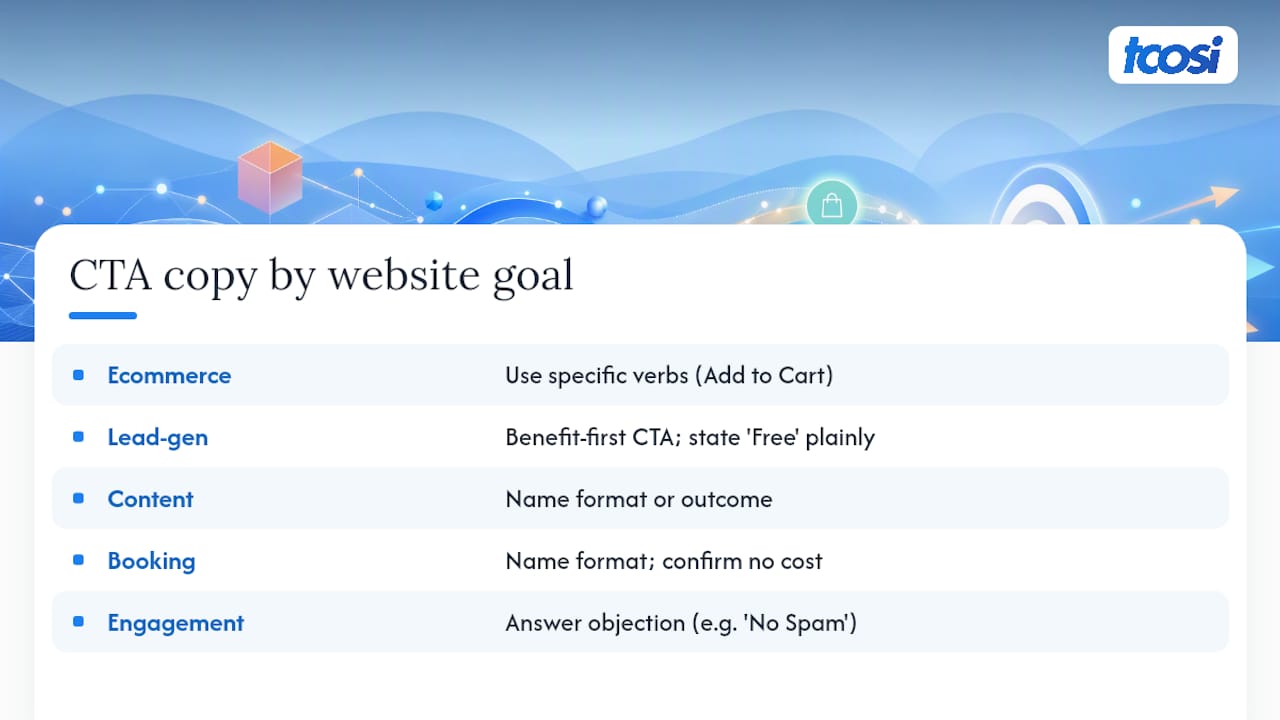
CTA Examples for Every Common Website Goal
Different goals call for different phrasing, and borrowing a template built for the wrong context is a common reason CTAs underperform. Here’s a working set organized by what you’re actually trying to accomplish.
1. Ecommerce CTAs that drive purchases
“Add to Cart” remains the standard for a reason: it’s specific, low-friction, and sets the exact right expectation. “Buy Now” works well when a visitor has already compared options and just needs a nudge. “Shop the Sale” performs especially well on time-limited promotions because it signals urgency without sounding like a countdown gimmick.
2. Lead-generation CTAs that build your pipeline
“Get My Free Guide” outperforms a plain “Download” because it’s personal and benefit-forward. “Book a Free Consult” works when the offer genuinely has no cost or obligation attached, but stating that plainly matters, since vague “free” claims erode trust fast. “See Pricing” is a quietly effective low-commitment option for visitors who aren’t ready to talk to a person yet.
3. Content CTAs that keep visitors engaged
“Read the Full Guide” and “Download the Checklist” both work because they name the exact format a visitor will receive. Consider anchoring content CTAs to outcomes instead of actions when the benefit needs explaining. “See How to Build Local Authority in 30 Minutes” tells a visitor what they’ll walk away with, while “Watch the Video” only tells them what to click.
4. Booking and scheduling CTAs
“Book Your Free Fit Call” beats generic “Schedule Now” because it names the format and confirms there’s no cost. For service businesses juggling different readiness levels, pairing a primary and secondary CTA side by side, something like “Book a Free Fit Call” next to a lower-commitment “See the Work,” lets visitors self-select without forcing a decision they’re not ready for.
5. Engagement CTAs that build community and trust
“Join Our Newsletter” is fine, but “Get Weekly Tips, No Spam” tends to outperform it because it addresses the objection before it’s raised. “Leave a Review” works best when it’s placed right after a completed purchase or service, while the experience is still fresh.
Buttons across all five categories work best when they stay concise and clearly name the action, with primary CTAs positioned above the fold and repeated at natural decision points further down the page.
Best Practices for Writing CTA Copy That Converts
The most reliable copy formula in conversion work is short: verb, plus benefit, plus an optional sense of urgency. “Get Your Free Quote Today” hits all three. “Submit” hits none of them. That gap explains most of the underperformance you’ll see on small business sites.
A useful sanity check comes from Nielsen Norman Group’s “complete the sentence” test: a visitor should be able to finish the phrase “I want to ___” using your CTA’s exact wording. If your button says “Learn More,” the sentence becomes “I want to… learn more,” which is technically true but tells the visitor almost nothing about what happens next. “I want to… see pricing” or “I want to… book a call” sets a specific, checkable expectation instead.
A few habits separate strong CTA copy from filler:
- Lead every CTA with an action verb: “Get,” “Start,” “Book,” “Claim,” never a passive noun phrase.
- State the benefit in the same breath as the action, not on a separate line the visitor might skip.
- Match the CTA’s promise to what the landing page actually delivers, no bait and switch, even a soft one.
- Use first-person phrasing like “Get my free audit” when your data or testing shows it resonates. It reads as more personal and less corporate.
- Avoid CTAs longer than five or six words. If it takes a full sentence to explain, the offer needs clarifying, not the button.
Pro Tip: Before publishing any new CTA, read it out loud in the voice of a visitor who’s never seen your site. If the sentence “I want to click this because ___” doesn’t finish itself instantly, rewrite the copy until it does.
The combined verb, benefit, and urgency approach, along with strong visual contrast and generous whitespace around the button, forms the backbone of most high-performing CTA design. Copy and design aren’t separate disciplines here. They’re solving the same problem from two directions.
Design and Placement Rules That Make CTAs Click-Ready
Great copy on a button nobody notices is wasted effort. Visual hierarchy and physical placement do as much work as the words themselves, and a surprising number of small business sites get the basics wrong without realizing it.
Contrast is the first lever. Your CTA button needs to stand out from its surroundings, not blend into a brand palette that was chosen for looking nice rather than for drawing the eye. Pair strong contrast with enough whitespace around the button that it isn’t fighting for attention against a nearby image or paragraph of text.
Mobile tap targets matter more than most site owners assume, since a large share of traffic now arrives on a phone. Buttons should measure at least 44 by 44 pixels, roughly the size of an adult fingertip, so a rushed visitor doesn’t miss the tap or hit the wrong element by accident.
Placement rules worth following on every page:
- Put your primary CTA above the fold so it’s visible before any scrolling happens.
- Repeat that same CTA at natural decision points further down the page, especially after you’ve made your strongest case.
- Use a sticky header or footer CTA on longer pages, but only one at a time, so it doesn’t compete with itself.
- Add short supporting microcopy near the button, cost, time commitment, or a privacy note, since this kind of detail reduces hesitation at the exact moment a visitor is deciding.
- Include basic accessibility markup, aria-labels and visible keyboard focus states, so the CTA works for visitors using screen readers or navigating without a mouse.
Motion can help draw the eye to a CTA too, when it’s used with restraint. A subtle animation on scroll or hover can guide attention without becoming a distraction or slowing the page down for visitors on older devices.
A Simple Framework for Writing Any CTA From Scratch
Most CTA writing struggles come from skipping straight to wordsmithing before the underlying offer is clear. A better process works in three steps, in order, every time.
Step one: identify the exact action. Not “engage the visitor,” but the literal thing you want them to do. Click a button. Fill in an email field. Pick up the phone.
Step two: state the benefit in plain terms. What does the visitor get, and how fast do they get it? “Free audit” is a benefit. “Optimization consultation” is a description of a service, not a reason to click.
Step three: add urgency only if it’s true. A countdown on a sale that never actually ends teaches visitors to ignore your urgency cues permanently. Real deadlines and real limited availability work. Invented ones backfire.
A visitor doesn’t need to be persuaded that your offer is good. They need to know, in five words or fewer, exactly what happens the moment they click.
A short swipe file of templates, adaptable to nearly any business:
- “Get My Free Audit” — first-person, benefit-led, no cost stated as friction
- “Book a 15-Minute Call” — names the time commitment up front
- “Start My Free Trial” — pairs action and benefit in four words
- “See Pricing” — low-commitment, useful for visitors still comparing
Microcopy pairs well with all four: a line reading “Free. No spam. 2-minute setup.” sitting just beneath the button answers three unspoken objections before a visitor has to ask.
How to Test and Improve Your CTAs Over Time
Guessing which CTA performs better wastes both time and traffic. A structured test tells you, with actual numbers, whether a change helped or hurt, and testing should never stop just because one version won once.
Five variables are worth testing, roughly in order of expected impact:
- Copy, the exact wording of the action and benefit
- Color and contrast, whether the button pulls the eye against its background
- Placement, above the fold versus mid-page versus sticky
- Microcopy, the supporting line beneath or beside the button
- Surrounding proof, testimonials, review counts, or trust badges placed near the CTA
Run one variable at a time. Testing color and copy simultaneously might show a lift, but you won’t know which change earned it, which means you can’t repeat the win elsewhere on the site. A dependable methodology is to change a single variable, run the test for a full business cycle, and only call a winner once you’ve collected enough traffic to trust the result rather than a lucky week.
Statistic Callout: Personalized CTA copy has outperformed generic versions by roughly 202% in reported testing, which makes personalization one of the highest-leverage variables to test first if traffic volume is limited.
Numbers alone don’t explain why a variant won. Pairing A/B results with heatmaps, session recordings, and short on-site surveys shows you where visitors hesitated, scrolled past, or abandoned the page entirely, which turns a single winning test into a repeatable pattern you can apply site-wide. For a deeper look at how design choices tie directly to revenue, our guide on conversion-focused web design walks through the same principle from a full-site perspective.
How tcosi Approaches CTA-Driven Website Design
Every website project I take on follows the same sequence, and CTAs never get bolted on at the end. I start by aligning on the actual business goal, whether that’s booking calls, selling a product, or growing an email list, before a single wireframe gets drawn. Wireframes come next, and CTA placement gets decided at that stage, not after the visual design is already locked in.
From there, copy gets written to match the verb-benefit-urgency formula, tested against real page context rather than written in isolation. I treat launch day as the start of the process, not the finish line. A launch checklist that confirms every CTA link works, every confirmation page loads, and every tracked event fires correctly catches the kind of small errors that quietly cost businesses conversions for months before anyone notices.
Clients tell me the clarity of that process, knowing exactly why each CTA sits where it does, is what separates a website redesign that actually performs from one that just looks better. That’s the difference between decoration and strategy.
Common CTA Mistakes That Quietly Kill Conversions
Confusing language tops the list. A button that says “Submit” or “Continue” gives a visitor zero information about what happens next, and hesitation at that exact moment is where conversions die. Every CTA should pass the plain-language test: could a stranger read this button and know exactly what they’re agreeing to?
Too many CTAs on one page is the second most common error, and it’s almost always well-intentioned. A homepage with a “Buy Now,” a “Learn More,” a “Contact Us,” and a “Subscribe” all competing for attention doesn’t give visitors more choice. It gives them decision fatigue, and most will click nothing rather than sort through four competing asks. One primary CTA per page, with a single lower-commitment alternative at most, keeps the decision simple.
Weak offers are the third failure point, and no amount of copywriting fixes them. “Learn More” about a service nobody’s asked for won’t convert regardless of button color, verb choice, or urgency language. If the underlying offer isn’t compelling, the fix starts with the offer, not the button text wrapped around it.
A fourth, less obvious mistake: CTAs that promise one thing and deliver another. A button reading “Get Your Free Quote” that actually routes to a generic contact form with no quote in sight breaks trust immediately, and visitors remember that mismatch the next time they consider clicking anything on your site.
Real CTAs That Fall Flat, and Why
“Click Here” is the classic example, and it fails for a simple reason: it describes the mechanical act of clicking rather than what a visitor gets for doing it. Replace it with “Get Your Free Estimate” or “Start Your Trial,” and the exact same button suddenly tells a complete story.
“Submit” fails for a related reason. It’s the default label on countless form builders, and it asks a visitor to hand over personal information without stating what they receive in return. “Send My Message” or “Request a Callback” reframes the same action around the benefit instead of the mechanics.
“Learn More” isn’t wrong so much as vague. It works fine as a secondary, low-commitment link, but it underperforms badly as a primary CTA because it doesn’t set any concrete expectation. A visitor clicking it has no idea if they’re about to read a paragraph or watch a twenty-minute video.
“Sign Up Now” struggles when it’s disconnected from a stated benefit. Signing up for what, exactly, and what happens immediately afterward? Compare it to “Get Weekly Tips, No Spam,” which answers both questions in the same breath.
Finally, a CTA repeated identically five times down a single long page, with no variation in copy or context, tends to lose effectiveness after the second or third appearance. Visitors start to tune it out the way they tune out a banner ad, which is exactly the opposite of what repetition at decision points is supposed to accomplish.
Tailoring CTAs to Different Visitors and Segments
A single CTA rarely works equally well for every visitor, because different segments arrive with different levels of trust, urgency, and prior knowledge. A first-time visitor from a cold ad click needs a lower-commitment ask than someone who’s read three blog posts and returned to your site twice this month.
Segment CTA intensity by traffic source where you can. Visitors arriving from organic search after reading a detailed article are further along than someone who clicked a paid ad on a whim, so the article’s CTA can afford to ask for more, a consultation request rather than a newsletter signup.
Returning visitors deserve different treatment than first-timers. If your platform supports it, a returning visitor who’s already downloaded a guide might see “Book Your Free Call” instead of “Download the Guide” a second time, since they’ve already taken the lower-commitment step.
B2B audiences generally respond better to CTAs that name a specific outcome or timeframe, “Book a 15-Minute Demo,” while consumer audiences often respond to urgency and social proof, “Join 5,000 Subscribers.” Neither approach is universally correct. It depends on what your specific visitors are trying to solve when they land on the page.
What I’d Prioritize First if I Were Starting From Scratch
If a small business asked me where to spend limited CTA effort, I’d point to three places: the homepage’s primary CTA, since it gets the most traffic of any single page; the highest-traffic product or service page; and any page currently using “Click Here” or “Submit,” since those are the fastest wins available.
Quick fixes carry outsized impact here. Rewriting one vague button into a verb-plus-benefit phrase, and making sure it’s visible without scrolling, often moves the needle more than a full redesign would.
A three-item starter checklist: rewrite your homepage CTA using the verb-benefit formula, confirm it’s visible above the fold on mobile, and add one line of microcopy addressing cost or time. Small, sequenced changes beat sweeping ones nobody has time to finish.
— Tommy Cosimano
Sources
The guidance in this article draws on a handful of consistently reliable sources. WordStream documents copy-driven conversion lifts and cross-channel CTA alignment. Omniconvert covers design specs and A/B testing methodology in depth. PayPal backs the personalization performance data. Shopify offers concrete placement and microcopy examples worth studying directly. For deeper testing frameworks, Babylovegrowth’s CTA guide is a solid supplementary read.
If your site needs more than a copy refresh, tcosi’s website design packages start at the Essentials tier and scale up through Growth and Premium as your CTA and conversion needs grow.
- 31 Call to Action Examples + How to Write Your Own | WordStream
- 10 Call to Action Examples That Convert (2026)
- How to write a call to action: Tips for creating compelling CTAs to drive more conversions | PayPal US
- Call-To-Action Button Examples + Tips for Making A Great CTA (2026) – Shopify
FAQ
What is an example of a call to action for a website?
A strong example is “Get My Free Quote,” which pairs an action verb with a clear benefit. Weaker examples like “Click Here” or “Submit” describe the mechanical act of clicking instead of what the visitor receives.
What are some examples of calls to action beyond buttons?
CTAs also appear as plain text links (“See how it works”), banner headlines (“Shop the sale now”), and inline phrases inside blog content (“Download the checklist”). All of them follow the same verb-plus-benefit rule regardless of format.
What is the CTA section of a website?
The CTA section is any block of a page built specifically to prompt an action, most often placed above the fold and repeated further down at natural decision points. Homepages, landing pages, and product pages typically each have their own dedicated CTA section.
How do I add a call to action button on my website?
Most website builders and content management systems, including WordPress, offer a button block or widget where you set the label text, destination link, and color. Keep the label short, action-led, and matched to what the destination page actually delivers, and confirm the tappable size meets the 44 by 44 pixel mobile standard.
How many CTAs should one page have?
One primary CTA per page works best, paired with at most one lower-commitment alternative for visitors who aren’t ready to commit. Stacking three or four competing CTAs on a single page tends to create decision fatigue rather than more conversions.