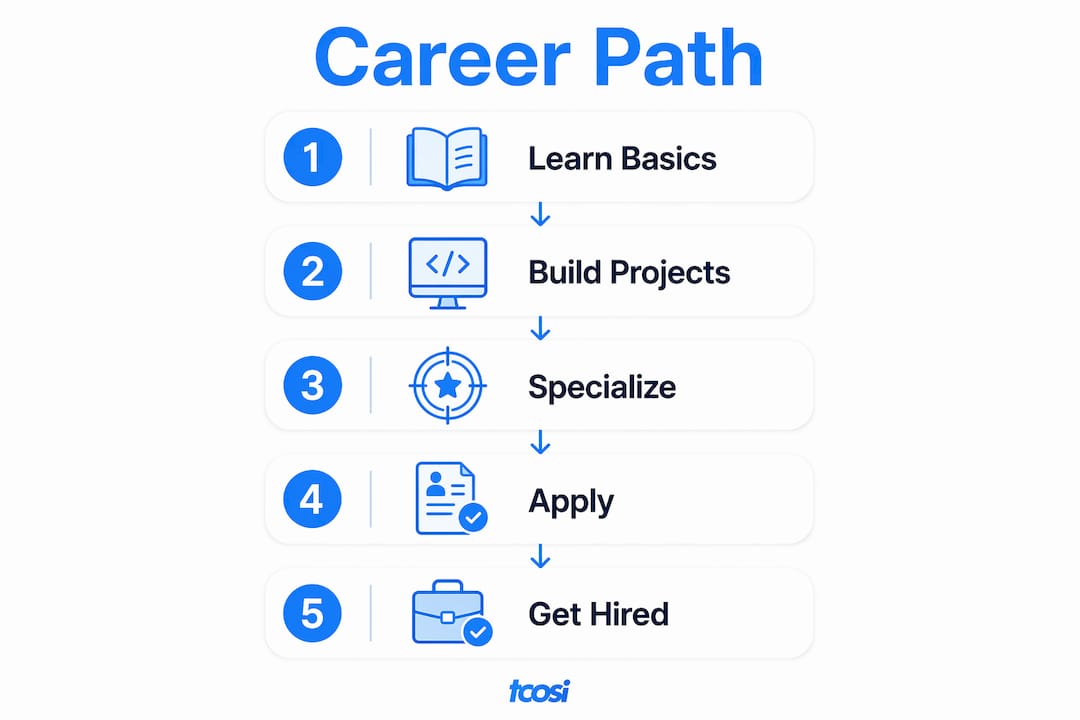
A WordPress developer builds, customizes, and maintains WordPress-powered websites — handling everything from custom themes and plugins to REST API integrations, performance tuning, and security hardening. If you want the shortest path to becoming hireable, here it is: learn the core stack (PHP, HTML/CSS, JavaScript), build three solid portfolio projects, then start applying to jobs or pitching clients.
Your immediate next steps:
- Install LocalWP to set up a local development environment today
- Create a GitHub account and push your first WordPress project
- Bookmark the WordPress Developer Resources handbooks — they are the authoritative source for coding standards, APIs, and recommended workflows
That three-step loop (learn, build, apply) is what the rest of this guide maps out in detail.
Table of Contents
- What does a WordPress developer actually do?
- What skills does a WordPress developer need to learn first?
- What are the main WordPress developer specializations?
- How do you go from beginner to hireable WordPress developer?
- What tools and resources should every WordPress developer use?
- How do you build a portfolio and land your first job or clients?
- What is the salary and job market like for WordPress developers in the US?
- How do employers evaluate WordPress candidates?
- What does tcosi look for when hiring WordPress developers?
- Key Takeaways
- What I actually look for in new developers
- tcosi works with developers at every stage
- Useful resources and further reading
- FAQ
What does a WordPress developer actually do?
A WordPress developer is responsible for the technical architecture, custom functionality, and ongoing maintenance of WordPress-powered websites. That covers building themes and plugins, working with the Block Editor (Gutenberg), and connecting external services through the REST API. It is a broad role, and the day-to-day work shifts depending on whether you are at an agency, working in-house, or freelancing.
Common daily tasks include:
- Building and customizing themes, including child themes and starter-theme modifications
- Developing custom plugins to extend WordPress functionality for specific client needs
- Creating custom Gutenberg blocks using JavaScript and React
- Integrating third-party APIs and services via the WP REST API
- Running performance audits and implementing caching, image optimization, and database cleanup
- Hardening site security through code reviews, plugin audits, and server-level configurations
- Using WP-CLI to automate repetitive tasks like database exports, plugin updates, and search-replace operations
- Managing version control workflows with Git and GitHub
A concrete example: a client needs a booking system that syncs with an external CRM. A WordPress developer might build a custom plugin that calls the CRM’s API on form submission, stores data in a custom post type, and displays results through a Gutenberg block. That single project touches PHP, JavaScript, REST API work, and database queries — which is exactly why the role rewards people who build things rather than just read about them.

What skills does a WordPress developer need to learn first?
The skill set breaks cleanly into three levels. Work through them in order — trying to learn React before you understand PHP is a common mistake that slows people down.
Beginner fundamentals
- HTML and CSS: structure and style every page you build; no shortcuts here
- Basic PHP: WordPress core is PHP, so you need to read and write functions, conditionals, and loops
- WordPress admin: understand how posts, pages, menus, widgets, and settings work before you touch code
- Themes: learn the WordPress template hierarchy and how theme files connect
- Plugins: install, configure, and troubleshoot common plugins before you build your own
Intermediate skills
- Deeper PHP: object-oriented patterns, hooks (actions and filters), and the WordPress Plugin API
- Modern JavaScript and React basics: required for Gutenberg block development
- WP REST API: read and write data programmatically; this opens up headless and hybrid patterns
- MySQL/SQL basics: query the database directly for custom queries and performance fixes
- WordPress coding standards: follow the official style guide from the start — employers check this
- WP-CLI: automate installs, updates, and database operations from the command line
Advanced skills
- Build tools: npm, webpack, or Vite for compiling JavaScript and CSS assets
- Headless WordPress: serving content via the REST API to a decoupled front end (Next.js, Nuxt, etc.)
- Performance engineering: Core Web Vitals optimization, object caching, and server-side tuning
- Security hardening: input sanitization, output escaping, nonce verification, and capability checks
- Automated testing: PHPUnit for unit tests, end-to-end testing with Playwright or Cypress
- Docker Compose + WP-CLI scripts: consistent dev/staging parity for agency-level workflows
Pro Tip: Don’t wait until you feel “ready” to start applying. For freelance and entry-level roles, you need solid HTML/CSS, working PHP knowledge, the ability to build a basic custom theme, and at least one plugin you wrote yourself. That is your minimum viable skill set. Ship something real, then keep learning.
What are the main WordPress developer specializations?
WordPress development is not one job — it is several. Knowing which path fits your interests helps you build the right portfolio and target the right roles.
Theme developer: Focuses on front-end presentation, template hierarchy, and design-to-code translation. Daily work involves converting Figma or Adobe XD mockups into clean, accessible HTML/CSS/PHP templates. Clients and employers expect sharp CSS skills, accessibility knowledge (WCAG 2.1), and a good eye for detail.
Plugin developer: Writes custom functionality that extends WordPress. This role leans heavily on PHP, the Plugin API, and database design. A plugin developer working at an agency might spend a week building a custom post type with a meta box UI, a REST API endpoint, and an admin settings page.
Block (Gutenberg) developer: Builds custom editor blocks using JavaScript and React. This is the fastest-growing specialization right now, because every new WordPress project uses the Block Editor. If you learn to build blocks well, you stand out immediately.
Full-stack WordPress developer: Handles both front end and back end, often including server configuration, deployment pipelines, and database optimization. This is the most common agency role and the one that commands the widest range of project types.
Agency white-label developer: Works behind the scenes on projects owned by another agency. Communication and clean handoff documentation matter as much as code quality here. Agencies hiring for this role want developers who can follow a brief, ask the right questions, and deliver work that another team can maintain.
Specialization affects rates. A plugin developer with a published, well-reviewed plugin in the WordPress.org repository can charge more than a generalist with the same years of experience. A Gutenberg specialist with a public block library has a concrete, demonstrable skill that is easy for a hiring team to evaluate.
How do you go from beginner to hireable WordPress developer?
This timeline is realistic for someone putting in consistent effort — roughly 10–15 hours per week. Full-time learners can compress it.
Months 0–3: Build the foundation
- Set up LocalWP and install a fresh WordPress instance
- Complete the Beginner WordPress Developer course on Learn WordPress
- Learn HTML, CSS, and basic PHP through structured tutorials
- Build your first brochure site: a five-page business website using a starter theme like Underscores (_s)
- Push everything to GitHub with clear commit messages
Milestone: You have a live demo site, a GitHub repo with real commits, and you understand the WordPress template hierarchy.
Months 3–6: Go deeper and build proof
- Build a custom theme from scratch (no page builder, no starter theme)
- Write a simple plugin — a custom post type with a settings page is a great first one
- Learn the WP REST API by building a small front-end widget that pulls data from WordPress
- Start following WordPress coding standards and run your code through a linter
- Add brief case notes to each project explaining your technical choices
Milestone: You have a theme, a plugin, and an API integration — each with a live demo and a GitHub link.
Months 6–12: Specialize and start applying
- Build a custom Gutenberg block and publish it as a standalone plugin
- Add basic automated tests (PHPUnit or a linter workflow via GitHub Actions)
- Contribute a small patch or documentation fix to an open-source WordPress project
- Build a simple portfolio page that links to all three projects with case notes
- Start applying to junior roles or pitching your first freelance client
Hireability checklist:
- At least three finished projects with live demos
- GitHub repo with a consistent commit history
- Short case notes on each project (what you built, why you made key decisions)
- A contact-ready resume or portfolio page
- Basic familiarity with security best practices and website security fundamentals
What tools and resources should every WordPress developer use?
Getting your environment right from day one saves hours of debugging later. Here is what professionals actually use.

Local development
LocalWP is the easiest way to spin up a WordPress site on your machine. It handles PHP, MySQL, and Nginx or Apache automatically. For more control, a Docker Compose setup with WP-CLI scripts gives you consistent dev/staging parity — useful once you are working on agency projects with multiple environments.
Version control
Git is non-negotiable. Every project should live in a GitHub repository from day one. Use feature branches for new work, write clear commit messages, and open pull requests even when you are working alone — it builds the habit and shows employers you understand collaborative workflows.
Developer toolchain
- WP-CLI: run installs, updates, database exports, and search-replace operations from the command line
- Node/npm: required for Gutenberg block development and modern build tools
- Xdebug: step-through PHP debugging; far more useful than
var_dump() - PHP_CodeSniffer with WordPress Coding Standards: catches style violations before you submit code
- Staging server: always test on a staging environment before pushing to production
Authoritative resources
- WordPress Developer Resources: the official handbooks for themes, plugins, block development, REST API, and coding standards — read these, not random blog posts
- Learn WordPress (learn.wordpress.org): free structured courses from the WordPress community
- Make WordPress (make.wordpress.org): where core contributors discuss development decisions
- WP-CLI documentation: command reference and package index for automation
Pro Tip: Contributing a small documentation fix or a typo correction to the official WordPress handbooks is a legitimate open-source contribution. It shows up on your GitHub profile, signals that you read the official docs, and gives you something concrete to mention in interviews.
How do you build a portfolio and land your first job or clients?
Your portfolio is your proof. Three well-documented projects beat ten half-finished ones every time.
What a strong portfolio includes
- Live demo: a URL the hiring manager can click right now
- GitHub link: the actual code, with a clear README explaining what the project does and how to set it up
- Case notes: two or three sentences on what problem you solved, what technical decisions you made, and what you would do differently
- Before/after metrics: if you improved a site’s load time or fixed a security issue, say so with numbers
Building your GitHub presence
- Keep a consistent commit history — sporadic commits with no messages look like abandoned work
- Write READMEs for every repo, even small ones
- Build small, reusable plugins or block examples that other developers might actually use
- Use GitHub Issues to track your own to-do list; it shows you understand project management
Where to find your first roles
- WordPress.org job board: niche, high-intent listings from teams that specifically want WordPress skills
- Agency careers pages: many small agencies post junior roles only on their own sites
- Freelance platforms: Upwork and Toptal both have active WordPress categories; Upwork is more accessible for beginners
- Local networking: WordCamp events (events.wordpress.org) put you in the same room as agency owners and hiring managers
- White-label partnerships: working as a white-label WordPress developer for an established agency gives you real client projects, feedback, and references without having to find clients yourself
Outreach tip: When you reach out cold to an agency, lead with your GitHub link and one specific project that matches their client type. A two-sentence email with a live demo link gets more responses than a long cover letter.
What is the salary and job market like for WordPress developers in the US?
Demand for WordPress developers in the United States is steady. WordPress powers a large share of the web, and businesses consistently need developers to build, maintain, and extend their sites. Web developer employment overall is projected to grow faster than average through 2033, according to the U.S. Bureau of Labor Statistics, which reflects the broader demand for skilled developers across all platforms including WordPress.
How experience and specialization affect earnings:
- Junior/entry-level: typically earn starting salaries and freelance rates that reflect early career stages
- Mid-level (2–4 years): salaries and freelance rates increase with experience
- Senior/lead: command higher salaries and consulting fees due to expertise
- Specialization premium: certain specializations tend to earn more within their experience levels
Freelance pricing models:
- Hourly: good for maintenance, debugging, and small tasks; easy to scope but caps your income
- Project-based: better for defined deliverables like a new theme or a custom plugin; rewards efficiency
- Retainer: monthly agreements for ongoing support, updates, and site optimization; the most predictable income model for freelancers
Note: These figures are general market estimates. Actual compensation varies by location, company size, and the specific skills you bring. Always research current listings on job boards for the most accurate picture in your area.
How do employers evaluate WordPress candidates?
Hiring teams are not impressed by a long list of technologies on a resume. They want to see that you can actually build something clean and maintain it over time.
Primary signals hiring teams look for:
- Clean, readable code samples that follow WordPress coding standards
- A Git history that shows real, incremental work — not one giant commit
- Small open-source contributions (even documentation fixes count)
- A live portfolio with technical case notes, not just screenshots
- Familiarity with Gutenberg and the ability to explain a REST API integration clearly
Common interview tasks
- Debug a broken theme: given a theme with a PHP error or a template that is not rendering correctly, find and fix the issue
- Build a basic block: create a simple Gutenberg block with editable text and a background color option
- Explain a REST API integration: walk through how you would pull data from an external API and display it in WordPress
- Describe a deployment workflow: explain how you move a site from local to staging to production, including database handling
Interview prep checklist
- Have a sample coding task ready: a small plugin or block you can walk through line by line
- Prepare a portfolio walkthrough script: two minutes per project, covering the problem, your approach, and the result
- Know the answers to common architecture questions: “How would you handle a custom post type with a REST API endpoint?” and “How do you prevent SQL injection in a custom query?”
- Be ready to discuss security: input sanitization, output escaping, nonce verification, and capability checks
- Review performance basics: what causes slow WordPress sites and how you diagnose them
What does tcosi look for when hiring WordPress developers?
At tcosi, the projects we take on range from brochure sites for local businesses to custom plugin builds and white-label work for marketing agencies. That variety means we need developers who are adaptable, communicative, and genuinely careful about the work they ship.
Career progression at an agency like tcosi typically looks like this:
- Junior developer: focused on ticket-level work, small feature builds, and following established patterns; learning to ask good questions and document what they do
- Mid-level developer: owns larger features, handles client touchpoints directly, and starts making architectural recommendations
- Senior/lead developer: sets the technical direction for projects, mentors junior developers, and manages client strategy alongside the project manager
Communication matters at every level, but it becomes critical at mid and senior stages. A developer who can explain a technical decision to a non-technical client in plain language is worth considerably more than one who cannot. White-label delivery adds another layer: your code and your notes represent another agency’s brand, so clarity and completeness in handoff documentation are non-negotiable.
Key Takeaways
Becoming a hireable WordPress developer comes down to learning the core stack, building three well-documented projects, and showing your work publicly through GitHub and a live portfolio.
| Point | Details |
|---|---|
| Learn in order | Master HTML/CSS and PHP before moving to JavaScript, React, and advanced tooling. |
| Three projects minimum | Build a custom theme, a plugin, and a Gutenberg block — each with a live demo and GitHub link. |
| Document everything | Case notes, clear READMEs, and deployment checklists signal professionalism to every hiring team. |
| GitHub history matters | Consistent commits and clean pull requests show employers you work like a real developer. |
| tcosi as a next step | tcosi offers white-label development partnerships and real client projects for developers ready to build experience. |
What I actually look for in new developers
Most candidates I talk to have the technical basics covered. What separates the ones I want to work with is simpler than they expect: they show their thinking. The GitHub repo has real commits. The portfolio has a sentence explaining why they made a specific decision. The email they send has a link to something live.
You do not need to be an expert to get your first agency role or white-label project. You need to be someone who finishes things, documents them, and communicates clearly. Those habits are harder to find than PHP skills.
If you are early in your career and want feedback on your work, or if you are interested in white-label opportunities or mentorship, I am genuinely open to those conversations. Reach out through the tcosi contact page and include your GitHub link. That is the best starting point.
tcosi works with developers at every stage
Whether you are looking for your first real client project, want to work as a white-label WordPress developer behind the scenes for an established agency, or just want honest feedback on your portfolio, tcosi is a practical next step.
tcosi takes on custom WordPress projects for businesses across the United States, from small business sites to complex plugin builds and agency partnerships. Developers who work with tcosi get real deliverables, real client feedback, and the kind of hands-on experience that a tutorial cannot replicate. If you want to see the scope of projects we handle, the custom WordPress agency overview gives you a clear picture of what agency-level work actually looks like.
Ready to take the next step? Send a note through tcosi.com with your GitHub link and a quick description of where you are in your learning. We will take it from there.
Useful resources and further reading
- WordPress Developer Resources: the official handbooks for themes, plugins, blocks, REST API, and coding standards; start here and return often
- Learn WordPress: free structured courses including the Beginner WordPress Developer course; the most direct path from zero to working knowledge
- Make WordPress: where core contributors discuss development decisions; reading these threads teaches you how WordPress actually evolves
- WordPress Events: find WordCamps and meetups near you; in-person community is one of the fastest ways to find mentors and job leads
- GrowthPlugins integration guide: practical use-case walkthrough for building plugin-based workflows in WordPress; useful for intermediate developers working on integration projects
- LocalWP: free local development environment; install this before anything else
- WP-CLI: command-line interface for WordPress; the official docs cover every command you will need for automation and scripting
- GitHub: host your code, build your commit history, and contribute to open-source projects; your profile is part of your resume
- tcosi white-label services: if you want real project experience working alongside an established agency, this is where to start
- Website security best practices: practical security guidance relevant to every WordPress developer building client sites
FAQ
What is a WordPress developer?
A WordPress developer builds and maintains WordPress-powered websites, handling custom themes, plugins, REST API integrations, performance, and security. The role covers both front-end presentation and back-end PHP development, depending on the specialization.
Can you learn WordPress development in 3 days?
You can learn the basics of the WordPress admin and template system in a few days, but becoming a hireable developer takes several months of consistent practice. A realistic timeline is 6–12 months to build the skills and portfolio needed for entry-level roles.
Is WordPress outdated in 2026?
No. WordPress powers a significant share of the web, and active development continues through the Gutenberg block editor, the REST API, and ongoing core releases. Demand for skilled WordPress developers remains strong across agencies, in-house teams, and freelance markets.
Does WordPress development require coding?
Yes, professional WordPress development requires PHP, HTML, CSS, and increasingly JavaScript and React for Gutenberg block work. Using WordPress as a site owner with page builders does not require coding, but building custom themes, plugins, or blocks does.