Logo placement on websites is defined as the deliberate positioning of a brand’s visual mark within a web page layout to direct user attention, establish identity, and support navigation. Where your logo sits is not a minor design detail. It shapes how quickly visitors recognize your brand, how confidently they move through your site, and whether your visual identity sticks after they leave. Research from Tobii, System1 Group, and the U.S. Web Design System all confirm that the role of logo placement on websites goes well beyond aesthetics. It is a functional decision with measurable consequences for brand recall and user engagement.
How does logo placement affect user attention and brand recall?
Eye tracking identifies where users visually focus before they click or scroll. This research method captures real attention patterns rather than relying on self-reported behavior, which means it gives designers verifiable data on whether a logo actually enters a visitor’s field of view. The findings consistently show that logos placed in high-attention zones get seen. Logos buried in low-attention areas get skipped.
Top-of-page ads achieved 65% visual penetration regardless of ad size. Position outperforms size when it comes to visibility. That finding applies directly to logo placement: a well-positioned, modestly sized logo will outperform an oversized logo placed in a low-attention zone every time.
Click-through rates alone do not prove logo placement effectiveness. Eye tracking captures whether a logo enters a visitor’s attention before any click happens. That distinction matters because a visitor can convert without ever consciously registering your brand, which weakens long-term recall and repeat recognition.
“Eye tracking advances UX research by shifting assumptions about logo visibility from guesswork to verifiable data on visual attention.” — Tobii
The practical takeaway is clear. Place your logo where eyes land first. That is the top of the page, and for most sites, the upper-left corner. Pair that placement with consistent header layouts to reinforce cognitive efficiency and reduce visitor confusion.
Top-left vs. top-center vs. top-right: which placement wins?

Logo placement location carries real consequences for usability and brand perception. Each position has a distinct profile, and the right choice depends on your site’s goals.
| Placement | Brand recognition | Navigation clarity | Emotional engagement | Best for |
|---|---|---|---|---|
| Top-left | High | High | Moderate | Most business websites |
| Top-center | High | Lower | High | Brand-forward or editorial sites |
| Top-right | Lower | Moderate | Higher | Niche or creative portfolios |
Top-left logo placement is the most common and expected location across the web. Users expect the logo to link back to the homepage, and placing it top-left aligns with that habit. Deviating from this pattern without a clear reason creates friction.
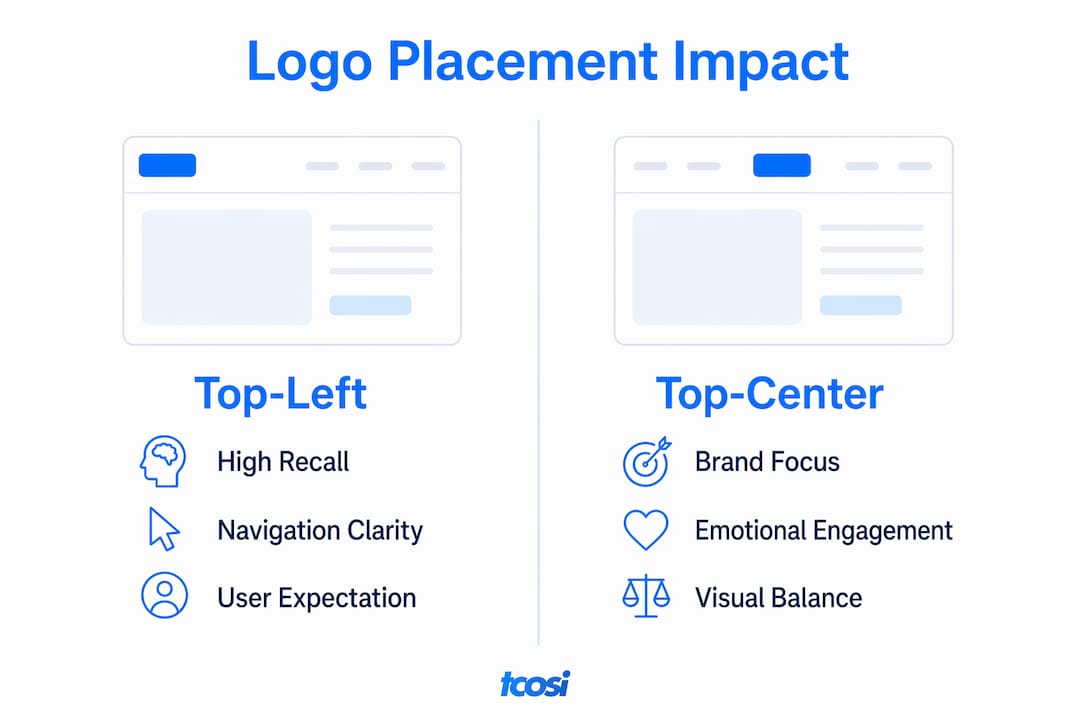
Top-center placement puts the brand front and center, which works well for companies where visual identity is the primary message. Fashion brands, nonprofits, and editorial publications often use this layout. The tradeoff is that it can reduce navigation clarity, especially when a full menu needs to sit alongside the logo.
Top-right placement is the least common and carries the highest risk of reduced brand recall. Users in Western markets read left to right, so the right side of the header receives less early attention. That said, top-right logos can preserve emotional engagement because they stay out of the way of storytelling visuals.
Responsive design requires logo placement to adapt at breakpoints rather than follow a single universal rule. On mobile, stacked navigation or a centered logo above a hamburger menu often performs better than forcing a desktop layout onto a small screen.
Pro Tip: Test your logo placement on a real mobile device, not just a browser resize. Tap targets, spacing, and visual hierarchy behave differently on actual hardware.
What are the tradeoffs between brand recall and emotional engagement?
Logo placement affects both immediate brand recognition and emotional engagement, and these two factors together influence short-term sales. Getting one right at the expense of the other is a real risk, and most designers do not think about it this way.
System1 Group’s research on ad branding reveals a useful framework for website design. Their findings show that introducing logos early, whether upfront or in a corner position, triples fast brand fluency compared to only showing the logo at the end. Brand fluency is the speed and ease with which a viewer connects a visual to a brand. Higher fluency means faster recognition on repeat visits.
Here is where the tradeoff gets interesting:
- Upfront logo placement maximizes brand fluency but can interrupt emotional storytelling on visually rich pages.
- Corner logo placement delivers strong branding benefits while causing minimal drops in viewer happiness or engagement.
- End-frame only placement produces the weakest brand recall, even when the logo is large and prominent.
Digital brand recall improves when logos appear within the first 2–5 seconds of user engagement. On a homepage, that means the logo must be visible before a visitor scrolls. A logo hidden below a full-screen hero image or buried in a cluttered header fails this test.
The implication for website design is direct. A corner logo in the header, visible on page load, gives you the best of both outcomes. It builds brand fluency without competing with your headline, hero image, or primary call to action.
Practical guidelines for optimal logo placement on your website
Good logo placement follows a short set of principles that apply across industries and site types. These are not opinions. They come from design system standards, UX research, and real-world testing.
- Make the logo clickable and link it to the homepage. Users expect this behavior. Breaking that expectation creates confusion and increases bounce rates.
- Follow the U.S. Web Design System’s basic header pattern. The USWDS basic header places the logo alongside navigation elements to maximize usability and consistency. This pattern works for government sites and translates cleanly to business websites.
- Write descriptive alt text for your logo image. Alt text like “CompanyName logo” serves screen readers and supports accessibility compliance. It also gives search engines a clear signal about your brand identity.
- Test logo visibility across devices. A logo that reads clearly on a 27-inch monitor may disappear on a 375-pixel-wide phone screen. Size, contrast, and spacing all need to hold up at every breakpoint.
- Avoid oversized logos that push navigation below the fold. A header that consumes more than 15–20% of the viewport on mobile creates a poor first impression and reduces the space available for your actual content.
- Keep the header clean. A logo surrounded by competing visual elements loses its anchoring function. White space around the logo improves recognition and gives the header room to breathe.
Pro Tip: If your logo relies on fine detail or thin letterforms, create a simplified version for small screens. A favicon-style mark often works better at 40–50 pixels than a scaled-down version of your full logo.
Consistent logo placement alongside navigation supports cognitive efficiency. When visitors find the logo in the same spot on every page, they build a mental map of your site faster. That consistency is a quiet form of trust-building that compounds over time.
Understanding how web design shapes branding goes hand in hand with getting logo placement right. The two decisions reinforce each other when they are made together.
Key Takeaways
Logo placement is a functional branding decision that directly shapes brand recall, navigation clarity, and emotional engagement on every page of your website.
| Point | Details |
|---|---|
| Top-left placement is the standard | Most users expect the logo top-left and use it as a homepage link. |
| Position outperforms size | A well-placed small logo gets seen more than a large logo in a low-attention zone. |
| Early logo exposure builds recall | Logos visible within the first 2–5 seconds of engagement significantly improve brand fluency. |
| Corner logos balance recall and emotion | Corner placement triples brand fluency with minimal impact on emotional engagement. |
| Responsive placement requires testing | Logo position must be tested at every device breakpoint, not assumed from desktop layout. |
What I’ve learned about logo placement after years of building websites
Most designers treat logo placement as a default decision. Top-left, clickable, done. I used to do the same thing. What changed my thinking was seeing how often clients had logos that technically followed the rules but still failed to register with visitors. The logo was there. It just was not working.
Eye-tracking research from Tobii shifted how I approach this. When you see a heat map of where visitors actually look on a homepage, the difference between a logo that gets attention and one that gets skipped is often just a few pixels of margin and a cleaner surrounding header. That is not a design philosophy. That is a measurable outcome.
The mistake I see most often is treating the logo as decoration rather than a navigation anchor. Designers spend hours on the mark itself and then drop it into a cluttered header without thinking about contrast, spacing, or how it behaves on a phone. The logo ends up competing with a search bar, a phone number, a social icon row, and a full navigation menu. None of those elements win in that situation.
My recommendation is to test your logo placement the same way you test anything else on your site. Look at it on a real phone. Ask someone who has never seen your site to find the homepage link. Watch where their eyes go. If they hesitate, the placement needs work. Iteration is not a sign that you got it wrong the first time. It is how you get it right over time.
— Tommy Cosimano
How tcosi approaches logo placement and website branding
If you are building a new site or reworking an existing one, logo placement decisions deserve the same attention as your copy and layout.
At tcosi, every WordPress website build includes a deliberate look at header structure, logo visibility, and how the brand mark behaves across devices. Tommy Cosimano works directly with small business owners and designers to make sure the logo does its job on every screen size. Whether you need a full custom website design or a focused redesign of your header and navigation, tcosi brings the same sharp eye to every project. If you want a site where your brand lands clearly from the first second, reach out to tcosi to talk through what your site needs.
FAQ
Where should a logo be placed on a website?
The top-left corner is the most common and effective placement for most websites. It aligns with user reading habits and sets the expectation that clicking the logo returns visitors to the homepage.
Does logo size matter more than logo position?
Position matters more than size. Eye-tracking research shows that top-of-page placement achieves strong visual penetration regardless of logo size, meaning a well-positioned small logo outperforms a large logo placed in a low-attention area.
How does logo placement affect mobile users?
Logo placement must adapt at responsive breakpoints. Mobile headers often require a centered logo above a hamburger menu or a simplified mark to maintain clarity and usability on small screens.
Can a logo placed in the corner still build brand recognition?
Yes. Research from System1 Group shows that corner logo placement triples brand fluency compared to end-frame-only branding, with minimal reduction in emotional engagement.
What is the role of alt text in logo placement?
Alt text on a logo image serves screen readers, supports accessibility compliance, and signals brand identity to search engines. Descriptive alt text like “BrandName logo” is a simple step that improves both usability and SEO.