Website security is the practice of protecting a website’s data, infrastructure, and users from unauthorized access, data theft, and service disruption. For small business owners and website administrators, the role of security in website management goes far beyond installing a plugin and hoping for the best. A breach does not just cost money. It damages your reputation, erodes customer trust, and can create legal liability if user data is exposed. Security is the foundation every other part of your website sits on.
What is the role of security in website management?
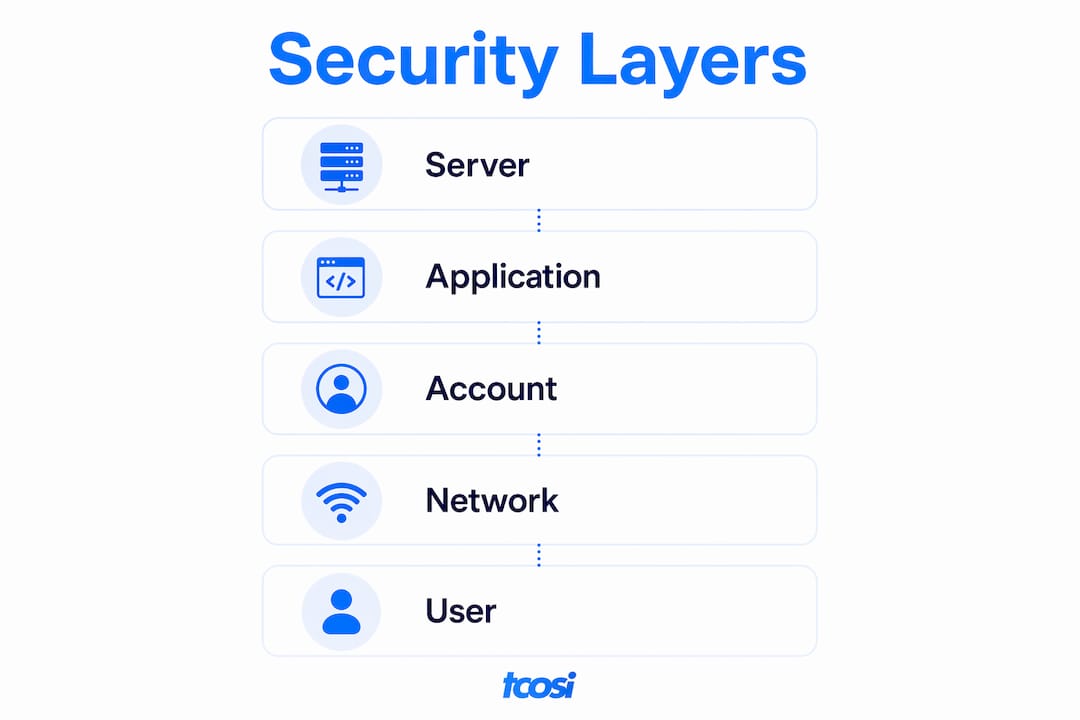
Website security management is the ongoing process of applying controls at the server, application, and account levels to keep a site protected. Security is an ongoing process, not a one-time setup. That distinction matters because new vulnerabilities appear daily, and a site that was secure six months ago may not be secure today.
The importance of website security shows up most clearly when something goes wrong. A compromised site can go offline, expose customer data, or get blacklisted by Google. Each of those outcomes carries a real cost to your business. Getting security right from the start is far less expensive than recovering from a breach after the fact.

A multi-layered security approach reduces risk by ensuring that if one control fails, others are still in place. No single tool or hosting feature makes a site unhackable. Layered defenses are the standard, not an advanced option.
What security layers does every website need?
Five core controls form the foundation of any website’s defense. Each one addresses a different attack surface, and together they cover the most common ways sites get compromised.
- HTTPS and SSL certificates. Encrypting data in transit protects both your visitors and your site’s credibility. Browsers now flag non-HTTPS sites as “not secure,” which directly affects visitor trust and search rankings.
- CMS, plugin, and server software updates. Outdated software is the most common entry point for attackers. Applying updates promptly closes known vulnerabilities before bots can exploit them.
- Strong passwords and two-factor authentication (2FA). Weak credentials remain one of the most preventable failure points in website security. Requiring 2FA for all admin accounts adds a second barrier even if a password is stolen.
- Web Application Firewall (WAF). A WAF filters malicious traffic before it reaches your site. It blocks common attacks like SQL injection and cross-site scripting (XSS) at the network edge.
- Automated offsite backups. Backups do not prevent attacks but they minimize downtime and data loss when something goes wrong. Storing backups offsite protects them from ransomware that targets the same server.
These five actions address the majority of automated bot-driven attacks. Most web attacks are not targeted campaigns against your specific business. They are automated scans looking for any site with a known weakness.
Pro Tip: One often-overlooked layer is HTTP security headers. Adding headers like Content-Security-Policy and X-Frame-Options to your server configuration prevents XSS, clickjacking, and MIME sniffing attacks with almost no performance cost.
What threats does good security management prevent?
Hackers run automated scans every 39 seconds looking for vulnerabilities. Small websites get hit just as often as large ones because the bots do not discriminate by size. They scan for outdated software, weak passwords, and misconfigured servers.
“Neglecting website security is a risk management failure that impacts brand trust and legal standing beyond immediate financial loss.” — Website Security: AI Security Essentials
The most common threats website administrators face include:
- SQL injection. Attackers insert malicious code into form fields or URLs to access your database directly. A WAF and input validation both block this.
- Cross-site scripting (XSS). Malicious scripts get injected into your pages and run in visitors’ browsers. HTTP security headers and output encoding stop XSS before it executes.
- Ransomware. Attackers encrypt your files and demand payment to restore access. Offsite backups make ransomware far less effective because you can restore without paying.
- Phishing via compromised sites. Attackers use hacked sites to host fake login pages or distribute malware. Regular malware scanning catches these injections early.
- Credential stuffing. Bots test stolen username and password combinations against your login page. Two-factor authentication blocks access even when credentials are correct.
Each of these threats has a direct business impact. Downtime costs revenue. A Google blacklist warning cuts organic traffic immediately. A data breach involving customer information can trigger regulatory penalties under laws like the California Consumer Privacy Act (CCPA). The financial and reputational damage from a breach extends well past the day it happens.
How do you maintain website security over time?
Initial setup gets you protected on day one. Ongoing management keeps you protected as threats evolve. These are the practices that separate a secure site from one that is waiting to get hit.
- Run software updates on a set schedule. Check your CMS, themes, and plugins weekly. Critical security patches should be applied within 24 hours of release.
- Conduct regular access reviews. Remove accounts for former employees or contractors immediately. Apply the least privilege principle: every user gets only the access their role requires.
- Test your backups. Storing backups is not enough. Run a restore test quarterly to confirm your backups actually work when you need them.
- Monitor logs for unusual activity. Proactive log monitoring enables early detection of intrusion attempts, unusual login patterns, and traffic spikes that signal an attack.
- Apply HTTP security headers. Security headers prevent common client-side attacks immediately upon implementation. They are a quick win that many site owners skip entirely.
- Maintain an incident response plan. Know exactly what you will do if your site gets compromised. Who do you call? What gets taken offline first? Having a plan reduces recovery time significantly.
Pro Tip: Schedule a monthly security review on your calendar. Treat it like a bill payment. Checking updates, reviewing user accounts, and scanning logs takes less than 30 minutes and catches most issues before they become problems.
Continuous website optimization and security go hand in hand. A site that gets regular attention stays healthier, performs better, and gives attackers fewer opportunities.
How does your hosting environment affect website security?
Your hosting environment is the foundation your application security sits on. Insecure hosting can undermine even the best application-level controls. Choosing the right hosting type matters as much as the security tools you install.
| Hosting type | Security level | Key considerations |
|---|---|---|
| Shared hosting | Lower | Accounts share server resources; one compromised site can affect neighbors |
| VPS hosting | Moderate | Isolated virtual environment; you manage server patching |
| Managed hosting | Higher | Provider handles patching, firewalls, and DDoS mitigation |
Managed hosting removes the burden of server-level security from your plate. The provider handles operating system patches, network firewalls, and account isolation. That does not mean you can ignore application security, but it does eliminate a significant category of risk.
When evaluating a hosting provider, look for these specific features: server-level firewalls, DDoS mitigation, automatic account isolation, malware scanning, and a clear policy on how quickly they apply security patches. A provider that cannot answer those questions directly is not a provider you want protecting your site.
For most small business owners, managed WordPress hosting paired with a WAF and offsite backups covers the majority of the threat surface without requiring deep technical expertise. Pair that with digital identity protection and you have a solid baseline that scales as your business grows.
Key takeaways
Website security is not a one-time task. It requires layered controls at the server, application, and account levels, maintained consistently over time.
| Point | Details |
|---|---|
| Security is ongoing | New vulnerabilities emerge daily; treat security as a continuous process, not a setup task. |
| Layered defenses work best | No single tool stops all attacks; combine HTTPS, WAF, 2FA, updates, and backups. |
| Hosting choice matters | Managed hosting with built-in firewalls and patching reduces server-level risk significantly. |
| Monitoring enables response | Log monitoring and alerts let you catch and contain threats before they cause major damage. |
| Access control prevents breaches | Least privilege and multi-factor authentication block the majority of unauthorized access attempts. |
Security is where I start every project
Every website I build at tcosi starts with security as a requirement, not an afterthought. I have seen what happens when it gets treated as optional. A client comes to me after their site has been injected with malware, their Google rankings have tanked, and their customers have received phishing emails from a domain they trusted. Cleaning that up takes weeks and costs far more than prevention would have.
The mistake I see most often is treating security as a one-time checklist. Owners install an SSL certificate, maybe add a security plugin, and consider the job done. But software ages. Plugins go unmaintained. Passwords get reused. The threat environment in 2026 is not the same as it was two years ago, and a site that was reasonably secure then may have real gaps now.
My honest advice: start with the basics and do them well before adding anything complex. HTTPS, strong passwords, 2FA, regular updates, and offsite backups cover the vast majority of real-world attacks. Once those are solid, you can layer in a WAF, security headers, and monitoring. Trying to skip to advanced tools before the basics are in place is like installing a security camera before you have a lock on the door.
The other thing I tell clients is to think about security as part of their overall website investment. A well-maintained, secure site builds trust with visitors, performs better in search, and costs less to manage over time. Security and growth are not competing priorities. They support each other.
— Tommy Cosimano
How tcosi can help you build a more secure website
Security-conscious website management is one of the core reasons clients work with tcosi long-term. Whether you need a new WordPress site built with security baked in from day one or ongoing support to keep an existing site protected, tcosi handles the technical side so you can focus on running your business.
tcosi’s WordPress development services include security-focused builds, regular maintenance, and the kind of ongoing attention that keeps sites healthy and protected. If you are a business owner who wants a website that is built to last and managed with care, reach out to tcosi to talk through what your site needs.
FAQ
What is the role of security in website management?
Website security management protects a site’s data, users, and infrastructure through layered controls applied at the server, application, and account levels. It is an ongoing process, not a one-time configuration.
How often should I update my website’s software?
Check for CMS, plugin, and theme updates weekly. Apply critical security patches within 24 hours of release to close vulnerabilities before automated bots can exploit them.
What is a Web Application Firewall and do I need one?
A WAF filters malicious traffic before it reaches your site, blocking attacks like SQL injection and XSS at the network edge. Most small business websites benefit from one, especially those handling customer data or transactions.
How do backups protect my website?
Automated offsite backups do not prevent attacks but allow fast recovery from ransomware, accidental deletion, or server failure. Test your restore process quarterly to confirm backups are functional.
What is the least privilege principle in website security?
Least privilege means every user account gets only the access level their role requires. Limiting admin access reduces the damage an attacker can do if any single account is compromised.