We run QA across the whole project, not just before launch: scoping, planning, execution, triage, and a release gate that acts as a hard stop. Before anything else, build the essentials: testable acceptance criteria, a release-gate checklist, and a staging smoke test. Start today by writing down what “done and safe to ship” means for your next release.
TL;DR:
- Define testable acceptance criteria and a device and browser matrix before coding, then assign owners and cadence to checks prioritized by risk during planning.
- Keep staging aligned with production configuration and plugin versions, run smoke tests after every deployment, and schedule full regression tests regularly.
- Hold releases until P0 and P1 defects are fixed and verified, staging smoke tests pass, security results are reviewed, and accessibility blockers are resolved.
- Use RUM to locate slow interactions, then reproduce them in lab tools; pair it with synthetic monitoring because RUM cannot detect outages without visitors.
- Schedule stakeholder UAT around specific user journeys, collect feedback in one place, and separate launch blockers from preferences to prevent minor opinions delaying critical fixes.
Table of Contents
- QA process stages and where QA belongs in a project lifecycle
- The complete QA checklist by testing area
- Setting up staging, test data, and automated regression
- How to capture, prioritize, and close bugs effectively
- The release gate: hard stop, roles, and sign-off
- Monitoring, RUM, and the cadence for ongoing QA
- Tools, templates, and starter checklist artifacts
- User acceptance testing and stakeholder feedback
- Device and platform testing across mobile and tablet
- Backup and rollback procedures for deployment failures
- Documentation standards for QA processes and test cases
- How agencies make QA stick without slowing teams down
- How we handle QA, handoff, and ongoing maintenance at tcosi
- FAQ
- Sources
QA process stages and where QA belongs in a project lifecycle
QA works best when it’s built into every stage of a project, not bolted on at the end. Each stage has its own job and its own output, and skipping one usually means the next stage catches problems too late to fix cheaply.
- Scoping: write testable acceptance criteria and define your device and browser matrix before any code gets written.
- Planning: build a risk-based test plan, assign owners to each check, and schedule cadence for recurring controls like security scans or accessibility audits.
- Execution: combine manual exploratory testing, where a person pokes at the site like a real visitor, with automated smoke and regression runs.
- Triage: use a severity model and a defect lifecycle so bugs get fixed in the right order, with clear retest and verification rules.
- Release decision: run the release-gate checklist and have a named person sign off before anything goes live.
This structure mirrors how detailed QA checklists approach the work: preparation, roles, planning, environment setup, execution, and reporting as a connected sequence rather than isolated tasks. When each stage feeds the next, you catch issues when they’re cheap to fix instead of after a client has already seen them.
The complete QA checklist by testing area
A good checklist groups checks by area so your team isn’t bouncing between a dozen scattered documents during a release crunch. We organize ours around distinct testing areas, each of which catches a different category of problem.
Functional testing covers the things that break trust fastest: links, forms, login flows, search, payment processing, API integrations, and what happens when something goes wrong (a failed payment, an expired session, a bad search query). Test the unhappy paths as carefully as the happy ones.
UI and design testing checks that the site looks and behaves the way it was designed to, across devices. That means responsive layouts, consistent spacing and typography, optimized images, and hover and focus states that respond the way a visitor expects.
Content and SEO checks catch the small things that slip through in a rush: leftover placeholder text, missing or duplicate meta titles and descriptions, a broken heading hierarchy, structured data errors, and sitemap or robots.txt files that block pages they shouldn’t. Canonical tags deserve a direct look, since a wrong one can quietly hide a page from search results.
Accessibility testing means checking your site against the Web Content Accessibility Guidelines (WCAG) 2.2, which lay out testable success criteria across three conformance levels: A, AA, and AAA. Keyboard navigation, ARIA roles, captions, and alt text all need direct testing, not a guess based on how the design looks. For a deeper walkthrough of what conformance actually requires, our accessibility guide breaks down the criteria most teams miss. The connection between accessibility and search visibility is worth understanding too, and this accessibility and SEO piece is a useful companion read.
Performance testing centers on Core Web Vitals: Largest Contentful Paint (LCP), Cumulative Layout Shift (CLS), and Interaction to Next Paint (INP). The right approach is to start with field data from real user monitoring to find slow interactions, then reproduce them in a lab tool to diagnose the cause. INP specifically breaks down into input delay, the time your code takes to respond, and presentation delay, so fixing it usually means reducing main-thread work rather than chasing a single number.
Security and supply-chain checks cover SSL certificate validity, Content Security Policy (CSP) tuning in report-only mode before enforcing it, Subresource Integrity (SRI) checks on third-party scripts, and monitoring of Certificate Transparency logs for unexpected certificates issued against your domain. Our website security guide covers these controls in more depth.
Compatibility testing means running your site across a real browser and device matrix, checking touch versus pointer interactions, and verifying that third-party widgets (chat tools, booking calendars, review plugins) behave consistently everywhere they load.
Pro Tip: Keep one master checklist per area instead of one giant list. It’s easier to assign, easier to update after an incident, and easier for a new team member to pick up.
Setting up staging, test data, and automated regression
Reliable QA depends on an environment that mirrors production closely enough that what passes in staging actually holds up after deploy.
- Keep staging in parity with production, same server configuration, same plugin versions, tracked under version control so nobody is guessing what changed.
- Use sanitized real-world data rather than placeholder text, including edge cases like long names, special characters, and empty states.
- Run a smoke test on every deploy and a fuller automated regression suite on a regular cadence for frequent builds.
- Fold basic accessibility and performance checks into your continuous integration pipeline so they run automatically, not as an afterthought.
- Lean on lab tools for quick, repeatable checks during development, and field data for the real picture of what visitors actually experience.
- Save manual exploratory testing for new features, complex flows, and anything automation tends to miss, like visual polish or awkward wording.
How to capture, prioritize, and close bugs effectively
A bug report is only useful if someone else can act on it without asking five follow-up questions. Every report should include the environment (browser, device, OS), exact steps to reproduce, what was expected versus what happened, and a screenshot or screen recording.
- P0 (blocks release): broken checkout, login failure, a page that won’t load at all.
- P1 (high impact): a form that silently drops a field, a broken image on a key landing page.
- P2 (backlog): minor visual misalignment, a typo in footer text.
Set a regular triage cadence so bugs don’t sit untouched, with a clear owner reviewing new reports and deciding what gets fixed now versus later. Before marking anything resolved, require closing notes and a link to retest evidence, so “fixed” means verified, not just “I think I fixed it.”
The release gate: hard stop, roles, and sign-off
Treat the release gate as a hard stop, not a formality. If the checklist isn’t fully satisfied, the release doesn’t go out, and any exception to that rule gets documented along with who approved it and why.
- Critical defects (P0 and P1) are closed and verified.
- Smoke tests pass on staging with production-equivalent data.
- Security scan results are reviewed and clean.
- Performance baseline is met against your Core Web Vitals targets.
- Accessibility critical issues are addressed before launch.
Running the release gate as a true hard stop and assigning a clear owner and cadence to each recurring control keeps accountability from getting fuzzy over time. For readers managing a handoff from a developer or freelancer, our developer handoff checklist covers verification steps worth running before you ever reach this gate.
Pro Tip: Turn your sign-off into a short, client-facing QA summary rather than handing over a raw bug log. Stakeholders want confidence the site is ready, not a spreadsheet of every ticket.
Monitoring, RUM, and the cadence for ongoing QA
Launch isn’t the finish line. Real user monitoring (RUM) shows you which interactions are actually slow for visitors, which is the right starting point for prioritizing INP improvements instead of guessing from a lab score alone. Pair that with synthetic monitoring to catch outright downtime, since RUM only tells you about traffic that’s already happening.
- Watch Certificate Transparency logs, domain expiration dates, and SRI or script-hash drift to catch supply-chain risks early, following the monitoring guidance in the OWASP front-end supply-chain handbook.
- Set a detection service-level target for how fast your team should notice an incident, and rehearse the response so containment gets faster each time.
- Schedule periodic regression sweeps rather than waiting for a complaint to trigger a check.
- Feed every postmortem into a specific checklist update instead of a vague reminder to “be more careful.”
If uptime monitoring isn’t something your team wants to manage directly, our uptime monitoring guide walks through free-tier limits and when outsourcing makes sense.
Tools, templates, and starter checklist artifacts
You don’t need enterprise software to run solid QA, but you do need the right categories covered: an issue tracker, a RUM provider, an automated test runner, an accessibility scanner, and a performance lab paired with synthetic monitors.
- Adopt a release-gate checklist, a bug report template, a test-case matrix, a test-data matrix, and a simple RACI chart naming who owns each QA control.
- Pick lightweight tools for small teams with infrequent releases, and more structured platforms once you’re shipping weekly or managing multiple sites.
- Copy your first set of templates directly into a shared runbook so the next release doesn’t start from a blank page.
User acceptance testing and stakeholder feedback
Technical QA catches broken functionality, but it won’t tell you whether the site actually does what the business needed it to do. That’s what user acceptance testing (UAT) is for: a structured round where stakeholders, not just testers, click through the real flows and confirm the site meets the goals it was built for.
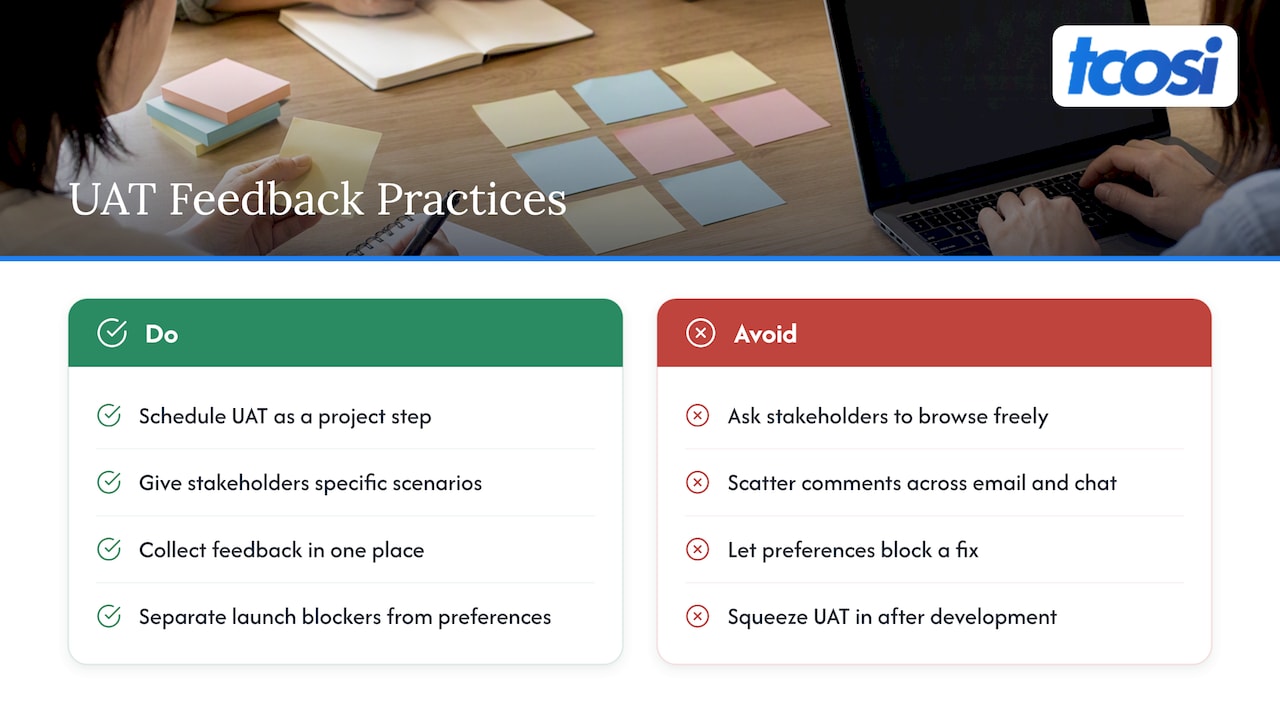
UAT works best as a scheduled step, not an open-ended “take a look whenever” request. Give stakeholders specific scenarios to walk through (complete a purchase, submit a contact form, find a service page from the homepage) rather than asking them to browse freely, since unstructured feedback tends to focus on preferences rather than problems.
Collect feedback in one place, even if that’s a simple shared document, so comments don’t get lost across emails and chat messages. Separate feedback into two buckets: issues that block launch and preferences that can wait for a future update. This keeps a stakeholder’s opinion about button color from holding up a fix for a broken checkout.
Our client feedback workflow outlines a staged approach to collecting and resolving this kind of input efficiently, which matters most when a project has several stakeholders weighing in at once. Build UAT into your project timeline from the start rather than squeezing it in after development wraps, since rushed UAT tends to surface issues too late to fix without delaying launch.
Device and platform testing across mobile and tablet
A site that works perfectly on your laptop can still break on a visitor’s phone, and the gap usually shows up in places developers don’t check by default. Mobile operating system versions matter here: a layout quirk on an older iOS version might not appear on the newest release, and the reverse happens just as often with Android’s wider range of manufacturers and screen sizes.
Build a device and platform matrix that reflects your actual traffic rather than testing every device that exists. Prioritize the combinations your analytics show are most common, then add a few older or less common devices to catch edge cases.
Tablets deserve their own pass rather than getting lumped in with either “mobile” or “desktop” testing. A tablet in portrait mode often triggers your mobile layout, while landscape mode might trigger your desktop layout, and the transition between them is a common place for broken navigation or overlapping elements to show up.
Pay attention to touch versus pointer interactions during this testing, since a hover state that works great on desktop might be invisible or unreachable on a touchscreen. Third-party widgets, like chat bubbles, booking calendars, and review plugins, are also worth testing specifically on mobile, since they’re often built and tested primarily for desktop and can behave unpredictably on smaller screens.
Backup and rollback procedures for deployment failures
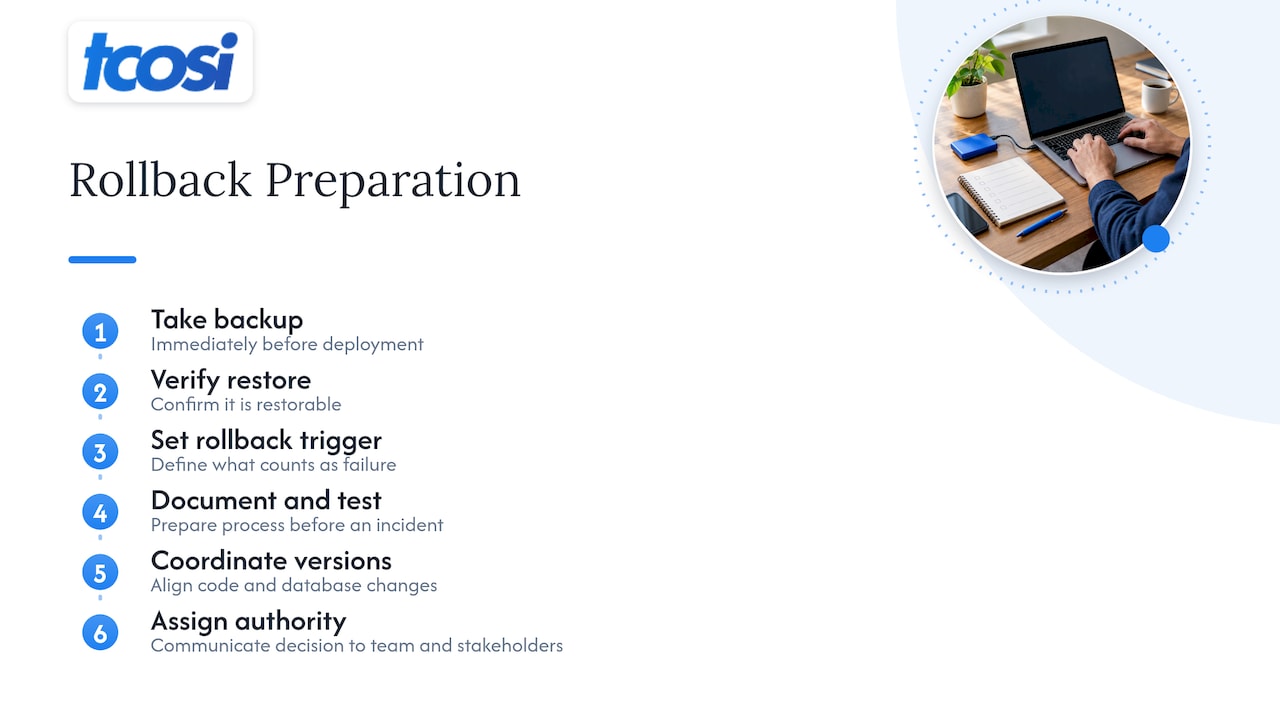
Every deployment plan needs an answer to “what if this breaks something” before it needs an answer to “how do we ship this.” A backup taken immediately before deployment, confirmed to be restorable and not just present, is the foundation of a safe rollback.
Define your rollback trigger in advance: what specifically counts as a failed deployment that warrants rolling back rather than pushing a quick fix forward. A clear line here prevents the scramble of debating in the moment while a site is down.
Keep your rollback process documented and, where possible, tested ahead of time rather than discovered during an actual incident. A rollback that takes 45 minutes because nobody remembers the steps defeats the purpose of having one.
Version control for both code and database changes matters here too, since a code rollback that leaves an incompatible database schema behind can cause more damage than the original problem. Coordinate the two so a rollback actually returns the site to a known working state, not a half-reverted one.
Document who has authority to trigger a rollback and how that decision gets communicated to the rest of the team and to stakeholders, so a deployment failure doesn’t turn into confusion about who’s in charge of fixing it.
Documentation standards for QA processes and test cases
QA documentation only earns its keep if someone other than the person who wrote it can actually use it. That means consistent formatting: every test case includes a clear objective, the exact steps to execute it, the expected result, and space to record the actual outcome.
Store test cases somewhere your whole team can access and update, not in a personal notes app or a one-off spreadsheet that only one person knows exists. Version your checklists the same way you version code, so when a postmortem leads to a new check, that update is visible and dated rather than quietly tacked onto an old document.
Write documentation for someone who joins the project later, not just for yourself today. A test case that says “check the form” is useless; one that says “submit the contact form with a valid email and confirm the thank-you page loads with the correct confirmation message” can be executed by anyone on the team.
Keep a running changelog of checklist updates tied to specific incidents or lessons learned, which turns your documentation into an asset that improves over time instead of a static file nobody revisits.
How agencies make QA stick without slowing teams down
In practice, QA works best when it’s continuous and collaborative instead of a single pre-launch scramble. Bringing stakeholders in early, during scoping rather than at sign-off, saves everyone from relitigating decisions after development is already underway.
We like running short, weekly mini-sprints: a smoke test after each deploy, and one documented release gate per release instead of a pile of ad hoc checks. A client-facing QA summary keeps stakeholders informed, while a separate technical bug log gives engineers the detail they actually need.
— Tommy Cosimano
How we handle QA, handoff, and ongoing maintenance at tcosi
We build QA into every website project we deliver, from scoping and acceptance criteria through release gates and the monitoring that follows launch. For a small business or growing agency without a dedicated QA team, that structure means fewer surprises after launch and a clear owner for every recurring check.

- If you’re managing a single site with occasional updates, keeping QA in-house with a solid checklist often works fine.
- If you’re shipping regularly, managing multiple stakeholders, or don’t have the bandwidth to own release gates and monitoring, an agency partnership tends to save time and reduce risk.
Our Ongoing Maintenance plan, priced at $100 per month, covers content updates and plugin and security management so your site gets the recurring attention a release gate alone can’t provide. If you’d rather hand off QA and maintenance entirely, get in touch and we’ll walk through what an ongoing partnership looks like for your site.
FAQ
What does the QA process mean?
A QA process is the structured sequence of checks, from scoping and planning through execution, triage, and release decision, that a team runs to confirm a website works correctly before and after launch. It typically includes functional, visual, content, accessibility, performance, and security checks organized into a repeatable checklist.
What are the 5 levels of testing?
Most QA workflows move through scoping, planning, execution, triage, and release decision as the core stages, with specific testing types like functional, accessibility, and performance checks running within execution. The exact names vary by team, but the sequence from defining requirements to a final sign-off decision stays consistent.
How long does it take to QA a website?
Timing depends heavily on site size and how much is new versus reused from a previous build, so there’s no single fixed duration. A risk-based test plan that focuses the most time on high-traffic pages and critical flows, like checkout or lead forms, tends to produce a faster and more reliable QA pass than testing everything equally.
How can I learn QA skills quickly?
Start by running a structured checklist, like the areas-based QA checklist covering functional, accessibility, SEO, and security checks, against a real website rather than studying theory first. Pairing that hands-on practice with the WCAG success criteria for accessibility testing builds practical skill faster than reading about QA in the abstract.
Sources
- Part V: Mitigations and Operations – OWASP Smart Contract Security
- Web Content Accessibility Guidelines (WCAG) 2.2
- Web
- How to Create and Implement a QA Checklist