There is no single best WordPress host. The right one depends on how much you want to handle yourself, how much traffic you get, and what you can spend after the introductory price ends. For most small businesses, the choice comes down to two paths: a budget shared host such as Hostinger or Bluehost, or a managed host such as Kinsta or WP Engine that takes server work off your plate.
I build and maintain WordPress sites for a living, so I see what happens when a host is a poor fit: slow pages, surprise renewal bills, and support tickets that go nowhere. This guide compares real options, shows what they cost, and tells you how to choose without needing a technical background.
TL;DR
- Budget shared hosting (Hostinger, Bluehost, DreamHost) works well for a small brochure site if you are comfortable with basic updates. Check the renewal price before you buy.
- Managed hosting (Kinsta, WP Engine, WPX) costs more, roughly $30 to $60 a month for one small site, but it handles speed, security and backups for you.
- Cloudways suits agencies and technical owners who want control and pay-as-you-go servers.
- Keep your domain registration separate from your hosting, and test support before you commit.
- A fast host helps, but a heavy theme or unoptimized images can still slow your site down.
Table of Contents
- How I compared these hosts
- The hosts at a glance
- Budget shared hosting: Hostinger, Bluehost and DreamHost
- Managed WordPress hosting: Kinsta, WP Engine and WPX
- Cloudways: flexible hosting for agencies and technical owners
- What I would pick by situation
- What to check before you buy
- Hosting is only one part of site speed
- Our perspective on choosing a host
- Hosting plus someone to look after it
- Common mistakes I see
- FAQ
- Sources
How I compared these hosts
I did not run my own lab tests for this article. I read the published pricing and reviews from several independent sources, then filtered them through what I see on client sites. Forbes Advisor, for example, evaluated 19 WordPress hosts across 32 factors aimed at small businesses, and WPBeginner publishes speed test results across seven picks. Their rankings differ, which tells you something: the top spot changes with the criteria.
Here are the criteria I care about for a business site:
- Real cost over three years, not the first-month price.
- Support quality, including whether you reach someone who knows WordPress.
- Backups and staging, so one bad plugin update does not take your site down.
- Speed and consistency, especially at peak traffic.
- How much work lands on you.
The hosts at a glance
Prices change often and depend on the term you prepay. Treat the numbers below as a starting point and confirm them on each host’s pricing page before you buy.
| Host | Type | Typical starting price | Best for |
|---|---|---|---|
| Hostinger | Budget shared | About $2.69 a month on a 48-month term, per WPBeginner’s 2026 data | Small sites, tight budgets |
| Bluehost | Shared, WordPress.org recommended | Intro pricing, often a few dollars a month | Beginners who want a guided setup |
| DreamHost | Shared | $1.99 a month for four years, renewing at $7.99, per one 2026 comparison | Lowest long-term cost on a small site |
| SiteGround | Shared, step-up tiers | $6.69 a month prepaid for 12 months on GrowBig, renewing at $29.99, per the same comparison | Staging and backups on a mid-tier plan |
| Kinsta | Managed | From $35 a month for one site, per Spendark’s September 2026 comparison | Support and a polished dashboard |
| WP Engine | Managed | $35 to $58 a month range for Kinsta and WP Engine, per Spendark | Established businesses that want hands-off hosting |
| WPX | Managed | Around $20 a month and up, per readers in a ProWordPress thread | A step up from shared without Kinsta pricing |
| Cloudways | Pay-as-you-go cloud | From $11 a month on DigitalOcean, per Spendark | Agencies and technical owners |
Budget shared hosting: Hostinger, Bluehost and DreamHost
Shared hosting puts many sites on one server. That keeps prices low, and for a five-to-fifteen page business site with modest traffic it is often enough.
Hostinger and Bluehost show up near the top of most roundups. Bluehost is WordPress.org’s longest-running recommended host, which is a fair sign of stability, though not a guarantee that it fits your site. Hostinger leans on value, and WPBeginner notes starter plans frequently under $3 a month on long-term contracts.
The catch: renewal prices and crowded servers
Two things trip up small business owners here.
First, the introductory price is not the price you keep. One 2026 comparison lists a SiteGround plan that renews at $29.99 a month after a $6.69 prepaid year. Multiply that out before you sign a long contract.
Second, shared servers can get crowded. Hosting Almanac describes “noisy neighbor” issues where other sites on the same server make your load times swing during busy periods. For a restaurant or law firm with steady, modest traffic, that may never matter. For a store running a promotion, it can.
Who should choose shared hosting
- You have a simple site and a modest budget.
- You or someone on your team can run updates and check backups.
- You are fine moving to a better plan later if traffic grows.
Managed WordPress hosting: Kinsta, WP Engine and WPX
Managed hosts focus only on WordPress. They typically include automatic backups, security monitoring, caching and support staff who know the platform. WPBeginner puts managed plans at $30 to $100 or more a month for small business use, which matches what I see clients pay.
Kinsta runs on Google Cloud with isolated environments per site and a CDN, according to Hosting Almanac. That isolation is the opposite of the noisy neighbor problem.
Not all “managed” means the same thing
Some hosts use the word for little more than auto-updates and server security. Hosting Almanac notes that stronger managed hosts add staging sites, application performance monitoring and git integration. Ask a host exactly what is included. If it cannot tell you in plain words, keep looking.
Who should choose managed hosting
- Your website brings in leads or sales, so downtime costs real money.
- Nobody on your team wants to troubleshoot plugin conflicts.
- You want support that goes beyond a script.
Cloudways: flexible hosting for agencies and technical owners
Cloudways sits between shared and managed. You pick a cloud provider and a server size, then pay for what you use. Hosting Almanac notes that agencies and developers often prefer this kind of flexibility over guided beginner experiences.
That control is also the downside. You are closer to the server, so you make more decisions. If you want a host that decides for you, managed is easier. If you work with a developer who likes to tune things, Cloudways can be a strong value.
What I would pick by situation
| Your situation | Where I would start |
|---|---|
| Brand-new site, small budget, comfortable with basics | Hostinger, Bluehost or DreamHost on a term you can afford at renewal |
| Lead-generation site where downtime hurts | A managed host such as Kinsta, WP Engine or WPX |
| Online store with traffic spikes | Managed hosting, plus server-first WooCommerce tuning |
| Agency hosting many client sites | Cloudways or a managed plan with agency tools |
| Nonprofit with little technical help | Managed hosting, or shared hosting paired with a maintenance plan |
What to check before you buy
Look at the renewal price, not the sale price
Write down the price for month 1, the price after the intro term, and the length of contract required to get the deal. Compare hosts on the 36-month total.
Test support yourself
A “24/7” label can mean a chatbot or a team with limited access. WPBeginner advises testing support channels before you commit. Open a pre-sales chat and ask a specific question about staging or backups. The answer will tell you a lot.
Confirm backups and staging
Daily backups you can restore yourself are a must. Staging lets you test an update before it touches your live site. If a plan skips staging, plan to add it another way.
Keep your domain and hosting separate
Registering your domain and buying hosting are two different services. Keeping them with different companies means a hosting dispute cannot trap your domain. Register the domain in your own name, with your own login.
Check speed against Google’s targets
Google’s Core Web Vitals guidance names three targets: Largest Contentful Paint within 2.5 seconds, Interaction to Next Paint under 200 milliseconds, and Cumulative Layout Shift under 0.1. A good host makes these easier to hit, but it does not do the work alone. Heavy images, bloated themes and too many plugins can sink a site on any server.

Hosting is only one part of site speed
I have seen clients move to an expensive host and see little change because the real problem was a 4 MB homepage image. Before you pay for a more expensive plan, rule out the cheaper fixes.
- Compress and resize images. I cover that in our image optimization guide.
- Set up caching correctly. If you use Elementor, this overview of caching plugins for Elementor shows what to compare.
- Review plugins and remove what you do not use.
- Measure over time. WPBeginner recommends tools like Pingdom or Google Search Console to track real load times, because a host can look fine at migration and slip later.
If your site is still slow after that, hosting is the next suspect. I explain the order I follow in our WordPress speed guide, and why speed ties into rankings in our technical SEO guide for WordPress.
Our perspective on choosing a host
We build WordPress sites for small businesses, nonprofits and agencies across the United States, and we rarely tell a client to buy the most expensive host. We start with what the site has to do. A five-page service business site does not need the same server as a store with thousands of products.
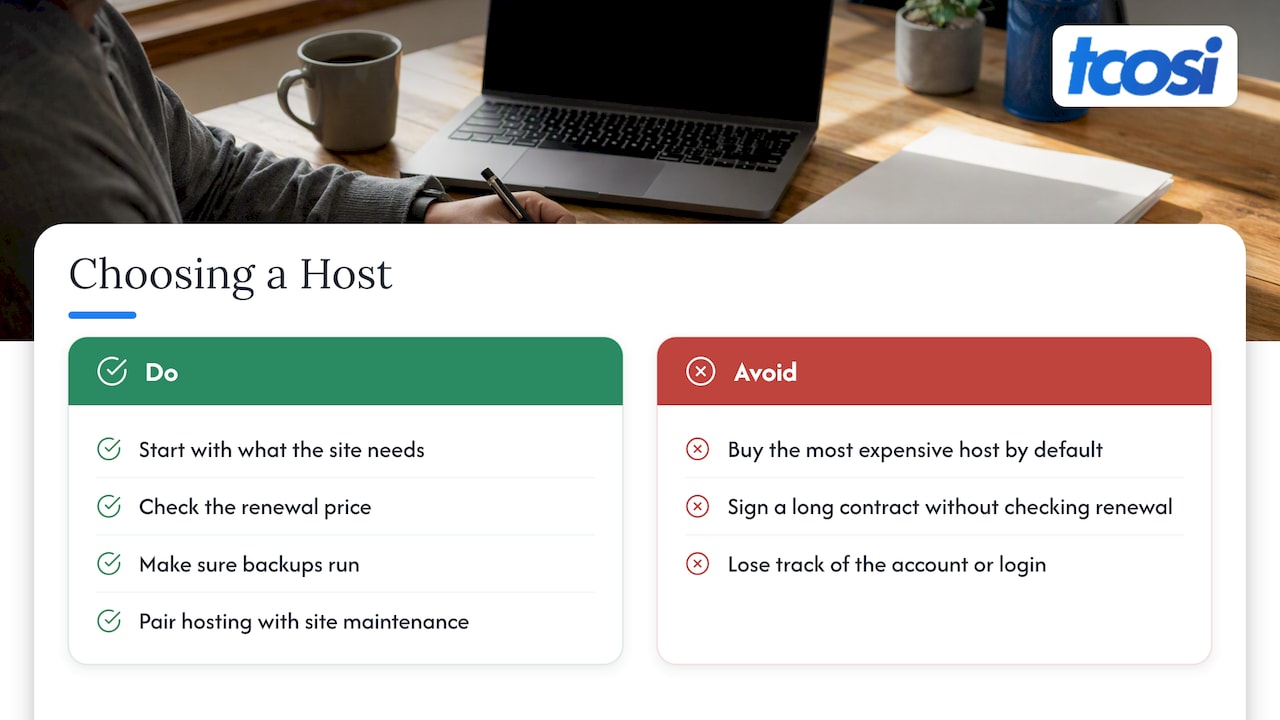
What we do insist on is clarity. You should know where your site lives, who holds the login, what it costs after the first year, and who to call when something breaks. Many of the problems we fix are not technical failures. They are owners who never knew which account their site was on, or who signed a long contract at a price that tripled at renewal.
Our honest rule: pick a host you can afford at the renewal price, make sure backups run, and pair it with someone who watches the site. Hosting keeps the lights on. Maintenance keeps the site healthy.
— Tommy Cosimano
Hosting plus someone to look after it
The host runs the server. It does not update your plugins, review security alerts, or change the text on your contact page. Many small business owners find that out the hard way.
I offer WordPress design, development and ongoing support for businesses across the US. My Ongoing Maintenance plan is $100 per month, and it covers the day-to-day care that a host leaves to you. If you are planning a new site, my website pricing page lists packages starting with Essentials at $1,200 and Growth at $2,400. I can also help you choose a host and set up the account in your name. For a sense of what upkeep costs across the market, see this breakdown of website maintenance costs.
Common mistakes I see
- Buying the longest term for the lowest price without checking renewal.
- Letting the agency or host own the account. You should be the account owner.
- Skipping staging and updating plugins on the live site.
- Assuming the host handles security when the plan only covers the server.
- Never checking real performance after launch.
FAQ
Which host is best for WordPress?
It depends on your site and budget. For a simple site, Hostinger, Bluehost or DreamHost offer low entry prices. For a business that depends on its site, a managed host like Kinsta, WP Engine or WPX gives you better support and isolation. Compare them on renewal price and support, not the sale price.
Is managed WordPress hosting worth the money?
It is worth it when downtime or slow pages cost you leads or sales, or when nobody on your team wants to handle updates and troubleshooting. Managed plans for one small site are commonly in the $30 to $100 or more per month range. If your site is a simple brochure, shared hosting plus a maintenance plan can cost less.
Should I buy my domain from my host?
I recommend keeping them separate. Domain registration and hosting are different services, and separating them stops a hosting issue from putting your domain at risk. Register the domain in your own name.
Does my host affect SEO?
Indirectly, yes. Google rewards a good page experience, and a slow or unreliable server makes that harder. Hosting is one factor among many, so images, theme and plugins matter as well.
Sources
- Forbes Advisor: 10 Best WordPress Hosting Services
- WPBeginner: 7 Best WordPress Hosting
- Hosting Almanac: Best WordPress Hosting
- WordPress.org: Hosting
- AIRankLab: Best WordPress Hosting 2026, Renewal Prices
- Spendark: Best WordPress Cloud Hosting
- r/ProWordPress: Best affordable WordPress host
- ICANN: FAQs for Registrants
- Google Search Central: Core Web Vitals
- Google Search Central: Page Experience