If selling products is the heart of your business, Shopify is usually the faster, simpler path. If your site is mostly content, services and search visibility, with a store as one part of it, WordPress (usually with WooCommerce) is usually the better fit. The honest answer depends on what your site has to do, who will look after it, and how much control you want.
I build custom WordPress sites for a living, so you should know where I stand. I will still tell you plainly when Shopify is the right call, because a platform that fits your business beats one I happen to build on.
TL;DR
- Shopify is a hosted, ecommerce-first platform. Hosting, security and checkout come built in, so it is quicker to launch a store.
- WordPress is a publishing platform that adds ecommerce through a plugin such as WooCommerce. It gives you more flexibility and stronger content control, with more setup and upkeep.
- Cost: Shopify is a predictable monthly plan plus apps and card fees. WordPress has a free core, but you pay separately for hosting, plugins and maintenance.
- Rule of thumb: mostly selling products, choose Shopify. Mostly content, services and findability, choose WordPress.
Table of Contents
- The difference in one minute
- Side-by-side comparison
- Ease of use
- Ecommerce features
- Customization and flexibility
- SEO and content marketing
- Performance and security
- Pricing in the United States
- Upkeep and disadvantages
- Which one fits your business
- Switching later
- Our perspective
- Work with tcosi on a WordPress site
- FAQ
- Sources
The difference in one minute
The two are not the same kind of tool, which is why comparing them feels slippery.
Shopify describes itself as a complete commerce platform for selling online or in person, with a storefront and a back office. It is hosted for you. Its own comparison page says it is an ecommerce website builder with built-in commerce features, including security, while WordPress is a content management system whose ecommerce comes through a plugin.
WordPress, per its own site, is an open-source publishing platform used by millions of websites, from creators and small businesses to enterprises. Self-hosted WordPress needs separate hosting, a domain, ongoing maintenance and an ecommerce plugin, as Shopify’s comparison lays out.
One thing trips people up: WordPress.org and WordPress.com are different. The WordPress.org software is downloadable but needs hosting and technical administration. WordPress.com is managed hosting you pay for, with support, security, storage and plugins bundled in, and WooCommerce at higher tiers. In this article, “WordPress” mostly means the self-hosted version with WooCommerce, because that is what most small businesses weighing this choice end up building.
Side-by-side comparison
| Shopify | WordPress + WooCommerce | |
|---|---|---|
| What it is | Hosted ecommerce platform | Open-source CMS with an ecommerce plugin |
| Hosting and security | Included | You choose a host and manage security |
| Setup | Fast, guided | More steps, more choices |
| Best at | Selling products, managing orders and inventory | Content, SEO control, custom features |
| Customization | Themes and apps; deeper changes mean learning Liquid | Very flexible; huge plugin library |
| Upkeep | Platform handles updates | You (or someone you hire) handle updates |
| Cost shape | Monthly plan plus apps and payment fees | Hosting, plugins, development, maintenance |
The pattern is consistent across independent comparisons too. HubSpot’s write-up says Shopify offers simpler setup, hosting, security and updates plus 24/7 support, while WordPress takes more setup and maintenance but gives greater flexibility and content-marketing control.
Ease of use
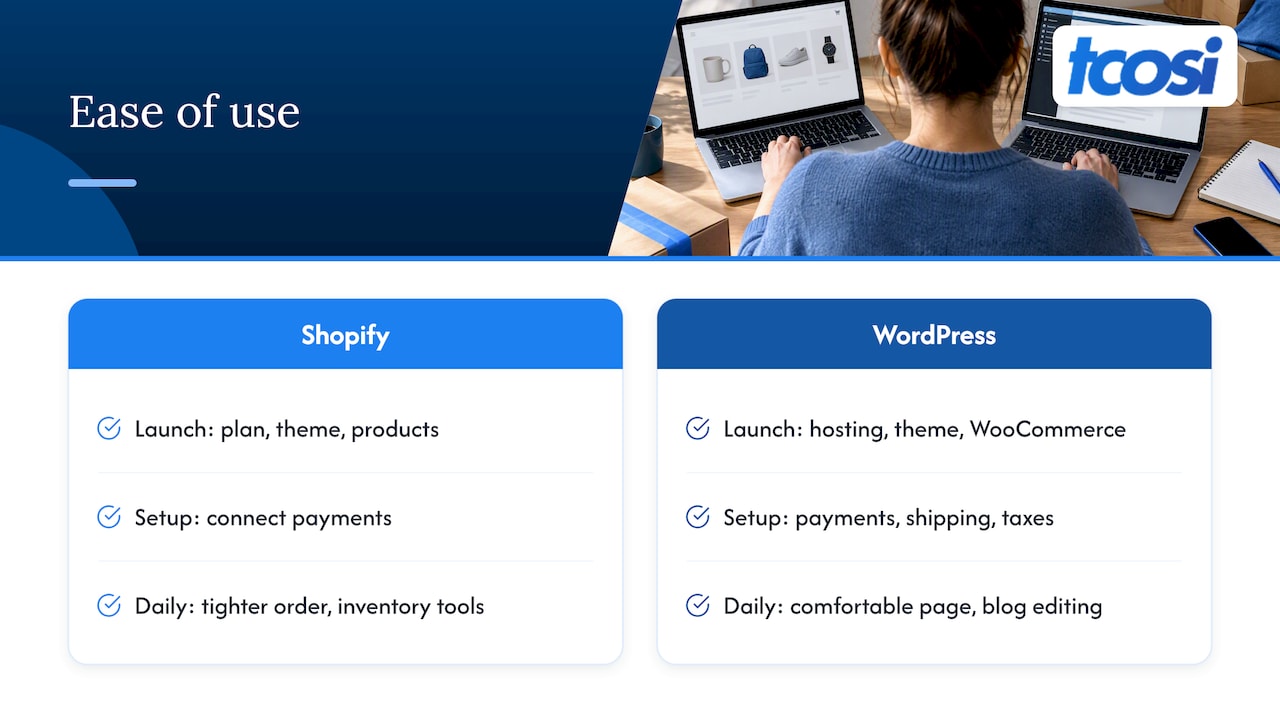
Shopify wins on day one. You pick a plan, choose a theme, add products and connect payments. There is no server to choose and no plugin stack to vet. For an owner who wants to sell a few dozen products this month, that matters.
WordPress asks more of you up front. You pick hosting, install WordPress, choose a theme, add WooCommerce, set up payments, shipping and taxes, and decide which plugins to trust. None of it is hard for a developer, but it is a lot for a busy owner doing it alone. That is exactly where I come in: my job is to make that technical side clear and collaborative, so you understand what you own.
After launch, the gap shifts. Day-to-day editing of pages and blog posts in WordPress is comfortable for most people. Day-to-day order and inventory management in Shopify is tighter, because that is what the whole product is built around.
Ecommerce features
Shopify’s official feature list covers storefront creation, product and inventory management, orders, shipping, payments, marketing and SEO automation, sales analytics, social and in-person selling, and mobile administration, according to its pricing page. All of that is in one place, supported by one company.
WooCommerce gives you the same building blocks through the plugin plus extensions. The advantage is that you can bend it to unusual needs: custom product types, unusual checkout flows, membership content mixed with a shop. The tradeoff is that every extension is another thing to update and test.
Digital products
Shopify handles digital file delivery through its Digital Products app, which supports all file types and uploads up to 5GB. WordPress can sell digital downloads too, through WooCommerce or other plugins. If digital downloads are your whole business, Shopify’s turnkey route is attractive. If the downloads sit alongside courses, articles and a community, WordPress often feels more natural.
Customization and flexibility
This is where WordPress pulls ahead. WordPress.com says its ecosystem includes 60,000+ plugins and WooCommerce extensions, and notes that Shopify has a smaller app catalog and that deep customization means learning Liquid, Shopify’s template language. That comparison comes from the WordPress side, so weigh it accordingly, but the underlying point holds: with WordPress you are rarely told something cannot be done.
For a small business, flexibility only matters if you will use it. A store with 30 products and a standard checkout does not need 60,000 plugins. A business with custom quoting, service pages, location pages and a store probably does. We do this kind of work regularly, including custom post type setup for things like portfolios, listings or case studies that a plain template cannot handle.
SEO and content marketing
Shopify has built-in SEO features, including fields for meta titles and descriptions. For a product catalog, that covers the basics well.
WordPress is the stronger home for content-led growth. A blog, resource library, service pages and landing pages all live in one system, and you have fine control over page structure, URLs and templates. If your customers research before they buy, that matters. Two of our guides go deeper: a WordPress SEO checklist for small teams and a look at how site structure affects SEO.
On either platform, the platform alone does not rank you. Content, page quality and consistent publishing do. If you want help with that side, SEO tools for online stores can handle keyword research, content planning and technical audits, which is useful whichever platform you pick.
Performance and security
Shopify manages hosting and security for you, which removes a whole category of worry. With WordPress, speed and safety depend on your host, your theme and how many plugins you run. A good managed host, lean plugins and regular updates get you a fast site. A cheap host with a dozen overlapping plugins does not.
If you go the WordPress route, the host matters. We compared two popular options in SiteGround vs Bluehost and premium options in Kinsta vs WP Engine. For store speed specifically, see our guide on WooCommerce performance.
There is also a technical baseline. WordPress’s official requirements page recommends PHP 8.3 or greater, MariaDB 10.11+ or MySQL 8.0+, and HTTPS. And only the most recent WordPress version is actively supported, with old versions no longer receiving security updates. Staying current is part of the deal.
Pricing in the United States
Cost is where most people start, and where most comparisons mislead. Let’s separate the pieces.
Shopify
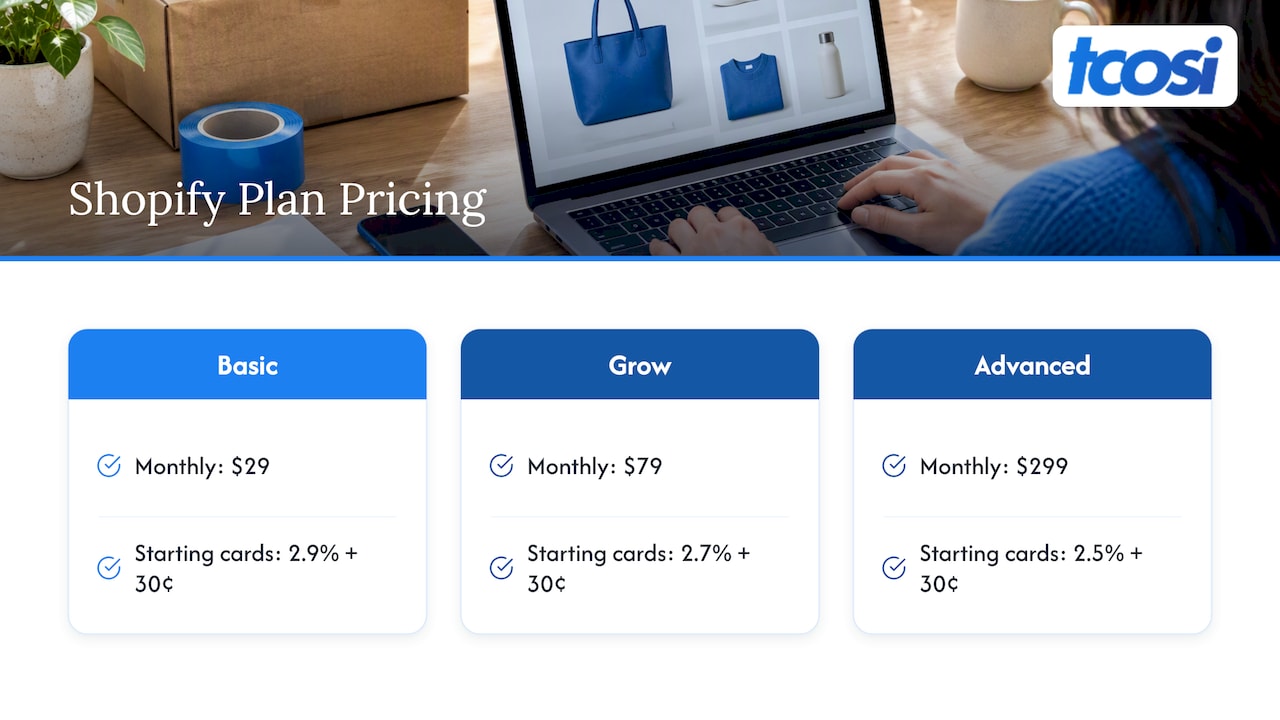
Shopify’s US pricing page lists Basic at $29/month, Grow at $79/month and Advanced at $299/month, with card rates starting at 2.9% + 30¢, 2.7% + 30¢ and 2.5% + 30¢ respectively. It also advertises a 3-day free trial followed by $1/month for the first 3 months, subject to the offer shown on the page. There are no setup fees, but third-party transaction fees may apply when you do not use Shopify Payments. Shopify notes that the Basic plan carries an additional 2% fee when using external processors such as PayPal or Stripe. Selling in other currencies through Shopify Payments adds a 1.5% currency conversion fee.
Expect to add apps, a premium theme if you want one, and perhaps a developer for custom work.
WordPress with WooCommerce
WooCommerce’s core software is free. According to WooCommerce’s pricing page, your total cost depends on hosting (typically $25 to $350/month), premium plugins and payment processing fees, with no platform-level transaction fees. WooCommerce makes that no-platform-fee point strongly, naturally, since it is the seller. Still, it is a real difference once volume grows, because Shopify’s external-processor fee applies on top of normal card fees.
If you prefer managed hosting without building anything, WordPress.com’s Personal plan is listed at several price points depending on billing term, with WooCommerce arriving at the Business tier and a dedicated Commerce plan above that.
What a custom WordPress build costs with us
You will not find development in either platform’s price list, and it is the part people forget. Here is what we publish:
| Package | One-off price |
|---|---|
| Base Website | $875 |
| Essentials | $1,200 |
| Growth | $2,400 |
| Premium | $4,800 |
Add-ons include a Style Guide at $300, Wireframes at $175, SEO Setup at $375 and Custom Post Type Setup at $800. Ongoing maintenance is $100 per month. Details are on our pricing page. For a broader view of upkeep costs, see our breakdown of website maintenance costs for US small businesses.
A fair way to compare
Over a year, Shopify Basic is $348 in plan fees before apps, theme and payment fees. A WordPress store has hosting, plugin and maintenance costs instead, plus a build. For a simple store, Shopify is often cheaper to start. For a site that needs custom features or content, a one-time build on WordPress can cost less than stacking apps and workarounds over several years. Run your own numbers with your expected orders, because processing fees scale with sales.
Upkeep and disadvantages
Every platform has a downside.
Shopify:
- Less flexibility than WordPress.
- Recurring plan and app fees that grow as you add features.
- Transaction fees if you do not use its payment system.
- Deeper design changes may mean working in Liquid.
WordPress:
- More setup and more decisions.
- You are responsible for updates, backups, security and fixing technical issues, as HubSpot’s comparison points out.
- Plugin conflicts happen when sites are neglected.
- Costs are spread across several vendors.
The WordPress disadvantages are mostly solvable by paying someone to handle them. That is the point of a maintenance plan: updates, plugin and security management, and content edits handled for a flat monthly fee, so nothing slides. Our guide on why websites need ongoing optimization explains why this keeps a site growing rather than just alive.
Which one fits your business
Forbes Advisor frames the decision around the business’s primary objective and the team’s capacity to handle technical maintenance. I agree. Ask yourself:
- Is selling products the main job of the site? Shopify.
- Is the store one piece of a bigger site with services, articles and local pages? WordPress.
- Do you have someone to handle updates? If not, Shopify, or WordPress with a maintenance plan.
- Do you need custom features? WordPress.
- Do you need to launch in days? Shopify.
Examples
- A candle maker with 40 products and a few hundred orders a month. Shopify. Simple catalog, quick launch, no server worries.
- A home services company that also sells a few products. WordPress. Service pages, location pages and reviews drive leads, and the shop is secondary.
- A nonprofit selling merchandise and taking donations while publishing news. WordPress. Content and flexibility come first.
- A coach selling downloads, courses and a newsletter. Either works. Shopify is quicker for pure downloads. WordPress suits content-heavy offers.
Switching later
Migrations are doable but not free. Product data, URLs, redirects and search rankings all need care. Choosing for where the business will be in two years saves rework. If you are heading to WordPress, our WordPress migration checklist walks through the steps.
Our perspective
We build on WordPress, so we see the same pattern again and again: businesses do not struggle because they picked the wrong brand name. They struggle because nobody explained the tradeoffs, or because the site was built and then left alone.
We think a website should be built to last. For businesses where the website is a lead engine, with service pages, local search, a blog and perhaps a small store, WordPress gives room to grow, and we make the technical side understandable. For businesses whose entire model is a large catalog and fast fulfillment, we would tell you Shopify may serve you better and save you money. Clarity first, then the build.
Whatever you pick, plan for the upkeep. A site that nobody maintains turns into a bandaid problem sooner than most owners expect.
— Tommy Cosimano
Work with tcosi on a WordPress site
If WordPress sounds like the right fit, I can help you plan and build it, from a base site to a full custom build with SEO setup, and then keep it healthy with monthly support. See our website pricing for packages, or get in touch to talk through what your site needs. Agencies can also look at our white-label WordPress development.
FAQ
Is Shopify better than WordPress for ecommerce?
For a store-first business that wants a quick launch and built-in tools, Shopify is usually easier. WordPress with WooCommerce is better when the store is part of a larger content or service site, or when you need custom features. Neither is better for every business.
Is Shopify built on WordPress?
No. Shopify is its own hosted commerce platform, while WordPress is a separate open-source publishing platform. They can coexist on a business’s web presence, but they are different systems.
Which is cheaper, Shopify or WordPress?
Shopify’s plans start at $29/month on its US pricing page, plus apps and payment fees. WordPress core is free, but hosting, plugins and development cost extra. Shopify is often cheaper to start, while WordPress can be cheaper over time for complex or content-heavy sites.
Which is better for SEO?
Shopify covers the basics for products, such as meta titles and descriptions. WordPress gives finer control and is better suited to blogs and content-led strategies. Results depend on the quality of your content and site structure more than the platform.
Do I need a developer for WordPress?
Not always, but it helps. You can set up a simple site yourself. For a custom design, a store, SEO setup or ongoing updates, a developer saves time and avoids costly mistakes.
Sources
- Shopify vs WordPress comparison (Shopify)
- Shopify vs WordPress comparison, hosting details
- About Shopify
- Shopify pricing
- Shopify Digital Products
- Shopify fees and costs, Help Center
- Shopify POS system cost guide
- Meet WordPress
- WordPress requirements
- WordPress version 7.0.3 documentation
- WordPress.com pricing
- WordPress.com vs Shopify
- WooCommerce pricing
- HubSpot: Shopify vs WordPress
- Forbes Advisor: Shopify vs WordPress.org