Images are the single most powerful conversion tool on any business website, directly shaping whether visitors stay, trust you, and buy. The role of images in business websites goes far beyond decoration. 93% of consumers name visual appearance as the primary factor in online purchase decisions, ranking it above product descriptions and reviews. That number tells you something critical: your images are doing sales work whether you plan them that way or not. The question is whether they’re working for you or against you.
How do images improve user engagement and brand perception?
Images are the fastest way to communicate what your business is and who it serves. A visitor decides within seconds whether your site feels credible. Strong visuals slow that decision down in your favor.
Authentic images do more than look good. Real photos of your team, your office, or your work build trust in a way that no headline can. Replacing stock photos with real photos of people increases conversion rates by 48–95%. That is not a small margin. It means a business that swaps one generic hero image for a genuine team photo can nearly double its contact form submissions.

Consistent visual branding across your website increases perceived trustworthiness by 52%. Consistency means your colors, image style, and tone all feel like they belong together. When they do, visitors read your site as professional and intentional. When they don’t, visitors feel something is off, even if they can’t name it.
Here is what strong image usage looks like in practice:
- Team and leadership photos put a human face on your business and reduce buyer hesitation.
- Facility and process images show visitors what working with you actually looks like.
- Service or product close-ups give visitors the detail they need to feel confident.
- Consistent color and lighting across all images signals that your brand is organized and reliable.
Pro Tip: If you only have budget to invest in one photography session, shoot your team first. Authentic people photos consistently outperform any stock image library.
What is the impact of image quality on conversion rates?
Image quality is a direct revenue variable, not a design preference. E-commerce sites using high-quality product photography experience conversion rates up to 94% higher than competitors using amateur imagery. That gap is wide enough to determine whether a business is profitable or not.
The data on quantity is just as clear. Product pages with high-resolution, zoomable images see conversion improvements of 27–45%. Listings with 7 or more images can see conversions 2.4 times higher than single-image pages. More angles, more context, and more detail all reduce buyer uncertainty.
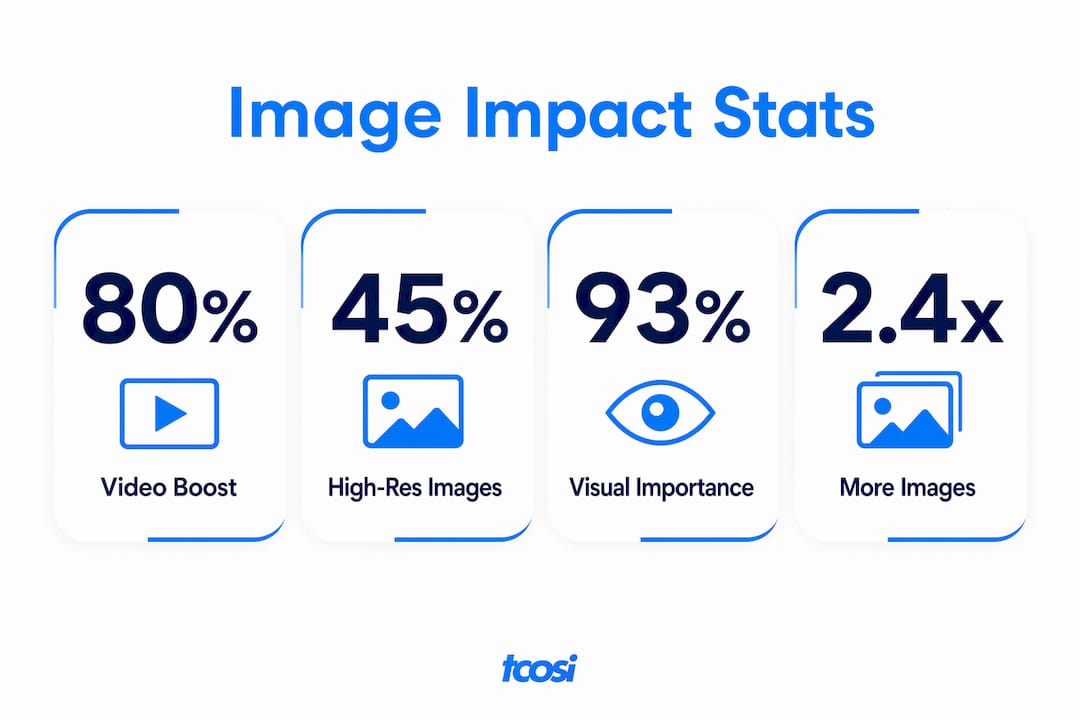
Video compounds the effect. Product videos combined with images can boost conversions by 80% or more. Video gives visitors the dynamic context that static images cannot, especially for complex products or services.
The table below shows how image investment maps to measurable outcomes:
| Image approach | Conversion impact |
|---|---|
| High-resolution, zoomable images | 27–45% conversion improvement |
| 7+ images per listing vs. single image | 2.4x higher conversion rate |
| Real people photos vs. stock photos | 48–95% conversion increase |
| Product video added alongside images | 80%+ conversion uplift |
| Amateur photography vs. professional | Up to 94% lower conversion rate |
Professional photography outperforms stock photos for one simple reason: specificity. A photo of your actual product, your actual team, or your actual location answers questions that a generic image never can. Visitors are not looking for beautiful. They are looking for real.
How does image optimization affect site speed and SEO?
Image quality means nothing if your pages load slowly. Every 100ms delay caused by unoptimized images leads to a 7% drop in conversions. That loss compounds across every visitor, every day. Unoptimized images are the leading cause of slow websites, and slow websites hurt both your search rankings and your user experience.
Image optimization is the practice of reducing file size without visible loss of quality. It is one of the most impactful website SEO improvements you can make, and it is often overlooked. The three core techniques are compression, format selection, and lazy loading.
- Compression reduces file size before upload. Tools like TinyPNG or Squoosh handle this without degrading visible quality.
- Format selection matters because WebP files are significantly smaller than JPEG or PNG at equivalent quality. Use WebP for all web images where browser support allows.
- Lazy loading tells the browser to load images only when a visitor scrolls to them. This speeds up initial page load, which is what Google measures.
- Descriptive alt text on every image helps search engines understand your content and improves accessibility for screen readers.
- Responsive images use the srcset attribute to serve smaller files to mobile users, reducing load time on slower connections.
Pro Tip: Run your site through Google PageSpeed Insights before and after optimizing images. The before-and-after score difference will show you exactly how much load time you recovered.
The balance between quality and speed is not a compromise. With the right formats and compression, you can serve sharp, professional images that load fast on both desktop and mobile. Ongoing site optimization keeps that balance in place as your content grows.
What types of images should businesses use on their website?
Not all images serve the same purpose. A visual content strategy for business means choosing the right image type for each part of your site, not just filling space with whatever looks good.
-
Branding images. These include your logo, team headshots, leadership portraits, and culture photos. They answer the question “Who are you?” before a visitor reads a single word. Place these prominently on your homepage and About page.
-
Service or product images. These show what you actually deliver. For service businesses, this means photos of your work in progress or completed projects. For product businesses, this means multiple angles, close-ups, and scale references. Balancing broad context shots with detailed close-ups satisfies different visitor needs at different stages of their decision.
-
Social proof images. Photos of real clients, before-and-after results, or team members working on a project add credibility that written testimonials alone cannot match. These images say “other people trust this business.”
-
Process or facility images. For local service businesses, a photo of your shop, your truck, or your team at a job site tells visitors you are real and established. These images reduce the hesitation that comes with hiring someone you have never met.
-
Supporting editorial images. Blog posts and resource pages benefit from images that illustrate concepts, break up long text, and give readers visual anchors. These do not need to be custom photography. Thoughtful, relevant illustrations or diagrams work well here.
The role of storytelling in web design connects directly to image selection. Each image should advance the story your site is telling, not just fill a layout gap. When your visuals and your copy work together, visitors feel the coherence and respond to it.
Key takeaways
Images are the primary driver of trust, engagement, and conversion on business websites, and treating them as conversion tools rather than decoration is what separates high-performing sites from average ones.
| Point | Details |
|---|---|
| Images drive purchase decisions | 93% of consumers rank visual appearance above descriptions and reviews. |
| Authentic photos outperform stock | Real people photos increase conversions by 48–95% over generic stock imagery. |
| More images mean more conversions | Listings with 7+ images convert 2.4 times higher than single-image pages. |
| Slow images cost you sales | Every 100ms delay from unoptimized images drops conversions by 7%. |
| Consistent branding builds trust | Cohesive visual branding increases perceived trustworthiness by 52%. |
What I’ve learned from building websites with real image strategies
Most business owners treat images as the last thing they think about. They spend weeks on copy, colors, and layout, then grab a few stock photos the day before launch. I’ve seen this pattern across dozens of projects, and it almost always leaves performance on the table.
The businesses that get the most from their websites are the ones that treat images as conversion machinery, not wallpaper. They photograph their team, their process, and their results. They use those photos intentionally, placing them where visitors need reassurance most. And they revisit their images the same way they revisit their copy.
One thing I tell every client: you probably already have better images than you think. A photo from a job site, a candid team shot, a finished project photo from your phone. Those images, used well, will outperform a $500 stock photo library every time. Authenticity is not a budget question. It is a decision.
A/B testing image choices is underused by most small businesses. Swapping one hero image and measuring the change in contact form submissions over two weeks costs nothing and teaches you more than any design opinion ever will. The data from your own audience is always more reliable than general best practices.
The technical side matters too. I have audited sites where beautiful, professional photography was buried under 4MB file sizes and no lazy loading. The images looked great in design mockups and killed the site’s performance in real life. Good image strategy covers both the creative and the technical. Neither works without the other.
— Tommy Cosimano
How tcosi approaches image strategy in web design
If your website’s images are not pulling their weight, the fix is rarely just swapping photos. It takes a clear plan for what each image should communicate, where it should live, and how it should load.
At tcosi, image strategy is built into every website design project from the start. That means thinking through image placement, compression, format, and authenticity before a single page goes live. Whether you need a full redesign or a focused performance improvement, tcosi works with you to make sure your visuals are doing real business work. See how a well-built site comes together by reviewing tcosi’s work, or get in touch to talk through what your site needs.
FAQ
Why do images matter more than text on a website?
67% of consumers rank image quality higher than product descriptions or reviews when making purchase decisions. Visuals communicate faster and carry more emotional weight than written content alone.
How many images should a product or service page have?
Pages with 7 or more images convert 2.4 times higher than single-image pages. Use a mix of broad context shots and close-up detail images to satisfy visitors at different stages of their decision.
Do stock photos hurt conversion rates?
Stock photos consistently underperform compared to authentic images. Replacing generic stock photos with real photos of people or your actual work can increase conversions by 48–95%.
How does image file size affect my website’s performance?
Every 100ms of delay caused by large, unoptimized image files leads to a 7% drop in conversions. Compress images, use WebP format, and apply lazy loading to keep load times fast.
What is the best image format for business websites?
WebP is the recommended format for web images because it delivers smaller file sizes than JPEG or PNG at equivalent visual quality. Smaller files load faster, which improves both user experience and search rankings.