Color in web design is a behavioral guidance system that shapes how visitors perceive your brand, process information, and decide whether to act. Most small business owners treat color as a finishing touch. It is actually a structural decision that affects trust, readability, and conversions from the first second a visitor lands on your page. Understanding color psychology in web design, the 60-30-10 rule, and WCAG 2.2 accessibility standards gives you a real advantage. This guide breaks down how color works, why it matters, and how to use it without making the mistakes that quietly hurt most websites.
How does color psychology influence user experience and conversions?
Color psychology in web design is the study of how specific hues trigger emotional and behavioral responses in visitors. These responses are not random. They follow patterns that designers and marketers have studied for decades.
Common associations in Western contexts include:
- Blue signals trust, reliability, and calm. Banks, healthcare providers, and tech companies use it widely for this reason.
- Red creates urgency and draws the eye. It works well for clearance sales and time-sensitive CTAs, but overuse causes anxiety.
- Green suggests growth, safety, and approval. It is a natural fit for financial tools, health brands, and confirmation messages.
- Yellow communicates optimism and energy, but it can feel overwhelming at high saturation on large areas.
- Orange blends urgency with warmth. It performs well on CTAs when the surrounding palette is neutral.
One of the most misunderstood facts in web design is that button color drives conversions less than color contrast does. The Von Restorff effect explains this: the human eye notices what stands out from its surroundings. A bright orange button on a white page converts well not because orange is magic, but because it is visually distinct. Swap the background to orange and the button loses its power entirely.
Color associations vary culturally, and this matters if your audience is global. White signals purity in Western markets but mourning in parts of East Asia. Red means luck in China but danger in many Western contexts. Blue is one of the few colors that carries positive associations across most cultures. If you serve an international audience, cultural research is not optional.

Color also does not work in isolation. Effective color is part of structural messaging and hierarchy, not a substitute for strong copy or clear UX. A well-chosen palette cannot rescue confusing navigation or weak value propositions.
Pro Tip: Run a blur test on your homepage. Blur the screen until text is unreadable, then check whether your CTA still stands out. If it disappears into the background, your contrast is the problem, not your color choice.
What technical standards must you follow when using color on websites?
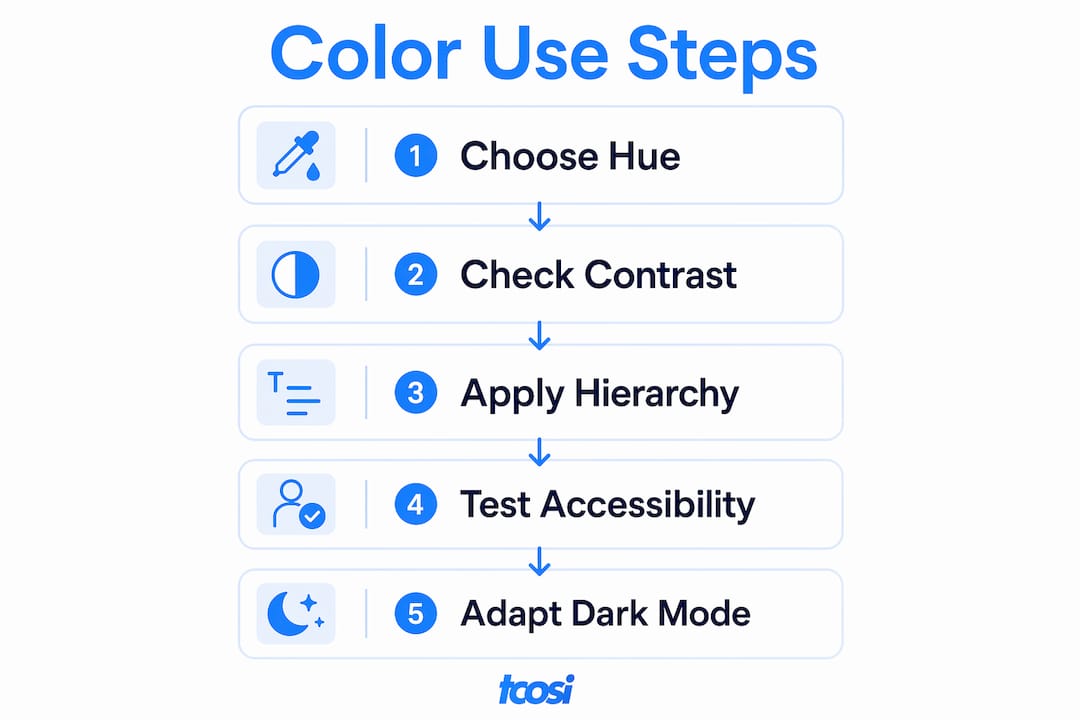
The technical side of using color effectively online is where most small business owners and newer designers lose ground. Getting the psychology right means nothing if the implementation fails accessibility or breaks in dark mode.
WCAG 2.2 and contrast ratios
WCAG 2.2 AA is the current accessibility standard for web color contrast. It requires a minimum contrast ratio of 4.5:1 for normal text and 3:1 for large text against its background. These numbers are not suggestions. Failing them means a portion of your visitors cannot read your content, and it creates legal exposure for businesses in regulated industries.
Approximately 8% of men and 0.5% of women worldwide experience color vision deficiency. That is a significant share of any website’s audience. Designing only for full-color vision means you are actively excluding real visitors. The fix is straightforward: pair color with non-color indicators such as icons, labels, or patterns to communicate information. Never rely on color alone to signal an error, a success state, or a required field.
Semantic color tokens and interaction states
Hard-coding hex values directly into your CSS creates technical debt. Every time your brand updates a color, a developer must hunt through hundreds of lines of code to make changes. Semantic color tokens solve this by assigning meaningful names to colors, such as --color-primary, --color-error, or --color-surface, so updates happen in one place and cascade everywhere.
Interaction states are equally important. Define explicit color values for these four states on every interactive element:
- Idle — the default appearance of a button or link
- Hover — a visible shift that signals interactivity
- Pressed — a darker or shifted tone confirming the click
- Disabled — a muted appearance that communicates unavailability
Using opacity alone to create disabled states is a common shortcut that fails in dark mode and on certain displays. Assign dedicated color values instead.
Designing for dark mode
Dark mode palettes require lightness flipping and desaturation of color backgrounds to maintain visual comfort and hierarchy. You cannot simply invert your light mode palette. Saturated brand colors that look sharp on white backgrounds become harsh and glaring on dark surfaces. Desaturate them slightly and reduce their brightness. Avoid pure black (#000000) and pure white (#FFFFFF) in either mode. Off-white and dark gray reduce eye strain and feel more natural on screen.
Pro Tip: Test your color palette in both light and dark mode before launch. Use your browser’s developer tools to toggle the prefers-color-scheme media query and check every page state.
How do the 60-30-10 rule and color hierarchy guide users through your site?
The 60-30-10 rule is an industry standard for balanced color distribution on websites. It gives your palette structure and prevents visual chaos.
Here is how the split works in practice:
| Proportion | Role | Example use |
|---|---|---|
| 60% dominant | Background and large surfaces | Off-white, light gray, or a neutral brand tone |
| 30% secondary | Section backgrounds, sidebars, cards | A muted version of your primary brand color |
| 10% accent | CTAs, links, highlights, icons | Your most vibrant or contrasting brand color |
The 60% dominant color provides breathing room. Visitors need visual rest between content blocks. A neutral background lets your content and CTAs stand out without competition. The 30% secondary color defines sections and reinforces brand identity without overwhelming the page. The 10% accent color is where your calls to action live. It should appear sparingly so it retains its power to draw the eye.
The most common mistake with this rule is treating the accent color as a general-purpose color. When your accent appears in headers, borders, backgrounds, and buttons all at once, it stops being an accent. It becomes noise. Reserve it for the moments that matter most: the button you want visitors to click, the link you want them to follow, the alert you need them to notice.
Color hierarchy also guides decision-making. When a visitor lands on your page, their eye follows a path shaped by contrast, size, and color weight. A well-structured palette makes that path obvious. A poorly structured one forces visitors to work harder, and most will not bother. Learning how to choose brand colors before you build your site saves significant rework later.
What color mistakes are quietly hurting your website?
Most color problems on websites are not dramatic. They are quiet failures that chip away at trust and usability over time. Here are the ones that show up most often.
- Relying on color alone to communicate. Error messages that turn red without an icon or label are invisible to visitors with color vision deficiency. Always pair color with a secondary indicator.
- Overusing saturated colors. Best palettes use muted brand colors with vibrant accents sparingly. High saturation across large areas causes visual fatigue and makes text harder to read.
- Ignoring contrast on CTAs. A button that blends into its background does not convert. Contrast drives clicks, not the specific hue you choose.
- Hard-coding colors without a system. When every developer on a project uses slightly different hex values for “your brand blue,” the site becomes inconsistent. Semantic tokens prevent this.
- Skipping dark mode testing. A palette that looks polished in light mode can become unreadable or visually harsh in dark mode if you have not tested it separately.
- Confusing personal preference with effectiveness. Your favorite color is not necessarily the right color for your audience. Test with real users, not just your own eye.
If your site shows any of these signs, it may be time to look at signs your website needs a redesign before the problems compound.
Pro Tip: Use a free tool like WebAIM’s Contrast Checker to test every text and background combination on your site. Run it before you finalize any color palette.
Key Takeaways
Color in web design functions as a behavioral guidance system that shapes user perception, trust, and action through contrast, hierarchy, and consistent application.
| Point | Details |
|---|---|
| Contrast drives conversions | Button contrast matters more than specific hue; the Von Restorff effect explains why distinct elements get clicked. |
| Follow the 60-30-10 rule | Use 60% neutral, 30% secondary, and 10% accent to create visual hierarchy and guide user attention. |
| Accessibility is non-negotiable | WCAG 2.2 AA requires a 4.5:1 contrast ratio; pair color with icons and labels for visitors with color vision deficiency. |
| Use semantic color tokens | Named tokens instead of hard-coded hex values make your palette maintainable and consistent across the site. |
| Test dark mode separately | Dark mode requires desaturated palettes and lightness flipping, not a simple inversion of your light mode colors. |
Color is a system, not a style choice
I have reviewed a lot of websites for small business owners, and the color conversation almost always starts the same way: “We want something that feels professional.” That is a reasonable goal. But “professional” is not a color. It is a result of contrast, consistency, and clarity working together.
What I have found is that most color problems are actually system problems. A business picks a brand color, hands it to a developer, and that developer hard-codes it in a dozen different places with slightly different values. Six months later, the site looks inconsistent, and nobody knows why. The fix is not a new color. It is a proper color system with named tokens, defined states, and a clear hierarchy.
The other thing I push back on is the idea that accessibility is a “nice to have.” Color used consistently across touchpoints builds trust, and trust is what converts visitors into clients. Accessibility is part of that trust. When a visitor with color vision deficiency cannot tell which field has an error, they leave. That is a real person and a real lost opportunity.
Color psychology is worth understanding, but I would caution against treating it as a formula. Blue does not automatically mean trust if the rest of your site is cluttered and slow. Context always wins. The best color decisions I have seen come from designers who understand website accessibility standards and treat color as one layer of a larger, well-built system.
— Tommy Cosimano
Color strategy is part of every site tcosi builds
At tcosi, color is never an afterthought. Every custom WordPress website I build starts with a clear color system: defined tokens, tested contrast ratios, and a hierarchy that guides visitors toward the actions that matter most to your business. Whether you are launching a new site or rethinking an existing one, getting color right from the start saves time, money, and a lot of frustration down the road. If you work with agencies and need a reliable partner for client projects, the white label WordPress development service at tcosi is built for exactly that. Good color strategy is part of every project, not an upgrade.
FAQ
What is the role of color in web design?
Color in web design guides user attention, communicates brand identity, and influences emotional responses that affect trust and conversions. It functions as a behavioral tool, not just a visual preference.
What is the 60-30-10 rule in web design?
The 60-30-10 rule divides a website’s color palette into 60% dominant neutral, 30% secondary brand color, and 10% accent color to create balanced visual hierarchy.
How does color affect user experience on a website?
Color shapes how visitors process information and feel about a brand. Poor contrast reduces readability, while a clear color hierarchy makes navigation and decision-making easier.
What contrast ratio does WCAG 2.2 require for web text?
WCAG 2.2 AA requires a minimum contrast ratio of 4.5:1 for normal text and 3:1 for large text to meet accessibility standards for readability.
Do I need a separate color palette for dark mode?
Yes. Dark mode requires its own palette with desaturated colors and adjusted lightness values. Inverting your light mode palette directly creates visual discomfort and breaks hierarchy.